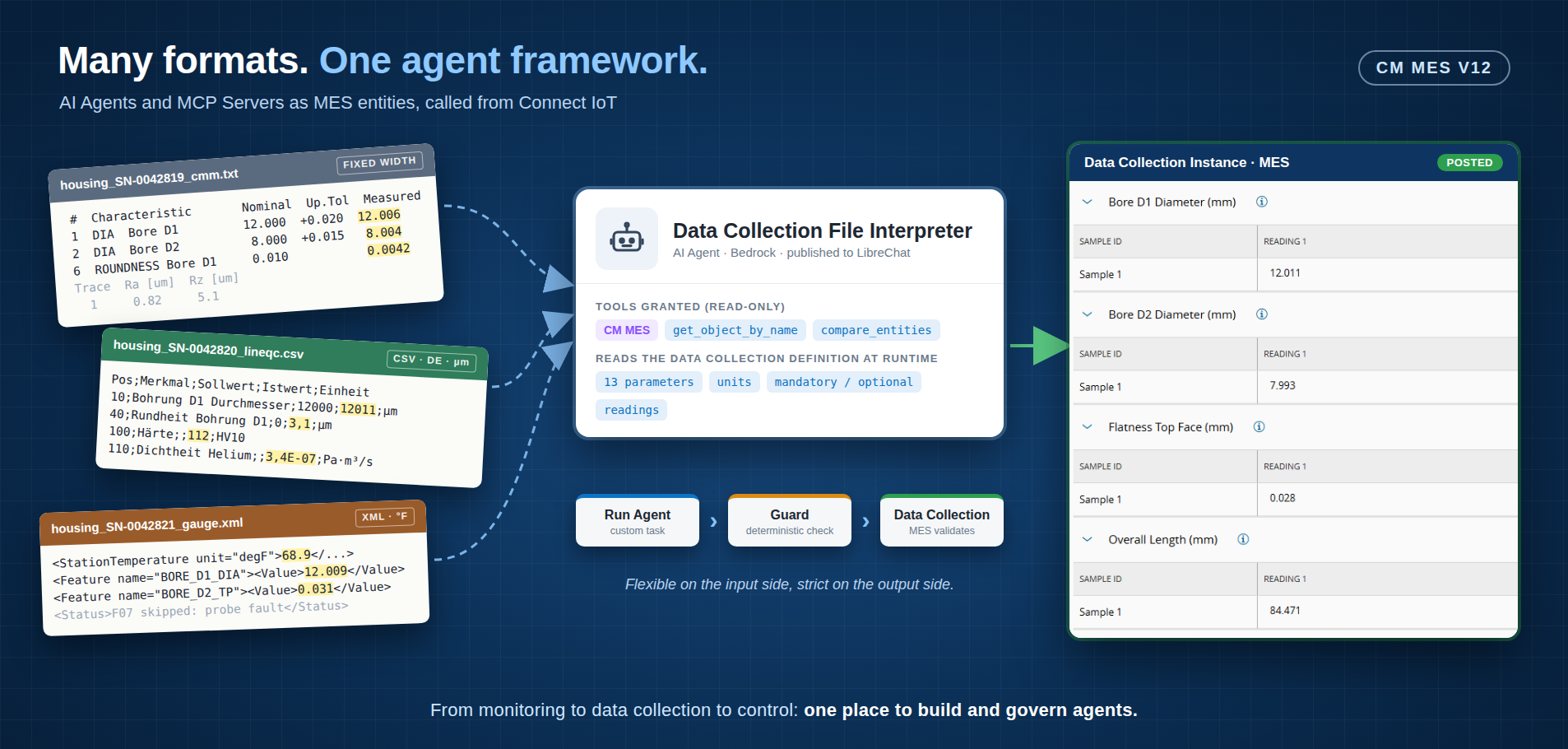
Every plant has a shared folder where equipment drops its results. Nobody owns it, every machine writes a different format, and the integration backlog has a ticket for each one.
MES v12 changes how we attack that folder. Not with a smarter parser, but with an agent framework built into the MES itself, where agents, their tools and their runtime are configured, secured and shipped like any other MES entity.
Overview#
The v12 release introduced the AI Agent and AI MCP Server entity types, system MCP servers that expose the MES to models, and a runtime (LibreChat) that the MES keeps in sync. Most people meet it through the chat panel. I want to show the other side: agents as building blocks that Connect IoT workflows call, headless, in the middle of an integration.
The case study is file-based data collection. One product, several measuring machines, and every one of them speaks its own dialect.
In From Insight to Action I argued that AI only matters when it closes the loop into the MES. This is that argument with a working integration behind it.
The Problem: One Part, Three Dialects#
Take a machined aluminum housing. Its final inspection produces data from three places:
| Source | Format | Quirks |
|---|---|---|
| CMM report | Fixed-width text, several sections | Nominal, tolerance and deviation columns next to the actual value; roughness traces in µm in a separate section |
| Line QC station | Semicolon CSV, German headers | Decimal comma, dimensions in µm, leak rate in Pa·m³/s |
| In-line air gauge | XML with coded feature names | BORE_D2_TP instead of a name, station temperature in °F, a feature skipped on probe fault |
All three files describe the same kind of part. Here they are as they come off the shop floor.
The CMM report#
A fixed-width report built for a person to read. The actual value sits between nominal, tolerances and deviation. Form and position use a different column layout from size. Roughness is a separate table with three traces and three roughness measures, and only one of them (Ra) is wanted. The room temperature is in the header.
==============================================================================
  CMM INSPECTION REPORT                                   Page 1 of 2
==============================================================================
  Machine      : CMM-01  (bridge type, probe head PH20)
  Program      : HOUSING_A12_FULL  rev. C
  Drawing      : A12-HSG-0007 rev. F
  Part / S/N   : SN-0042819
  Operator     : OP07          Shift: 2
  Started      : 2026-11-18 08:14:52      Finished: 2026-11-18 08:21:07
  Alignment    : 3-2-1 on datums A (base), B (bore D1), C (side)
  Units        : mm / deg
  Room temp.   : 20.4 C   (part temp. comp. ON, CTE 23.6e-6/K)
------------------------------------------------------------------------------
 SECTION 1 - SIZE
------------------------------------------------------------------------------
 #  Characteristic             Nominal     Up.Tol   Lo.Tol    Measured   Dev.
 1  DIA  Bore D1               12.000      +0.020   -0.020    12.006     +0.006
 2  DIA  Bore D2                8.000      +0.015   -0.015     8.004     +0.004
 3  DIST Centre D1 -> D2       42.000      +0.030   -0.030    42.012     +0.012
 4  LEN  Overall length (X)    84.500      +0.100   -0.100    84.455     -0.045
 5  LEN  Overall width (Y)     32.000      +0.050   -0.050    32.021     +0.021
------------------------------------------------------------------------------
 SECTION 2 - FORM AND POSITION
------------------------------------------------------------------------------
 #  Characteristic             Tol. zone                       Measured   Use
 6  ROUNDNESS  Bore D1         0.010                           0.0042     OK
 7  FLATNESS   Top face        0.050                           0.027      OK
 8  PARALLEL   Top face // A   0.030                           0.014      OK
 9  POSITION   Bore D2  |A|B|  0.050 (dia.)                    0.018      OK
------------------------------------------------------------------------------
 SECTION 3 - SURFACE (profilometer PRF-2, Lc 0.8 mm, 3 traces on sealing face)
------------------------------------------------------------------------------
 Trace     Ra [um]    Rz [um]    Rmax [um]
   1        0.82       5.1        6.0
   2        0.79       4.9        5.7
   3        0.85       5.3        6.2
 Max Ra allowed 1.6 um
==============================================================================
 Characteristics: 9 + surface     Out of tolerance: 0      RESULT: ACCEPTED
==============================================================================
The line QC export#
A semicolon CSV from a German line, with comment lines before the header. Dimensions are in micrometres, not millimetres, and use a decimal comma (3,1). Hardness and a helium leak test appear here but nowhere else, and the leak rate is in Pa·m³/s while the MES expects mbar·l/s.
# QS-Linie 3 - Prüfprotokoll Export v2.4
# Teil-Nr.;A12-HSG-0007;Seriennr.;SN-0042820;Prüfplatz;LQ-3;Datum;18.11.2026 09:02:44
# Dezimaltrennzeichen: Komma
Pos;Merkmal;Prüfmittel;Sollwert;OT;UT;Istwert;Einheit;Bewertung
10;Bohrung D1 Durchmesser;Messdorn MD-12;12000;20;-20;12011;µm;i.O.
20;Bohrung D2 Durchmesser;Messdorn MD-08;8000;15;-15;7993;µm;i.O.
30;Abstand Bohrungsmitte D1-D2;Messvorrichtung MV-4;42000;30;-30;41988;µm;i.O.
40;Rundheit Bohrung D1;Formtester FT-1;0;10;0;3,1;µm;i.O.
50;Position Bohrung D2 (A|B);Messvorrichtung MV-4;0;50;0;22;µm;i.O.
60;Ebenheit Deckfläche;Messtisch MT-2;0;50;0;28;µm;i.O.
70;Parallelität Deckfläche zu A;Messtisch MT-2;0;30;0;11;µm;i.O.
80;Gesamtlänge;Messschieber MS-200;84500;100;-100;84471;µm;i.O.
90;Gesamtbreite;Messschieber MS-200;32000;50;-50;31986;µm;i.O.
100;Härte;Härteprüfer HP-V;;;;112;HV10;i.O.
110;Dichtheit Helium (integral);Lecksucher LS-He;;1,0E-05;;3,4E-07;Pa·m³/s;i.O.
# Ende des Protokolls - 11 Merkmale, 0 n.i.O.
The air gauge result#
An XML export where features are codes, not names: BORE_D2_TP is the true position of bore D2, BORE_D1_CIRC is roundness. The station temperature is in Fahrenheit. Feature F07 is missing from the list, and the reason is only given in a free-text <Status> at the end.
<?xml version="1.0" encoding="UTF-8"?>
<!-- In-line air gauge station AG-5, result export. Station temperature is reported in Fahrenheit. -->
<GaugeResult station="AG-5" program="HSG_A12_INLINE" version="3.1">
  <Header>
    <Serial>SN-0042821</Serial>
    <Timestamp>2026-11-18T09:40:18Z</Timestamp>
    <Operator id="OP11"/>
    <Environment>
      <StationTemperature unit="degF">68.9</StationTemperature>
      <Humidity unit="%RH">44</Humidity>
    </Environment>
  </Header>
  <Measurements unit="mm">
    <Feature code="F01" name="BORE_D1_DIA"       nominal="12.000" tol="+/-0.020"><Value>12.009</Value></Feature>
    <Feature code="F02" name="BORE_D2_DIA"       nominal="8.000"  tol="+/-0.015"><Value>7.998</Value></Feature>
    <Feature code="F03" name="BORE_PITCH_D1_D2"  nominal="42.000" tol="+/-0.030"><Value>42.006</Value></Feature>
    <Feature code="F04" name="BORE_D1_CIRC"      nominal="0"      tol="0.010"><Value>0.0055</Value></Feature>
    <Feature code="F05" name="BORE_D2_TP"        nominal="0"      tol="0.050"><Value>0.031</Value></Feature>
    <Feature code="F06" name="TOP_FACE_FLAT"     nominal="0"      tol="0.050"><Value>0.019</Value></Feature>
    <Feature code="F08" name="LENGTH_X"          nominal="84.500" tol="+/-0.100"><Value>84.517</Value></Feature>
    <Feature code="F09" name="WIDTH_Y"           nominal="32.000" tol="+/-0.050"><Value>31.994</Value></Feature>
  </Measurements>
  <Surface instrument="PRF-2" unit="um" parameter="Ra">
    <Trace n="1">0.91</Trace>
    <Trace n="2">0.88</Trace>
  </Surface>
  <Status>F07 skipped: probe fault on parallelism fixture</Status>
</GaugeResult>
Three layouts and three naming styles for the same features. The units differ too: millimetres or micrometres, Celsius or Fahrenheit. And some optional values appear in only one of the files.
The MES does not care about any of that. It wants one Data Collection with clean parameters: BoreDiameter1, Flatness, SurfaceRoughnessRa, in millimetres, with the right sample and reading structure.
The classic answer is a parser per format. Three formats today, seven next year, each with a regex that breaks the day a vendor adds a column. The parser is never the hard part. Keeping twenty of them alive is.
The cost of file integration is not writing the first parser. It is owning the twentieth.
What v12 Brings: Agents as MES Entities#
The framework is small, and that is its strength. Four concepts carry it:
| Concept | What it is | Why it matters |
|---|---|---|
AI Agent | Instructions, model, provider and allowed tools, stored as an MES entity | Versioned, secured and exportable like a Data Collection or a Workflow |
AI MCP Server | A registered tool server (MES, Data Platform, documentation, your own) with its authentication mode | Tools are granted per agent, not per prompt |
| Runtime synchronization | The MES pushes agents and servers to the runtime and tracks the result | One source of truth, no hand-configured chat platform |
| System MCP servers | CM MES, CM MES Entity Query, CM Data OData and others, shipped with the product | The agent can ask the MES questions without custom code |
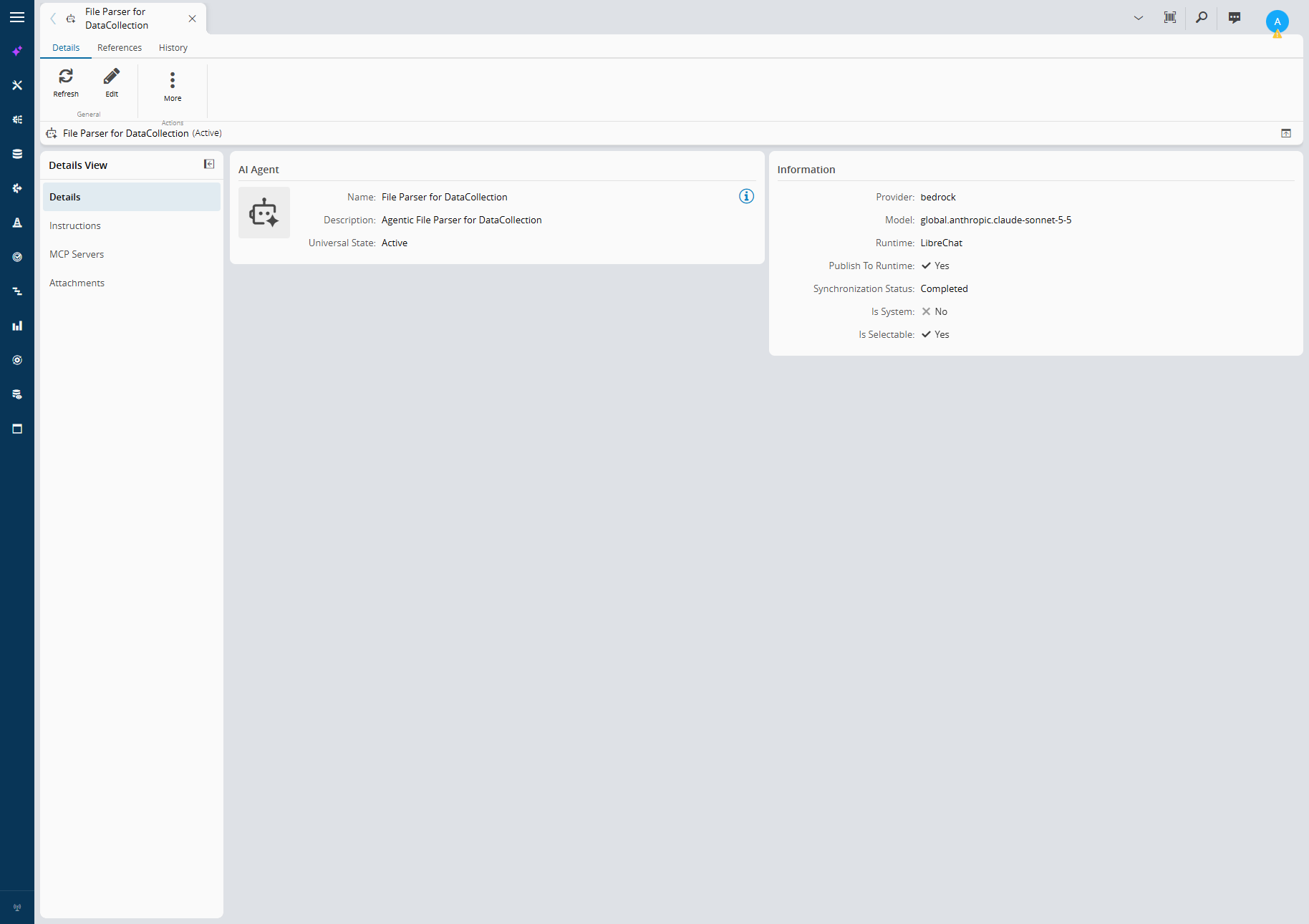
The agent for this case is an ordinary entity: a name, a model, a provider, and a runtime it is published to.
 |
|---|
| The agent is an MES entity: model, provider, runtime and synchronization status in one place. |
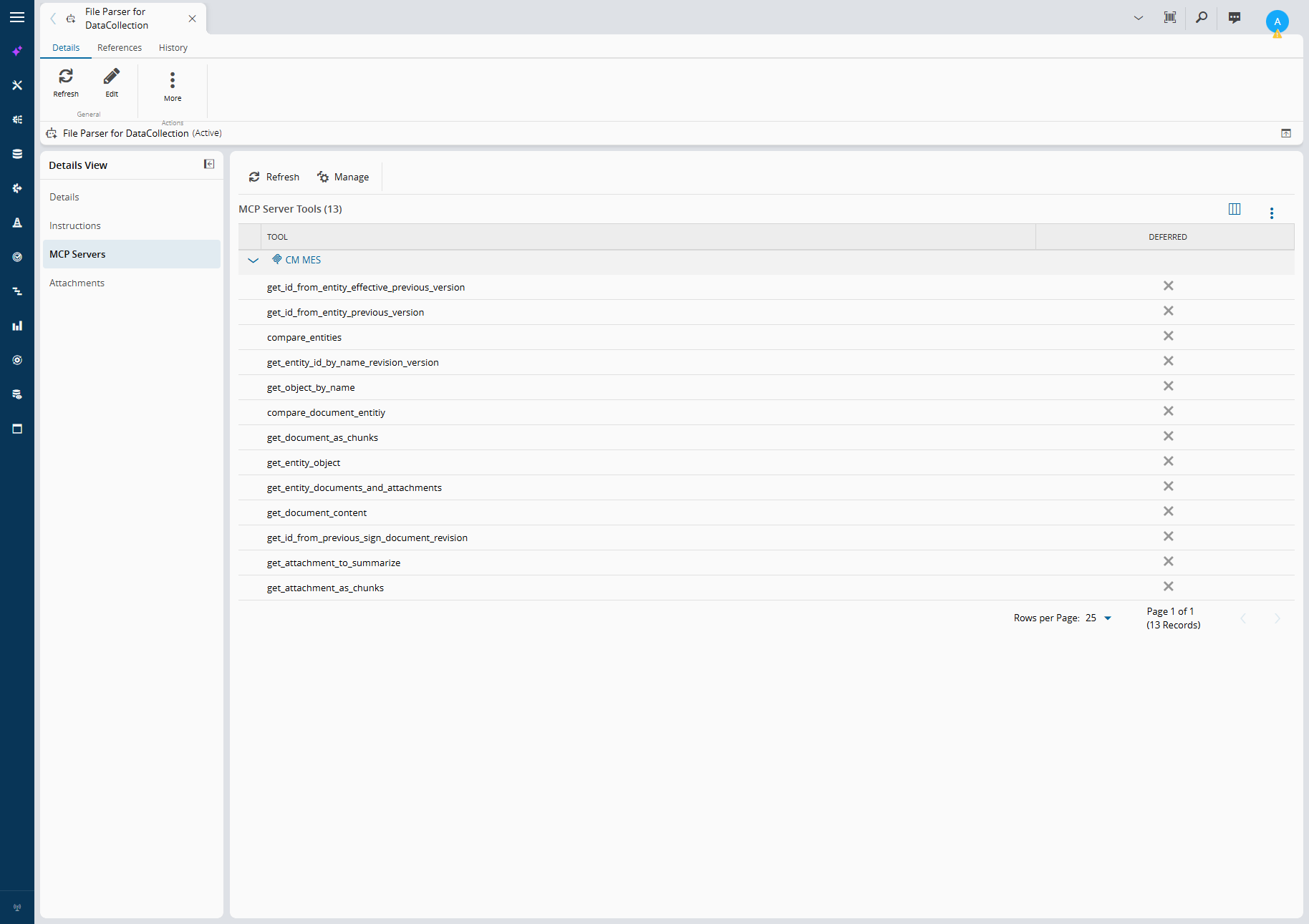
Its reach into the MES is explicit. It gets the CM MES MCP server and only the tools it needs, listed on the agent itself.
 |
|---|
| Tools are granted per agent. Nothing here can write to the MES. |
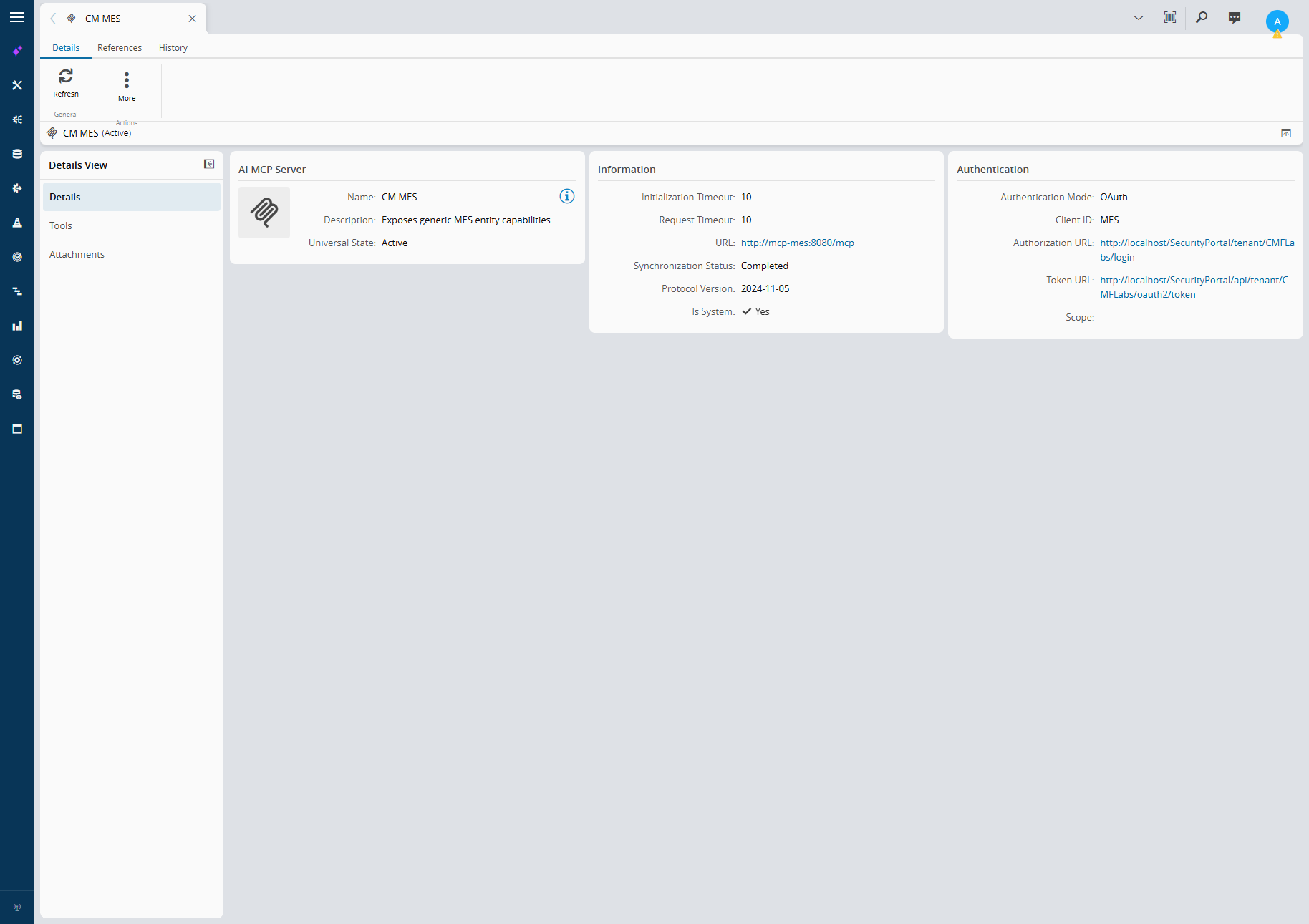
The tool server itself is another entity, with its endpoint and authentication defined once and reused by every agent that needs it.
 |
|---|
The CM MES system MCP server. OAuth means tool calls run with a real MES identity, not a shared secret. |
This is the part that is easy to undersell. Before v12, “add AI” meant a side project with its own credentials, its own prompts in a config file and its own idea of who is allowed to do what. Now the agent lives where the rest of the manufacturing model lives.
The Agent: Ask the MES, Don’t Hard-Code It#
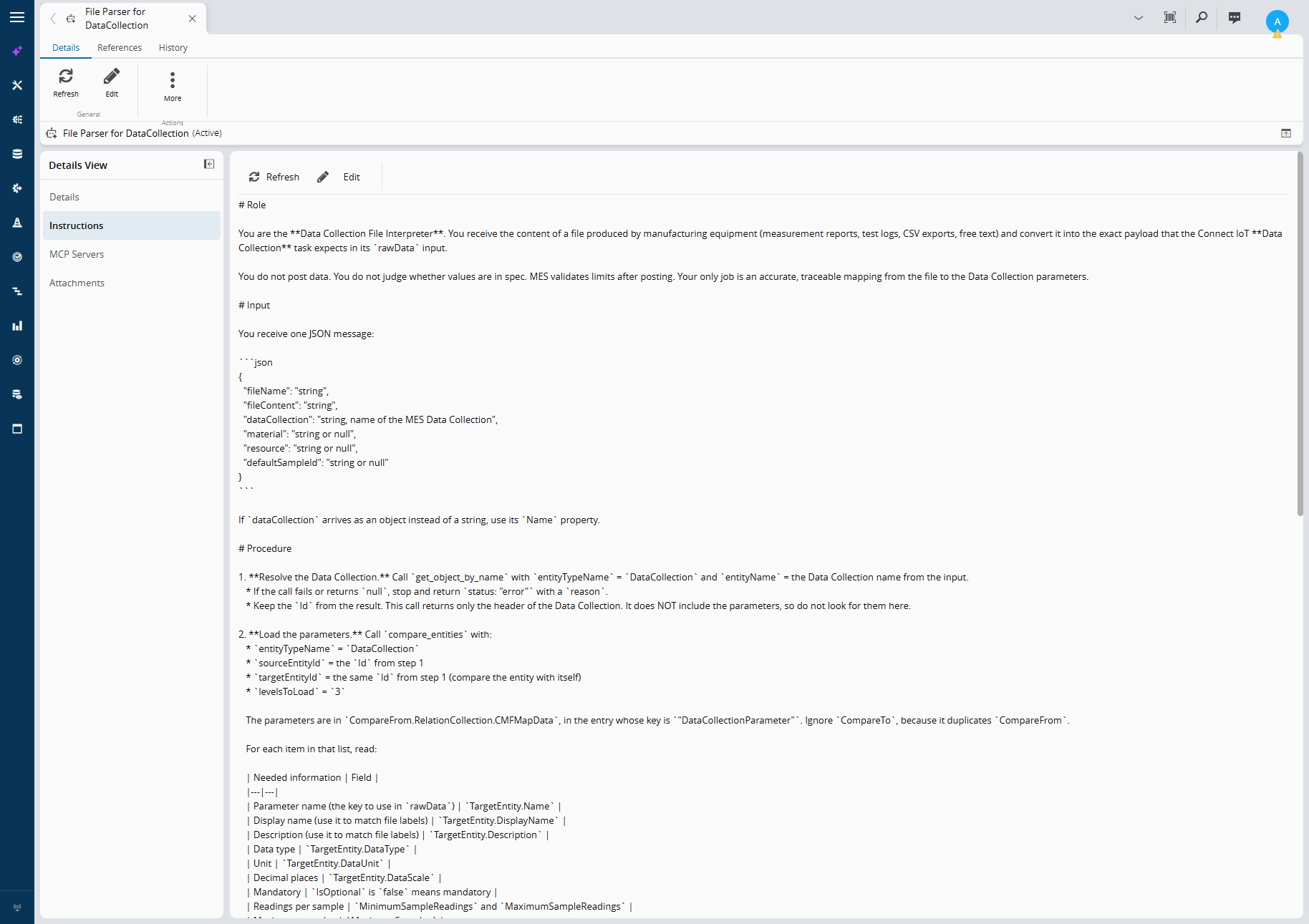
The agent is the Data Collection File Interpreter. Its contract is narrow on purpose: read a file, map it to the parameters of a named Data Collection, return JSON. It never posts and never judges limits.
 |
|---|
| The instructions are the whole program: procedure, hard rules and an output contract. |
The important design choice is in step 1 and 2 of the procedure. The agent does not carry the parameter list in its prompt. It asks the MES:
get_object_by_nameresolves the Data Collection and returns itsId.- then we can call other tools to retrieve all the parameters and their specification
The consequence is what makes this scale: change the Data Collection in the MES and the agent follows. Add a parameter, mark one optional, change its unit, and the next file is mapped against the new definition. No prompt edit, no redeploy.
The input or prompt the agent expects is a plain JSON message built by the workflow:
{
  "fileName": "housing_a12_SN-0042820_lineqc.csv",
  "fileContent": "Pos;Merkmal;Prüfmittel;Sollwert;OT;UT;Istwert;Einheit;Bewertung\n10;Bohrung D1 Durchmesser;...",
  "dataCollection": "DC_Housing_A12_FullInspection",
  "material": null,
  "resource": "CMM-01",
  "defaultSampleId": null
}
And the output is a contract, not prose. This is a real answer for the CMM report of serial SN-0042817:
{
  "status": "ok",
  "dataCollection": "DC_Housing_A12_Final",
  "material": "LOT-A12-1107",
  "rawData": {
    "BoreDiameter1": { "value": "12.008", "sampleId": "Sample 1" },
    "BoreDiameter2": { "value": "7.996", "sampleId": "Sample 1" },
    "Flatness": { "value": "0.031", "sampleId": "Sample 1" },
    "OverallLength": { "value": "84.462", "sampleId": "Sample 1" }
  },
  "mappings": [
    { "parameter": "BoreDiameter1", "source": "Bore D1 Diameter (ACTUAL)", "confidence": "high" },
    { "parameter": "BoreDiameter2", "source": "Bore D2 Diameter (ACTUAL)", "confidence": "high" },
    { "parameter": "Flatness", "source": "Flatness Top Face (ACTUAL)", "confidence": "high" },
    { "parameter": "OverallLength", "source": "Overall Length (ACTUAL)", "confidence": "high" }
  ],
  "unmapped": [],
  "missing": [],
  "warnings": ["The file has Part ID SN-0042817. I did not use it as the sampleId. defaultSampleId was null, so I used \"Sample 1\"."]
}
Every value is traceable to a label in the file, every conversion is declared in warnings, and a missing mandatory parameter goes to missing instead of being invented.
The Connect IoT Side: Deterministic Around the Probabilistic#
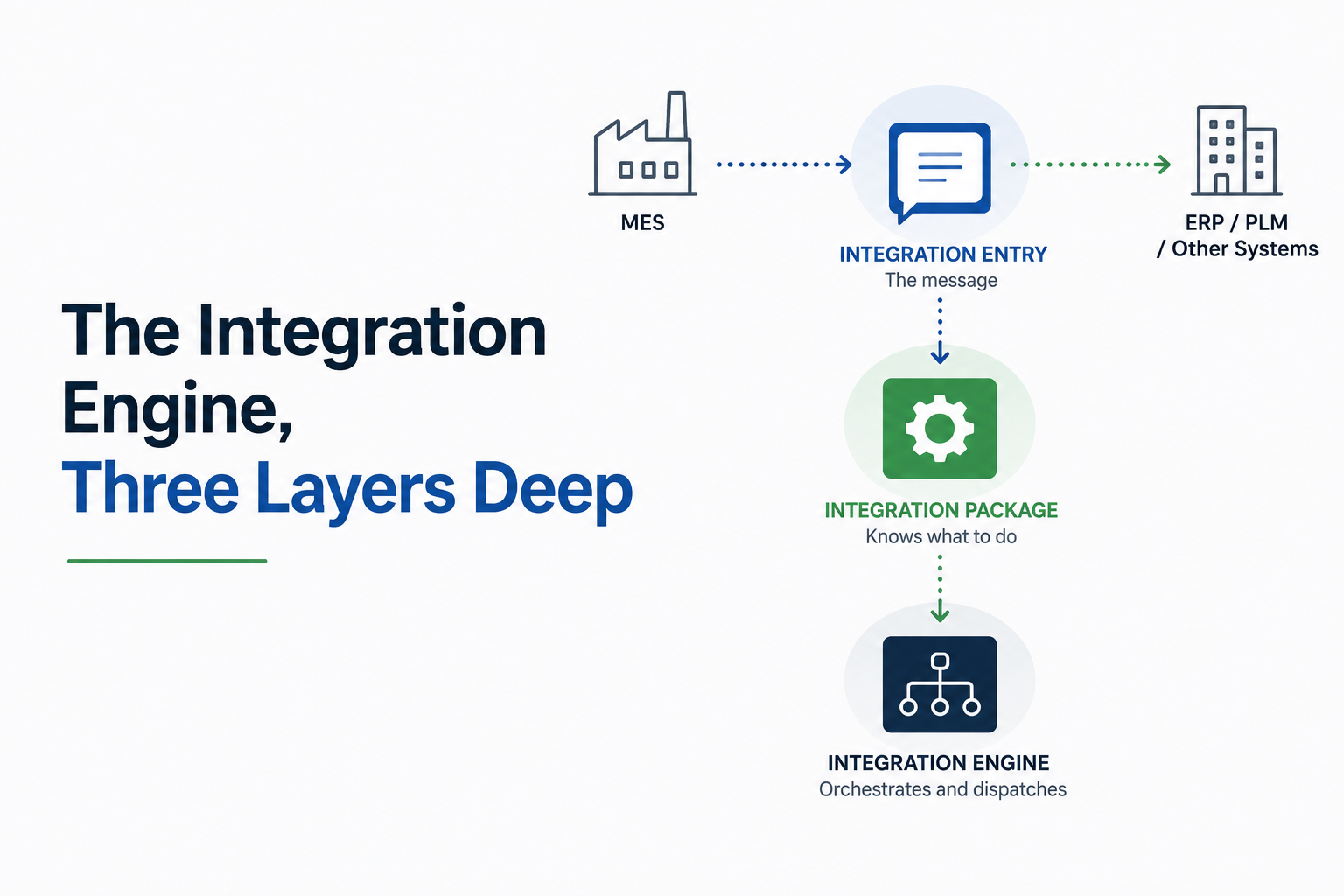
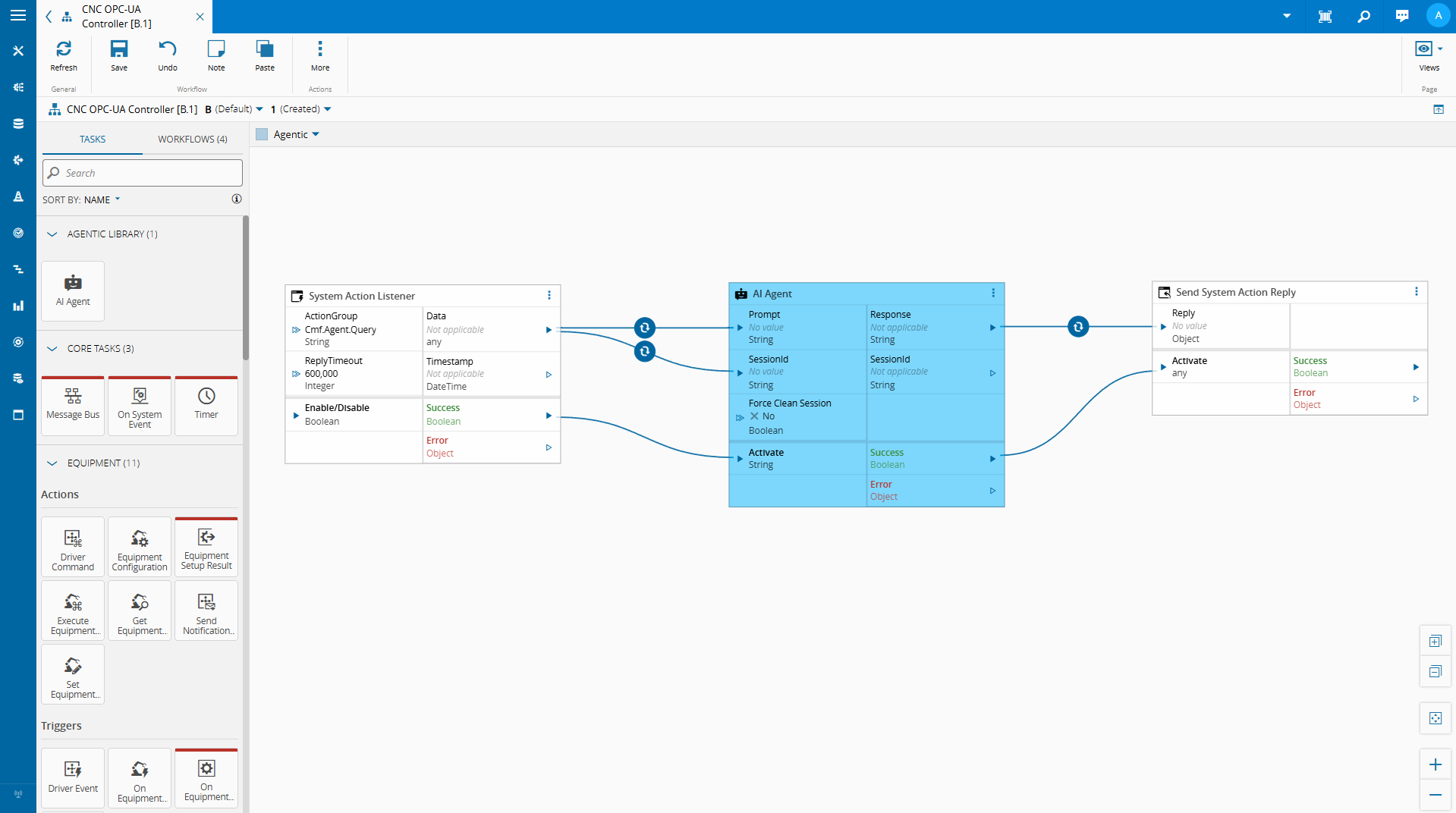
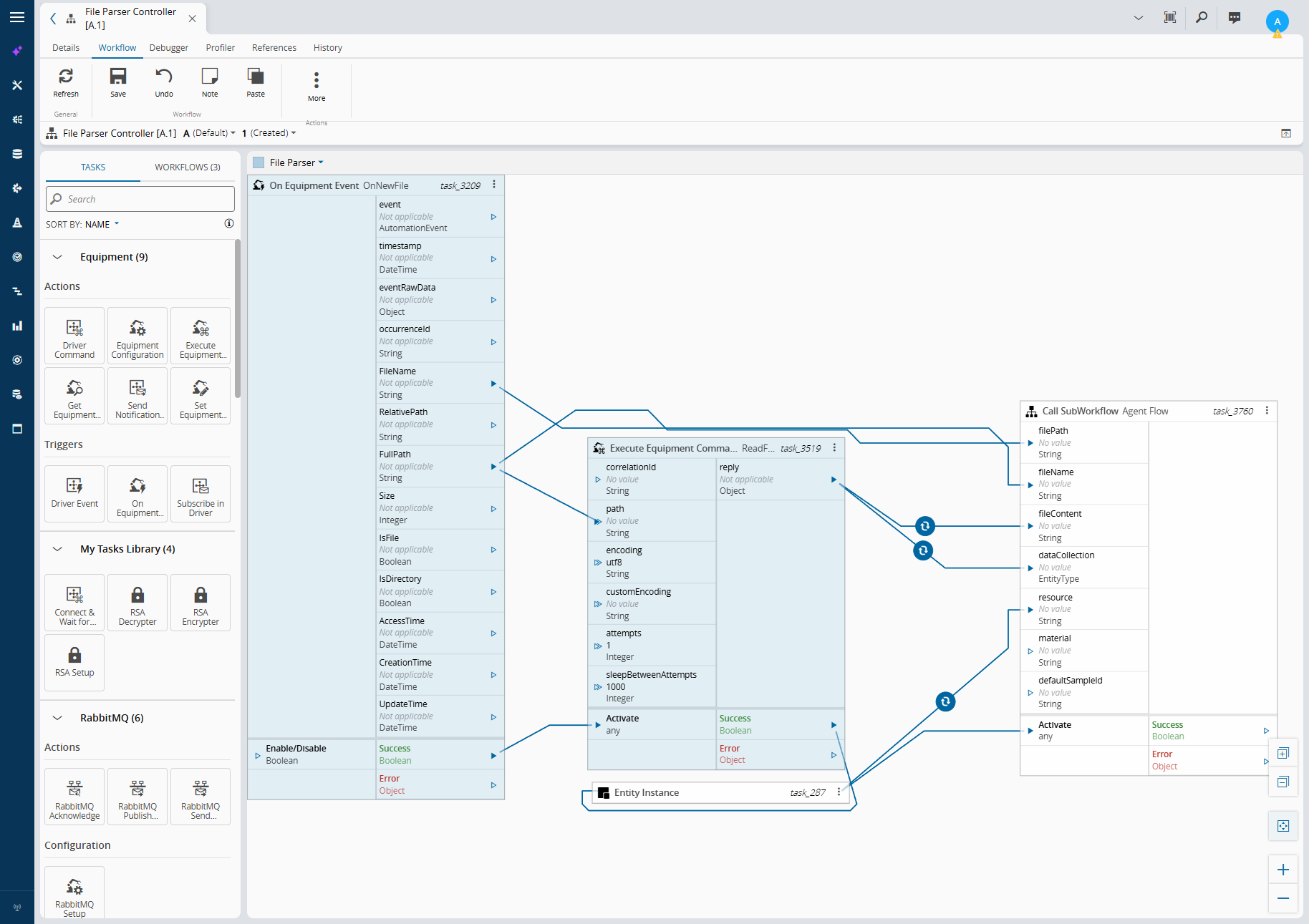
The agent is one task in a workflow, not the workflow. The File Parser page is classic Connect IoT: a file watcher raises OnNewFile, the driver reads the content, an Entity Instance task resolves the resource the controller runs on, and everything is handed to a sub-workflow.
 |
|---|
| Plain Connect IoT: file event, read, resolve the resource, call the agent sub-workflow. |
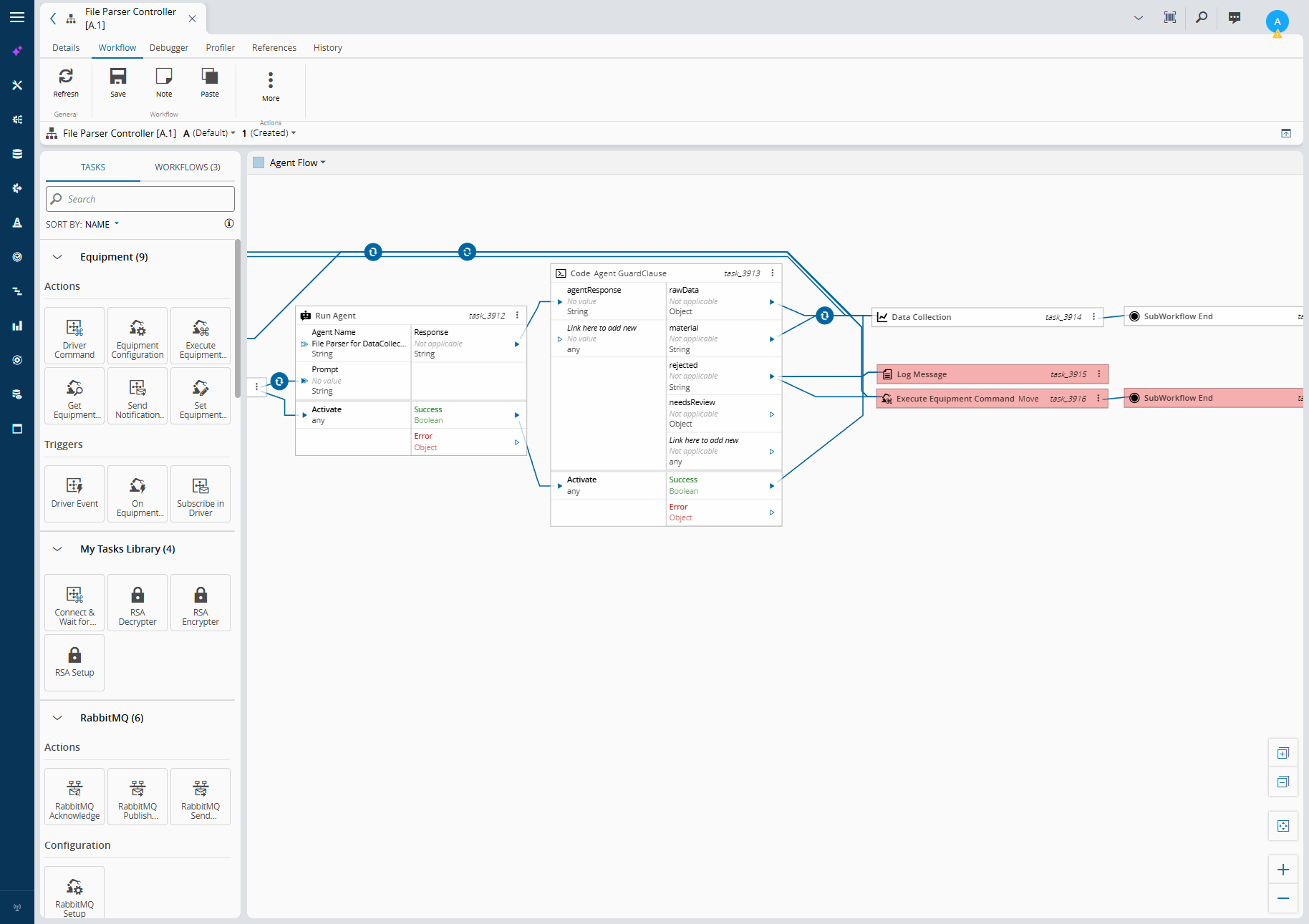
The Agent Flow sub-workflow is where the pattern lives: Run Agent, then a code task that validates the answer, then the out-of-the-box Data Collection task. A rejected answer is logged and the file is moved to a dead-letter folder.
 |
|---|
| Agent, guard clause, Data Collection. The agent never touches the MES directly. |
The Run Agent task#
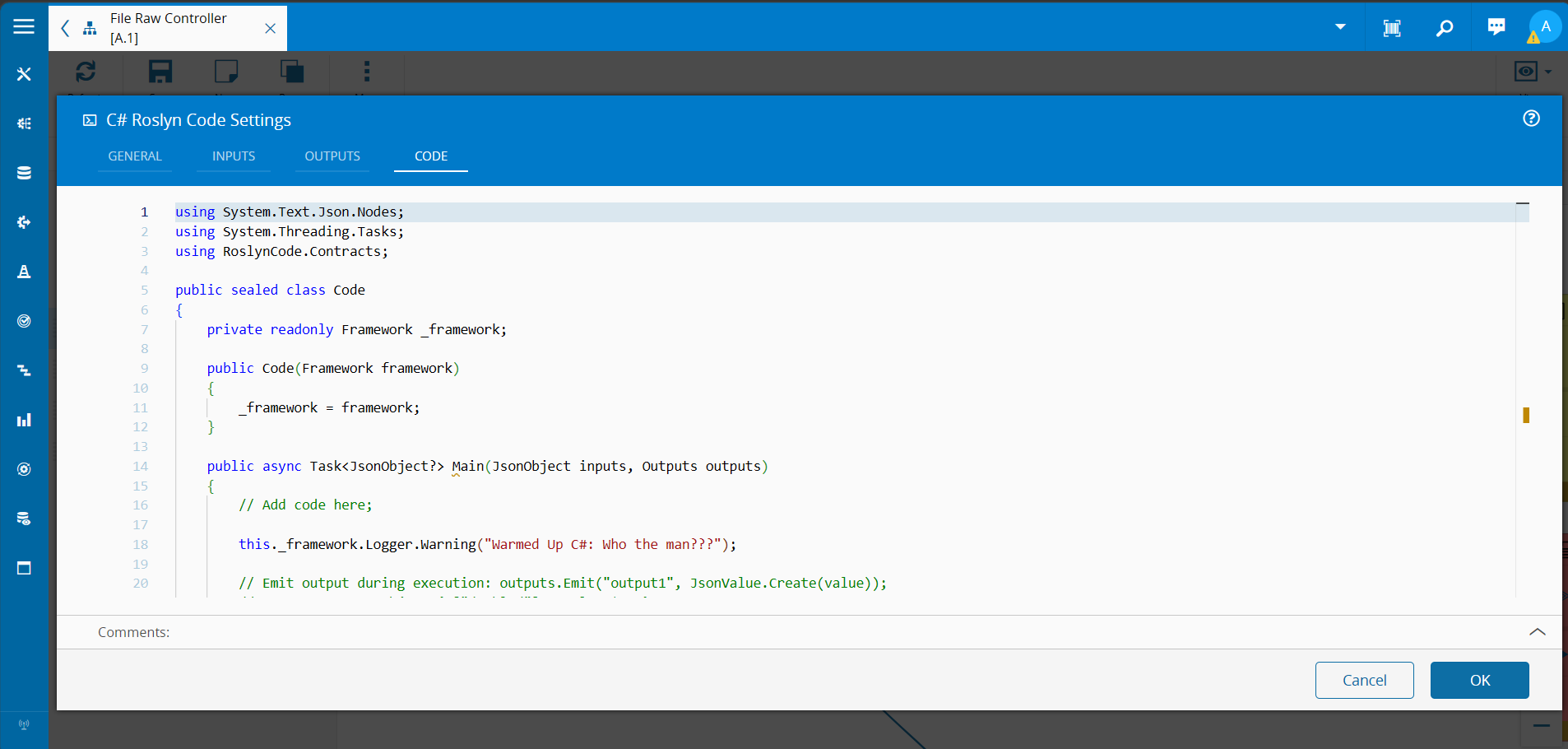
Run Agent is a small custom task in an Automation Task Library. The agent is picked in the designer from the MES entity list, the prompt comes from a setting or an input, and the task calls a thin business service wrapping IAIAgent.RunPrompt (the platform also documents an Agent prompt API). The core of it fits on one screen:
public override async onChanges(changes: Task.Changes): Promise<void> {
    if (changes["activate"]) {
        this.activate = undefined;
        try {
            // The input, when linked, wins over the setting for this activation
            const picked: string | { Name?: string } = changes["agentName"]?.currentValue ?? this.agentName;
            const agentName = typeof picked === "string" ? picked : picked?.Name;
            const prompt = changes["prompt"]?.currentValue ?? this.prompt;
            if (!agentName?.trim()) { throw new Error("RunAgent: 'agentName' is required"); }
            if (!prompt?.trim()) { throw new Error("RunAgent: 'prompt' is required"); }
const input = new RunAgentPromptInput();
            input.AgentName = agentName;
            input.Prompt = prompt;
this._logger.info(`RunAgent: calling agent '${agentName}' (prompt: ${prompt.length} characters)`);
            const startedAt = Date.now();
            const output = await this._systemAPI.call<BaseOutput & { Response: string }>(input);
            const response = output?.Response ?? "";
            this._logger.info(`RunAgent: agent '${agentName}' answered in ${Date.now() - startedAt} ms (response: ${response.length} characters)`);
this.response.emit(response);
            this.success.emit(true);
        } catch (error) {
            this.logAndEmitError((error as Error)?.message ?? String(error));
        }
    }
}
Note what the info log does not contain: the prompt. These prompts carry whole equipment files. Sizes and timings go to info, a truncated preview goes to debug, and that is a rule worth keeping for every task that talks to a model.
The guard clause#
The model’s own status is never trusted blindly. A code task re-checks the answer, deterministically, before anything reaches the MES:
/** Downgrades "ok" when the evidence in the response does not support it. */
function effectiveStatus(r: AgentResponse): Status {
    if (r.status !== 'ok') {
        return r.status;
    }
    const allHighConfidence = r.mappings.every(m => m.confidence === 'high');
    const everyMappingHasData = r.mappings.every(m => m.parameter in r.rawData);
    const hasData = Object.keys(r.rawData).length > 0;
return r.missing.length === 0 && allHighConfidence && everyMappingHasData && hasData
        ? 'ok'
        : 'needs_review';
}
ok goes to the Data Collection task. needs_review goes to a human. Anything else is rejected with a reason. The final word on limits, SPC and protocols stays where it always was: the MES validates the post exactly as it would for any other integration.
Flexible on the input side, strict on the output side. That is the whole trick.
The Result#
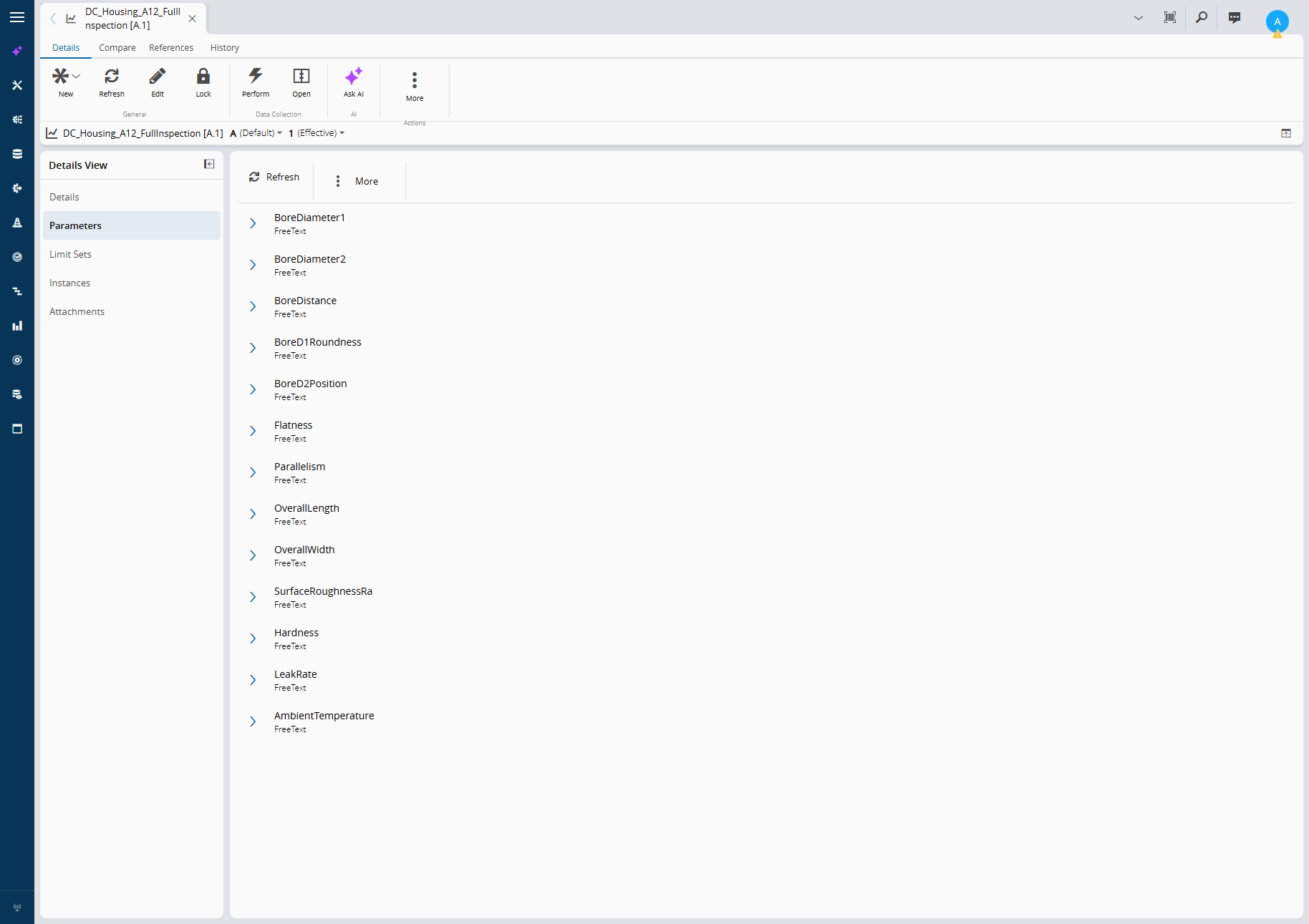
Three formats, one Data Collection. The full inspection version has thirteen parameters: nine mandatory dimensions and GD&T characteristics, plus four optional ones that only some sources provide.
 |
|---|
DC_Housing_A12_FullInspection: the agent reads this definition at runtime. Note the v12 Ask AI action on the entity itself. |
The optional parameters are where hand-written parsers usually crack, because every source covers a different subset:
| File | Optional values present | Mandatory missing | Expected outcome |
|---|---|---|---|
CMM report (.txt) | Roughness Ra (3 traces), ambient temperature | none | ok |
Line QC (.csv, German) | Hardness HV10, helium leak rate (Pa·m³/s → mbar·l/s) | none | ok |
Air gauge (.xml) | Roughness Ra (2 traces), temperature (°F → °C) | Parallelism | needs_review |
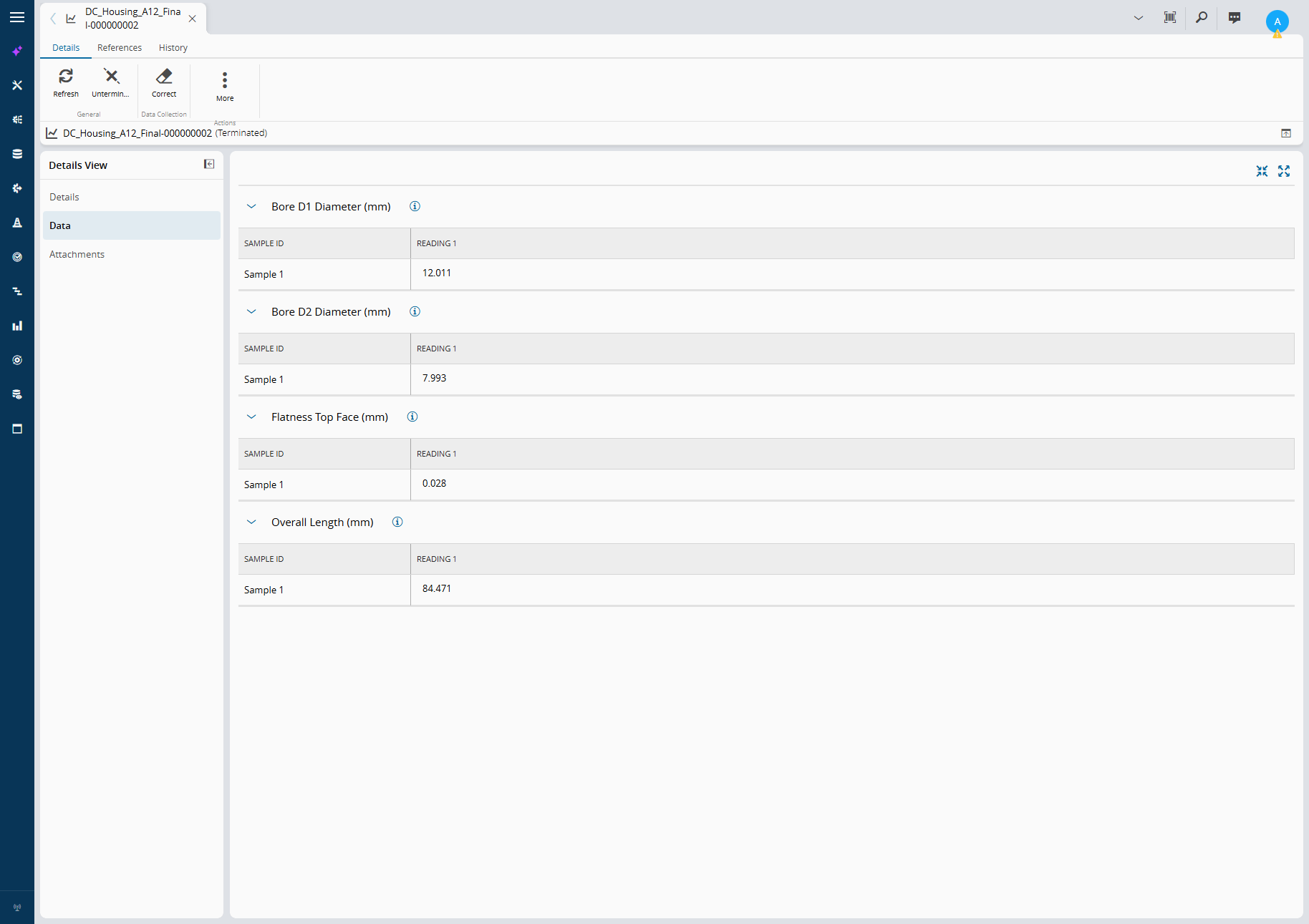
The agent maps what is there, converts only what is unambiguous, and reports what is not there. Here is what lands in the MES after the CSV run: values that arrived in micrometres under German labels, posted in millimetres against the right parameters.
 |
|---|
From Bohrung D1 Durchmesser;...;12011;µm to Bore D1 Diameter (mm) = 12.011. |
No parser was written for that CSV. Nothing in the workflow changed between the three formats.
Shipping It Like Everything Else#
An agent you configure by hand in one environment is a demo. An agent in source control is a feature.
Because the agent is an MES entity, it exports like one. We export it with the standard ExportObjects service, commit the XML to the Data package, and register it with an ImportObject master data row, next to the Data Collection it serves. Install the package in another environment and the agent, its instructions and its granted tools arrive together, and the MES synchronizes it to that environment’s runtime.
With the new feature in v12 of the Global Data Orchestrator you can even manage it from a Center of Excellence and then deploy it to all your sites.
That is the Build vs Buy argument in miniature. The cheap part was writing the instructions. The valuable part is that versioning, deployment, security and audit came from the platform.
One Framework, Many Problems#
File parsing is the example, not the point. The same four pieces (an agent entity, granted tools, a workflow that calls it, and a deterministic guard) cover a much wider band of problems:
| Problem | Trigger | What the agent does | Guard | Action |
|---|---|---|---|---|
| Data collection | File or message arrives | Maps unstructured content to an MES definition it reads at runtime | Schema and status check in a code task | Data Collection task posts, MES validates limits |
| Monitoring | Alarm burst, scheduled check, drifting KPI | Reads history through MES and Data Platform tools, explains the likely cause | Confidence and source citations required | Notification, Shift Handover entry, maintenance request |
| Control | Process deviation, recipe drift | Proposes a corrective setpoint or recipe adjustment within an allowed envelope | Hard limits in the workflow, optional human approval via Business Scenarios | Connect IoT writes to the equipment only after the guard passes |
The progression is deliberate. Data collection is low risk: the MES validates everything after the fact. Monitoring adds judgement but no actuation. Control is where the guard stops being a nice-to-have and becomes the design.
What does not change across the three is the centre. One place to define agents. One place to grant tools. One identity model for who the agent acts as. One runtime that the MES keeps in sync. That is what centralized means here: not one big agent, but one way of building and governing many small ones.
Compare that with the alternative most plants are drifting into: a chatbot here, a Python script calling an API key there, a vendor’s “AI module” in the historian. Each one is reasonable on its own. Together they are ungovernable.
Final Thoughts#
The folder full of files is not going away. Equipment vendors will keep inventing formats faster than anyone can write parsers.
What v12 changes is where the intelligence lives. Agents are MES entities, tools are granted not improvised, and the workflow engine keeps the deterministic parts deterministic. The model reads the chaos. The MES decides what is true.
Start with data collection, where the MES already checks the answer. Then move up the stack. The framework is the same all the way to control. Only the guard gets stricter.
Next blogs I’ll show case more business use cases and how we can have human in the loop flow and a multi agent assessment. Stay tuned for more!