If your integration layer can’t survive the ERP going down for maintenance, you don’t have an integration layer you have a dependency.
A recap of blog A Closer Look at Integration Entries and Integration Entries, Part II: Low Code.
The synchronous trap#
Most integration problems start the same way: someone wires a synchronous call between two systems, it works fine in the demo, and six months later a single SAP outage takes down production reporting. The request-response model is simple to reason about, which is exactly why people reach for it first. It’s also the wrong default for anything that isn’t trivially fast and trivially reliable.
The alternative is asynchronous processing: the caller writes a message somewhere, gets an immediate acknowledgment, and a background worker does the actual work on its own schedule. This buys you three things that matter in a shop-floor context — long-running tasks don’t block the caller, the receiving side scales independently, and the two systems are no longer tightly coupled to each other’s uptime.
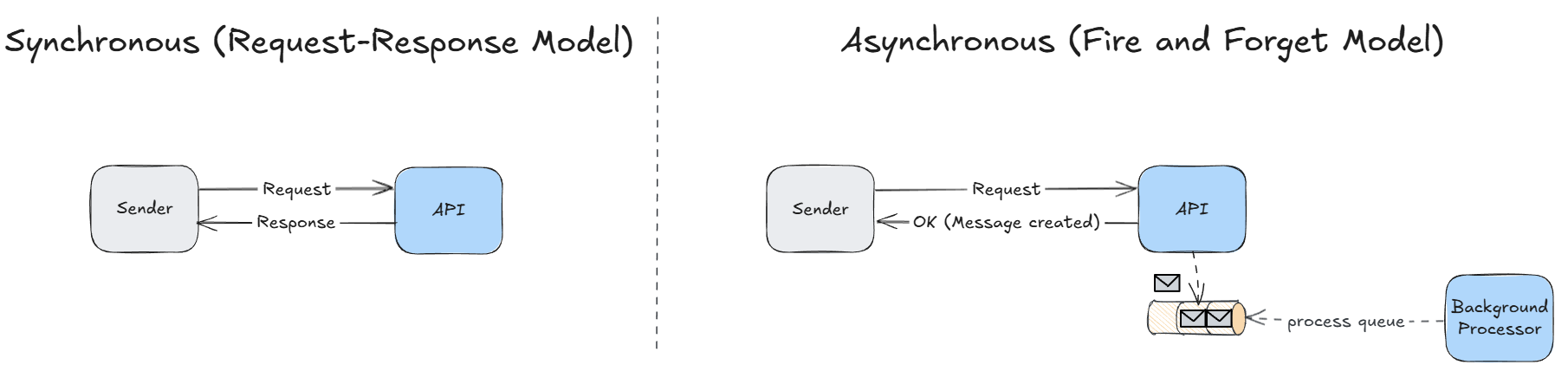
That last one is the one people underrate. If MES can hand a message to a queue and walk away, an ERP outage stops being a P1.
CM MES bakes this pattern in as the Integration Engine, and it’s the mechanism behind nearly every ERP, PLM, or asset-management integration you’ll build on the platform.
Three components, one job#
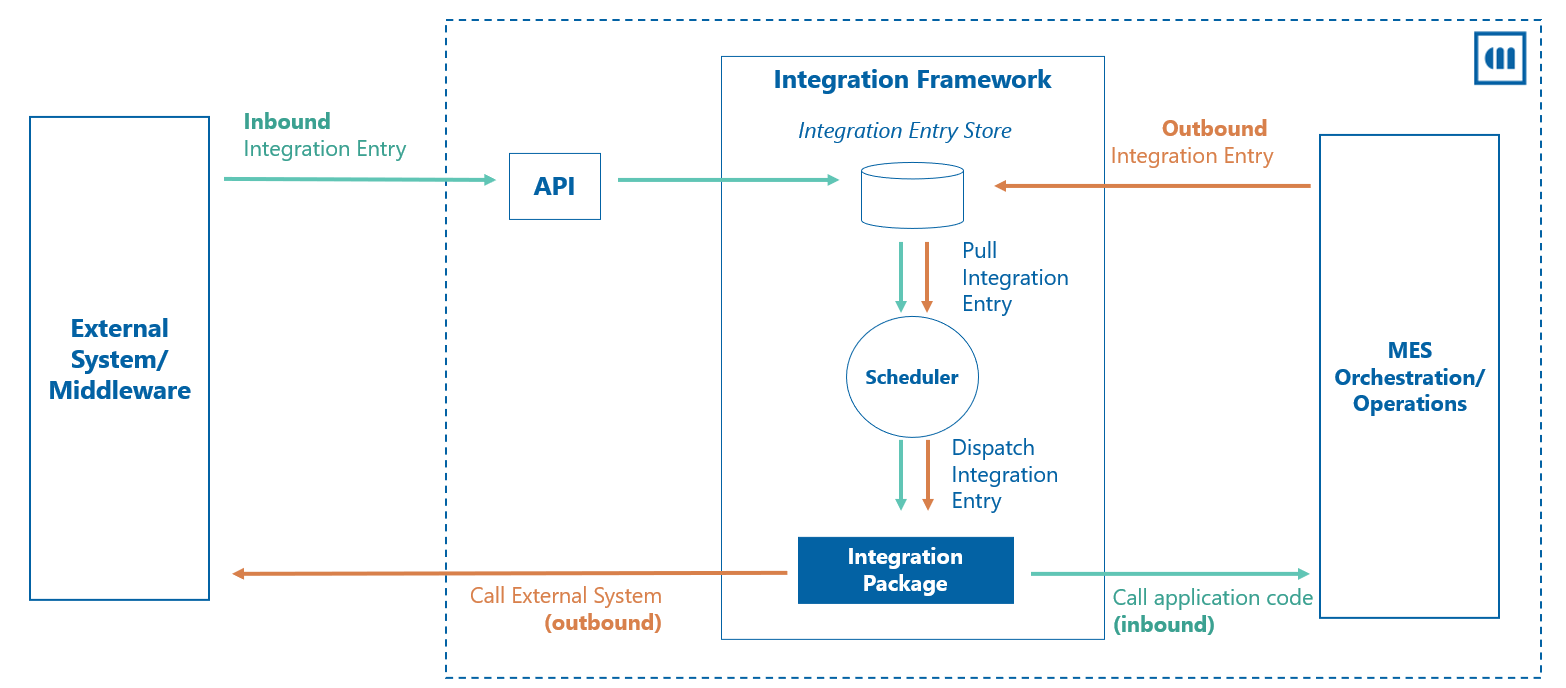
The framework splits cleanly into three concepts, and once they click, the rest of the system reads like plumbing:
- Integration Entry — the message itself. Conceptually the same thing as a message sitting in a RabbitMQ queue: metadata plus a payload.
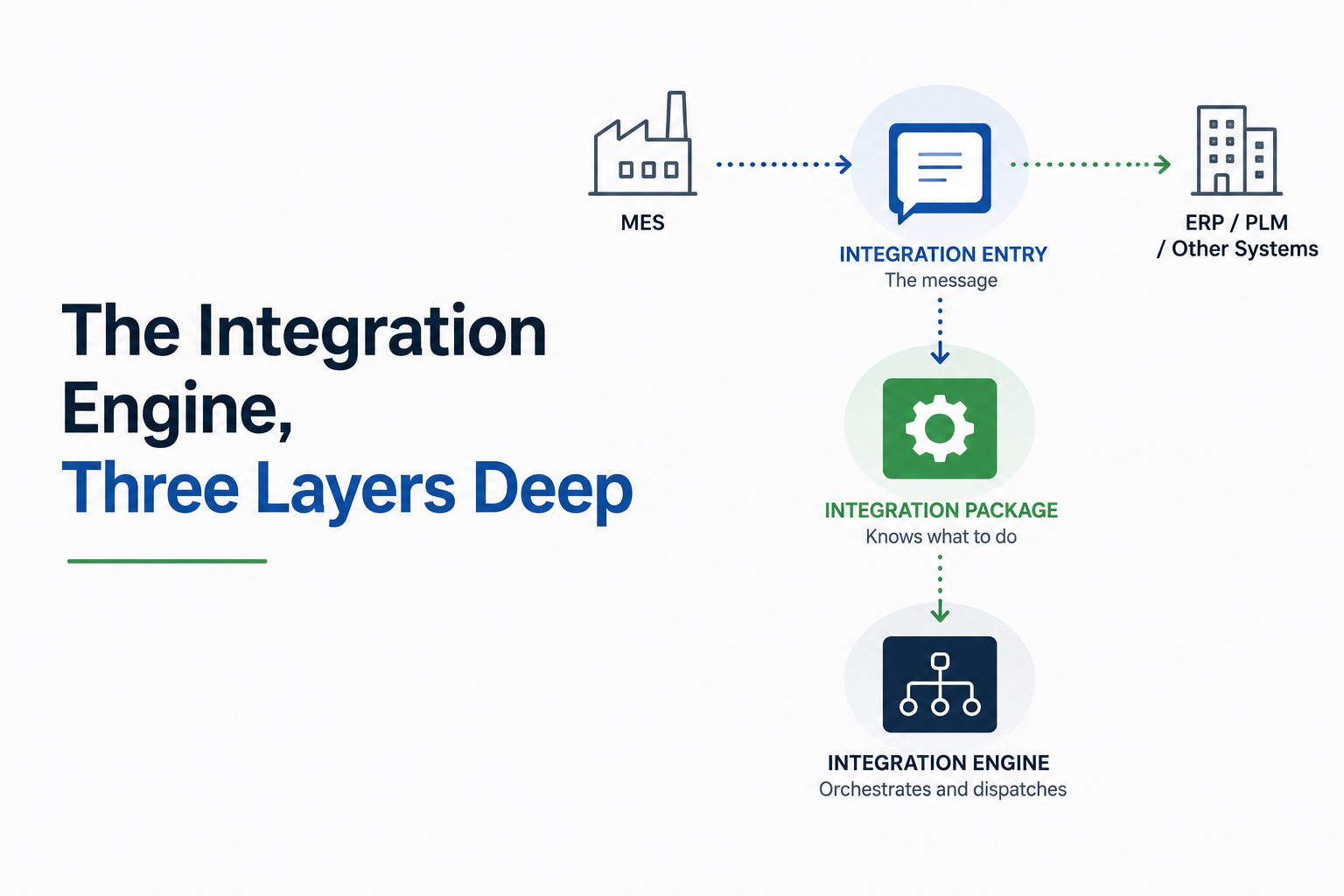
- Integration Package — the component that knows what to do with a message once it’s picked up.
- Integration Engine — the orchestrator that pulls entries, figures out which package should handle each one, and dispatches them.
Inbound entries (ERP → MES) get created through the standard CreateObject API or a custom API that does validation up front. Outbound entries (MES → ERP) are typically created by DEE Actions reacting to something that just happened on the shop floor. Either direction, the entry lands in the same store and gets picked up the same way — which is the whole point of decoupling.
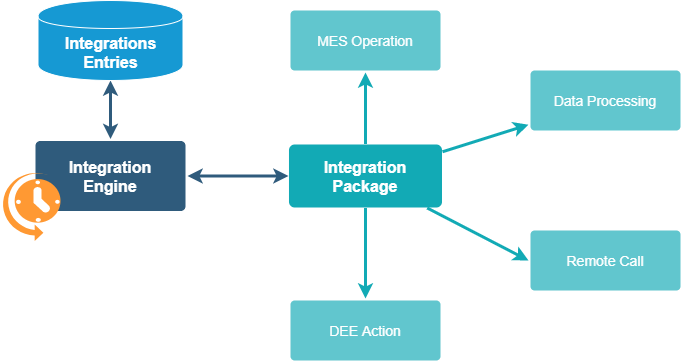
The Integration Entry represents a message to be processed and is the core entity type of the integration entity framework. It carries a small, deliberate set of properties:
| Property | Type | Description |
|---|---|---|
Name | String | Unique identifier — GUID or a naming convention, your call |
MessageType | String | What kind of message this is; drives package resolution |
SourceSystem | Lookup (IntegrationSystem) | Where the message came from |
TargetSystem | Lookup (IntegrationSystem) | Where it’s going |
SystemState | Enum | Current processing status |
IsRetriable | Boolean | Whether a failed entry is eligible for retry |
The payload itself lives in a separate but tightly-coupled entity, IntegrationMessage. It’s rarely handled on its own but it matters in one very specific operational way, which we’ll get to.
An Integration Entry is just a message on a queue that happens to be an entity type. Don’t over-model it.
The state machine you’re actually debugging#
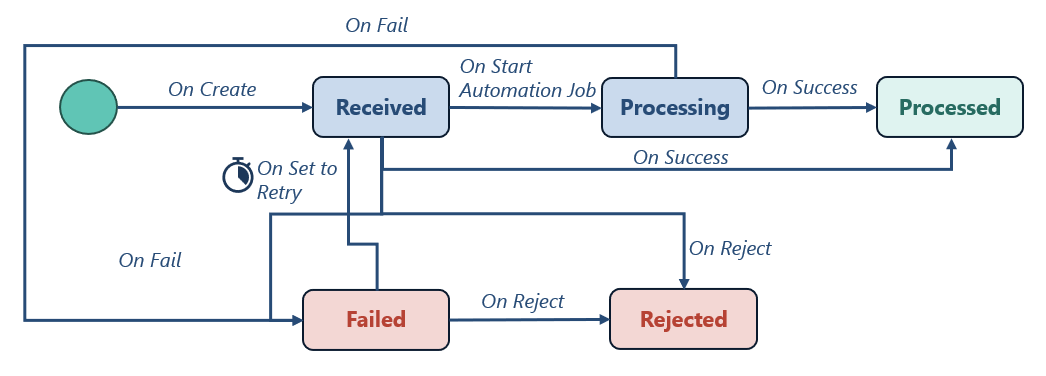
Every entry moves through a state machine: Received → Processing → Processed, with Failed and Rejected as the off-ramps.
Receivedis the signal that tells the orchestrator “this one’s up for grabs.”Processingexists mostly for Automation Job scenarios (more on that below) — for a standard DEE-Action-backed integration, you’ll rarely see it linger there.
Failed entries with IsRetriable set get swept up by a timer, RetryIntegrationEntry, which runs every five minutes by default and flips them back to Received. This is the detail that trips people up in support tickets: setting IsRetriable to true does not immediately requeue the entry. You’re waiting on the next timer tick, not triggering an event.
Packages: the part that does the work#
Out of the box you get two packages.
GenericIntegrationHandler bridges the framework to MES orchestration — you point it at a DEE Action per message type, and that action does the actual work. SapIntegrationHandler connects directly to an SAP instance.
In practice, the generic handler covers the overwhelming majority of real deployments, SAP included, because most SAP integrations go through middleware rather than a direct connection.
Resolution — which package handles which entry — is configured in the IntegrationHandlerResolution smart table, keyed by SourceSystem, TargetSystem, and MessageType.
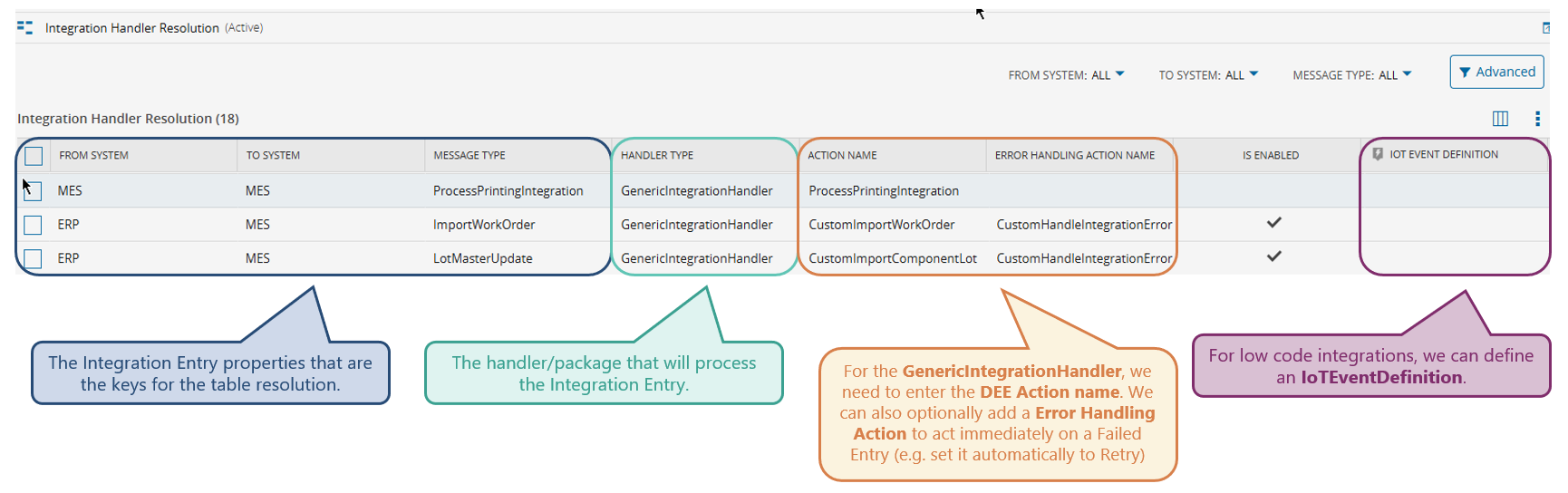
For the generic handler you supply a DEE Action name, and optionally an error-handling action that fires immediately on failure. That second field is more useful than it sounds: if you know a given error class is transient (ERP temporarily unreachable, say), the error action can flip the entry to retry automatically instead of waiting for someone to notice it sitting in Failed.
If the generic handler genuinely doesn’t fit — you need a persistent connection to an external message broker, for instance — you can build a custom package as an assembly with five kinds of classes:
Package(registration and active/inactive state)Monitor(watches connectivity to the third-party system)Handler(the actual business logic), andSender/Receiver(workers that talk to the external environment). Worth knowing: in the generic packageSenderandReceiverare essentially empty stubs.
All the real work sits in the Handler, which just looks up and invokes a DEE Action. That’s not a limitation — it’s the reason the generic handler is flexible enough to not need replacing.
What the orchestrator actually does on every tick#
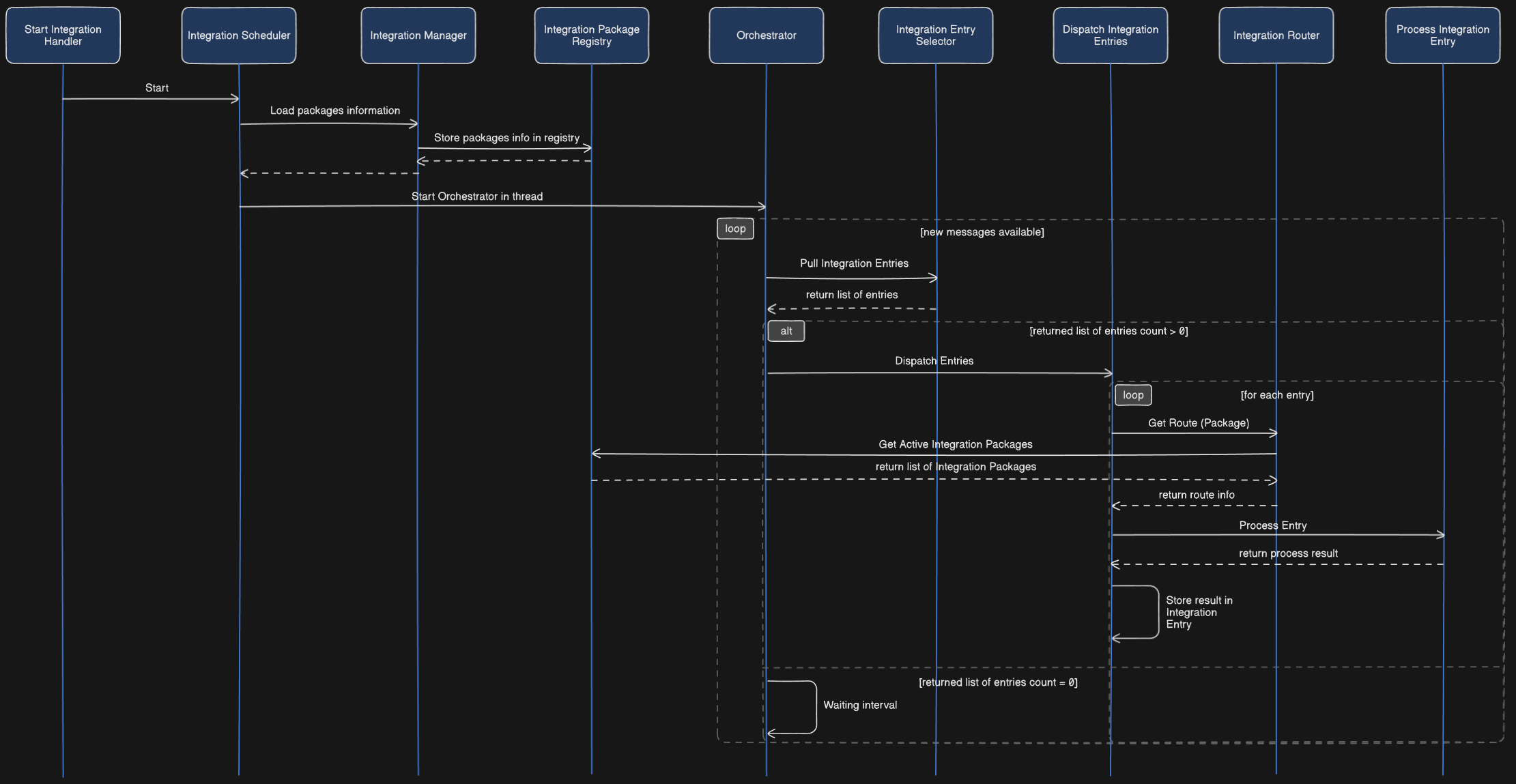
On host startup, the Integration Scheduler launches, loads active packages into an in-memory registry (so resolution doesn’t hit the database on every message), and starts the orchestrator loop. Each cycle:
- Pull the next
Receivedentry (or batch) viaT_PullNextIntegrationEntrystored procedure. - Calculate the route — which package handles this entry.
- Dispatch to that package’s
Handler. - Write the result and flip the state to
ProcessedorFailed.
The pull step is the interesting part, because it has to work correctly across multiple hosts pulling from the same table at once:
-- conceptual shape of what T_PullNextIntegrationEntry does
SELECT TOP (@BatchSize) *
FROM IntegrationEntry
WITH (READPAST, UPDLOCK)
WHERE SystemState = 'Received'
ORDER BY CreationDate ASC
READPAST skips rows another transaction already has locked instead of blocking on them; UPDLOCK claims the rows this transaction just read so a second host can’t grab the same entries a moment later. That’s the entirety of the cross-host coordination story — no distributed lock manager, just SQL doing what SQL is good at.
BatchId and ParentIntegrationEntryId: read the fine print#
Two properties change how entries get pulled, and both have a sharp edge that isn’t obvious from the property description alone.
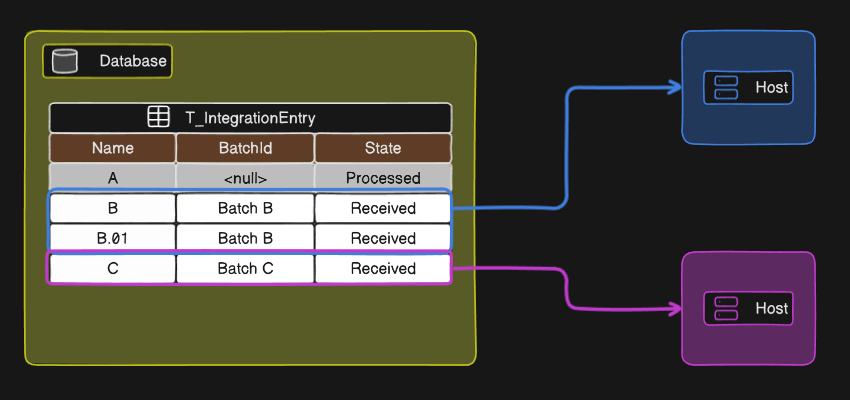
BatchId groups entries so they’re pulled together and processed sequentially by the same host — occupying a single processing slot, not one slot each. But the grouping guarantee only applies to entries that already exist when the pull happens. If Host A has already locked two entries with BatchId = B, and a third entry with the same BatchId gets created before Host A finishes, does Host B risk picking it up? The answer yes, that’s possible. The batching guarantee is about entries present at pull time, not a standing claim on the batch identifier.
ParentIntegrationEntryId creates an ordering dependency — entry B won’t become eligible until entry A (its parent) is processed. What it does not do is act as a circuit breaker. If the parent fails permanently after exhausting its retries, the framework does not automatically prevent the child from being picked up indefinitely — it just never becomes eligible while the parent is actively Failed-and-retriable-or-in-flight. Getting this wrong means silently stuck message chains that look healthy in every dashboard until someone goes looking.
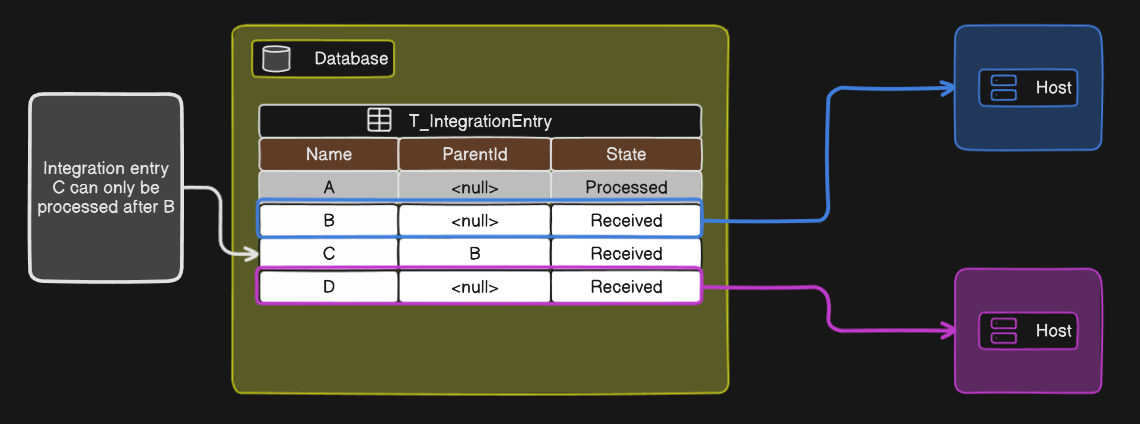
ParentIntegrationEntryIdorders execution. It does not guarantee the chain completes.
Configuration knobs, and the one you shouldn’t touch first#
| Setting | Path | Default |
|---|---|---|
| Scheduler enabled | /Cmf/System/Configuration/Integration/IntegrationSchedulerIsActive/ | — |
| Generic package enabled | /Cmf/System/Configuration/Integration/GenericIntegration/IsActive/ | — |
| Polling interval | /Cmf/System/Configuration/Integration/PollingInterval/ | 60000 ms |
| Max retries | /Cmf/System/Configuration/Integration/MaxNumberOfRetries/ | 10 |
| Parallel requests | /Cmf/System/Configuration/Integration/NumberOfParallelRequests/ | 5 (per host) |
NumberOfParallelRequests is the one people reach for first when throughput feels slow, and it’s the one that deserves the most respect. It’s per host, not per system — two hosts at the default gives you ten concurrent processing slots cluster-wide. Batched entries still only consume one slot regardless of how many messages are in the batch. Bump this number without load-testing first and you’ll find your bottleneck somewhere less convenient, like the ERP-side API you’re now hammering five times harder.
Low-code: drag, drop, and a Kafka topic you didn’t ask for#
The newer addition to this story is building integrations without writing a DEE Action at all — using an AutomationController workflow instead. The canonical example, and a good one: importing a production order from an ERP.
{
  "plantCode": "PLT01",
  "partNumber": "PN-4471-B",
  "dueDate": "2026-08-15T00:00:00Z",
  "quantity": 500,
  "unitOfMeasure": "EA",
  "priority": 2
}
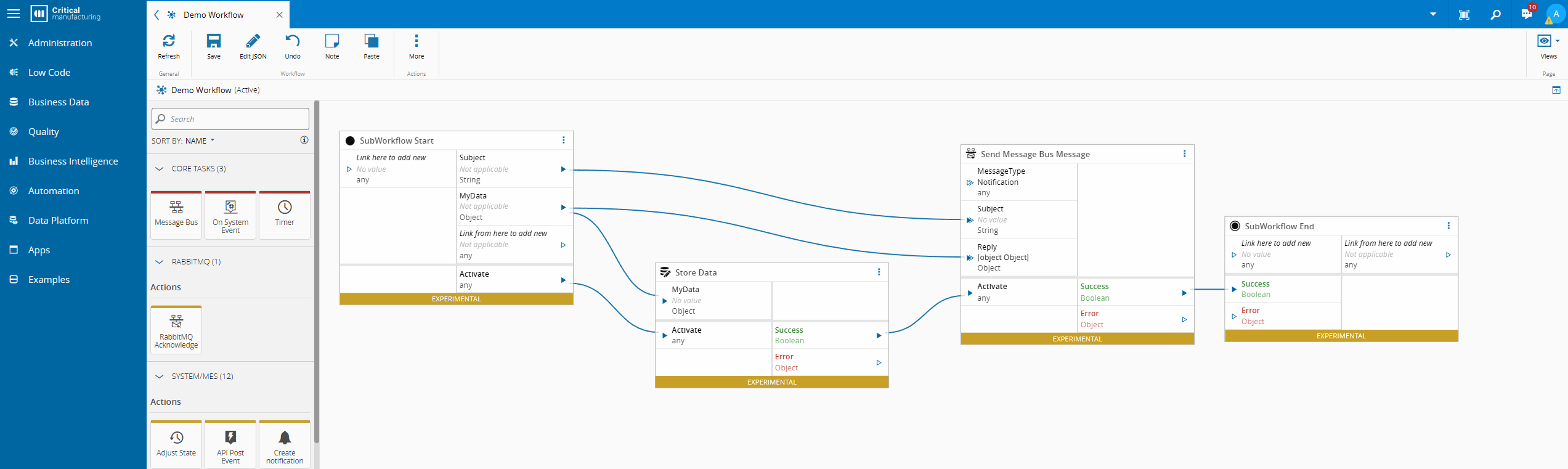
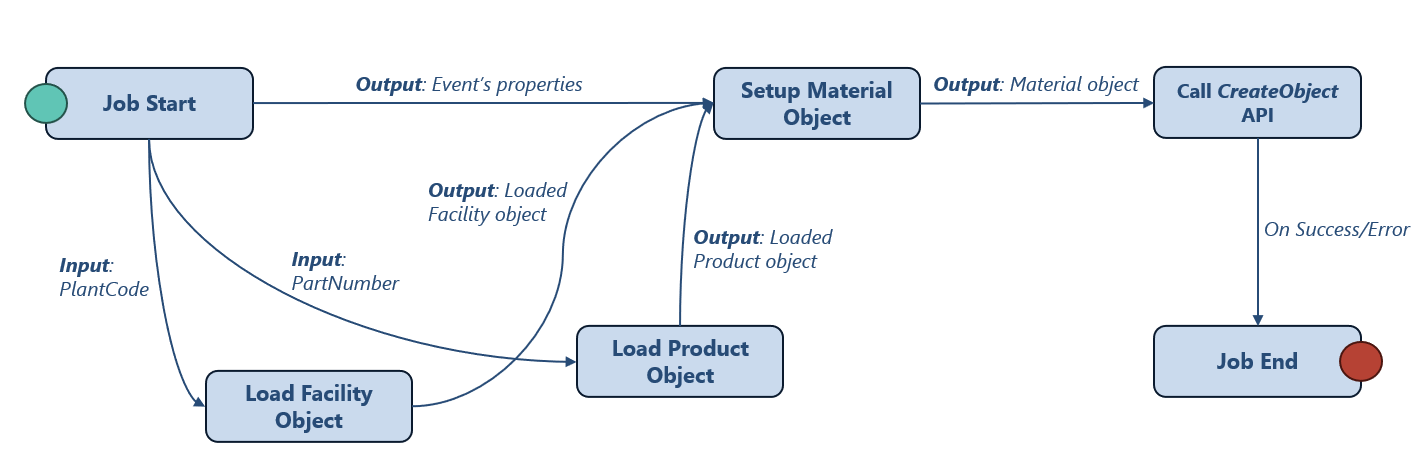
You register this shape as an IoTEventDefinition (scoped to Enterprise Integration — you can import the JSON directly and let the system infer property types instead of typing each one by hand), build an AutomationController workflow that consumes it, and instead of pointing IntegrationHandlerResolution at a DEE Action, you point it at the event definition. The workflow itself — load the facility, load the product, build the material object, call CreateObject — reads almost exactly like the equivalent DEE Action would, just assembled visually.


Now we can build a workflow that is going to consume the message.
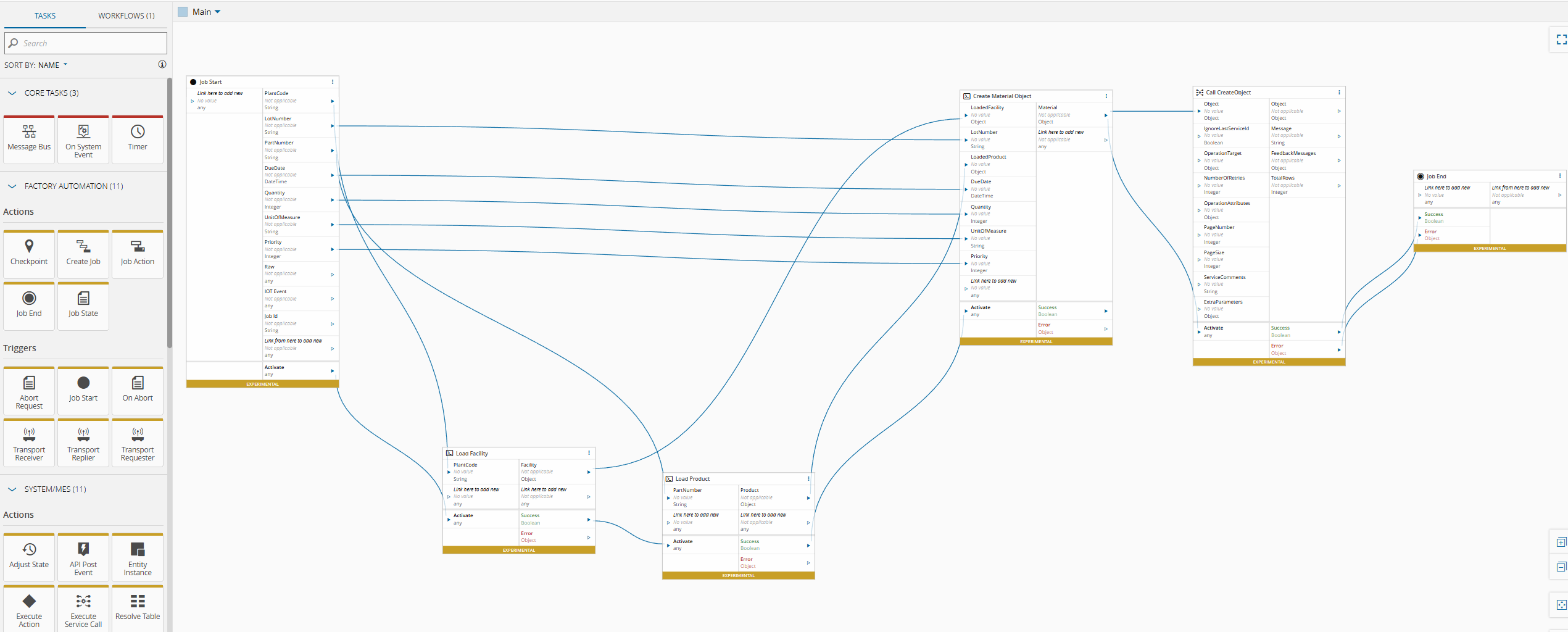
Under the hood it’s genuinely more moving parts than the DEE Action path: the message goes to a dedicated Kafka topic per event definition, the Connect IoT manager consumes it and creates an Automation Job, a second message round-trips through RabbitMQ, and then the workflow executes.
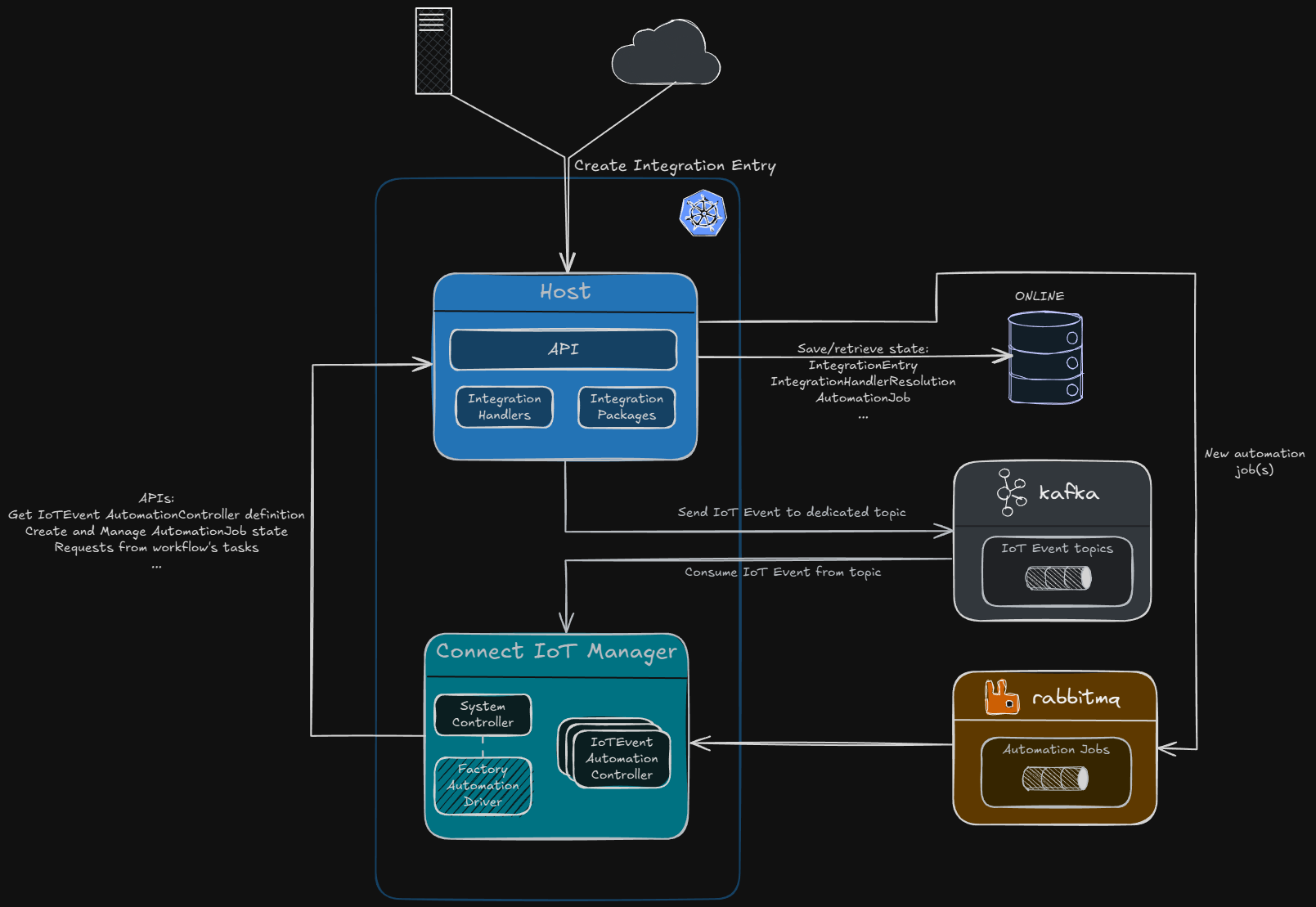
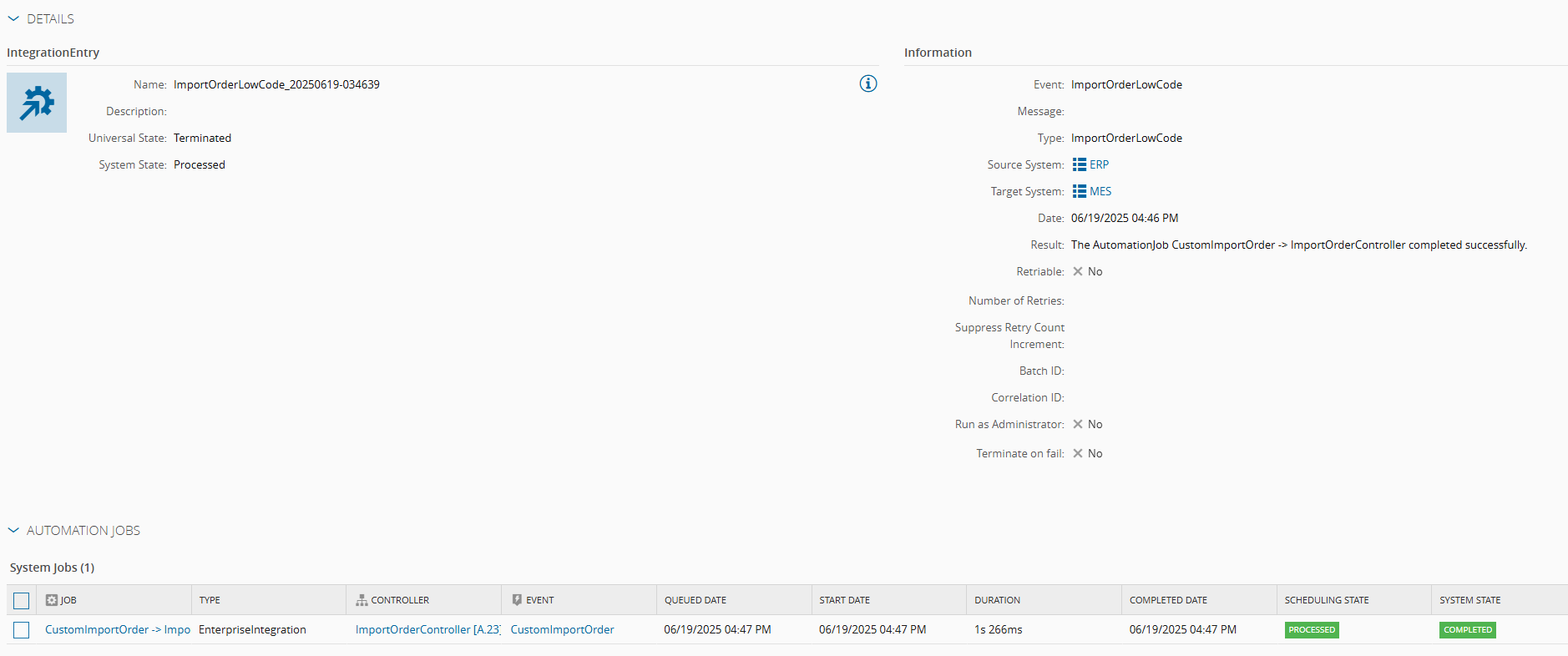
All of that complexity buys you real things — faster prototyping, workflows non-developers can read and modify, components reused across multiple integrations. It is not, however, free.
The atomicity tax nobody mentions in the demo#
Here’s the part that belongs in bold above the fold, and doesn’t get enough airtime: an Automation Job workflow is not a database transaction. Each task executes independently. If your workflow creates a material in one task and a production order in the next, and the second task fails, you now have a material with no production order and no automatic rollback of the first step.
A DEE Action wrapped in a single MES transaction doesn’t have this problem, it either fully commits or fully rolls back. A multi-step low-code workflow can leave you in a state that’s inconsistent by construction, and the framework will not warn you about it.
This isn’t a reason to avoid low-code integrations.
It’s a reason to design them assuming partial failure is normal, not exceptional — idempotent steps, compensating actions, or simply keeping the workflow to a single state-changing call.
Low-code doesn’t remove the need for transactional thinking. It just moves where you have to do it yourself.
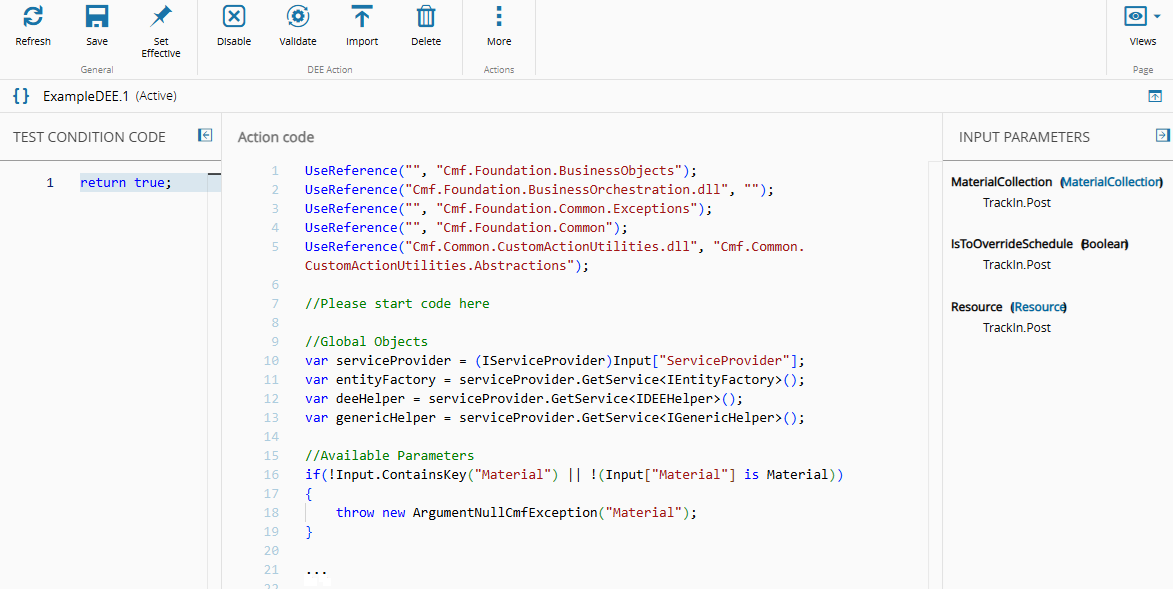
With the creation of Business Workflows you are now also able to create DEEs with Low Code. This maintains the transactionality and offers a low code solution.
Final thoughts#
The generic handler plus a DEE Action will get you through the overwhelming majority of integration requirements, and there’s no shame in that being the boring, correct answer. Low-code earns its place for prototypes, cross-functional handoffs, and genuinely simple single-step imports, but it is still not a wholesale replacement for the traditional path, and not in domains where a partially-completed workflow can be a compliance problem rather than an inconvenience.
Read the two source posts if you haven’t — Integration Entries and Low-Code Integrations go deeper on the wiring than I have room for here. But the batch-locking edge case and the atomicity gap are the two things worth carrying into your next design review, because they’re exactly the kind of detail that only shows up once you’re already in production.
This blog post was based on a talk by Ricardo Cunha in 2025-10-16 @CM-Portugal