Most enterprise software gives you two options when the out-of-the-box data model doesn’t fit: fork the code, or live without the feature. CM MES was built to reject that choice entirely.
Overview#
The MES dynamic model is a the mechanism that lets you add a brand-new business entity to the system by filling in a wizard, not by shipping a deployment. It’s one of those pieces of architecture that’s easy to take for granted until you’re asked to explain why it works.
This post covers the static/dynamic split, what happens under the hood when you create and generate an entity, the different ways MES lets you attach data to that entity, and when to reach for a table instead.
Why the split exists#
Before MES existed in its current form, the requirement on the table was blunt: the system needed to be extensible by configuring metadata, not by writing code. Every other application on the market made you choose between using what the vendor shipped, or hand-rolling a new set of database tables, access layers, and UI screens from scratch every time the business needed a new concept.
That flexibility is dangerous on its own. Opening the door to add whatever entity you want may end up with every site running a system that only superficially resembles every other site, nothing comparable, nothing maintainable centrally. So the second requirement showed up right behind the first: whatever gets built has to stay consistent. A custom entity created by customization needs to be structurally comparable to a base entity shipped by the product.
Flexibility without consistency isn’t extensibility, it’s just fragmentation with extra steps.
Put those two requirements together and you get controlled scalability: customers can extend the system in a thousand different directions, but every one of those directions is built on the same underlying structure, with the same meta-structure.
The blueprint and the building#
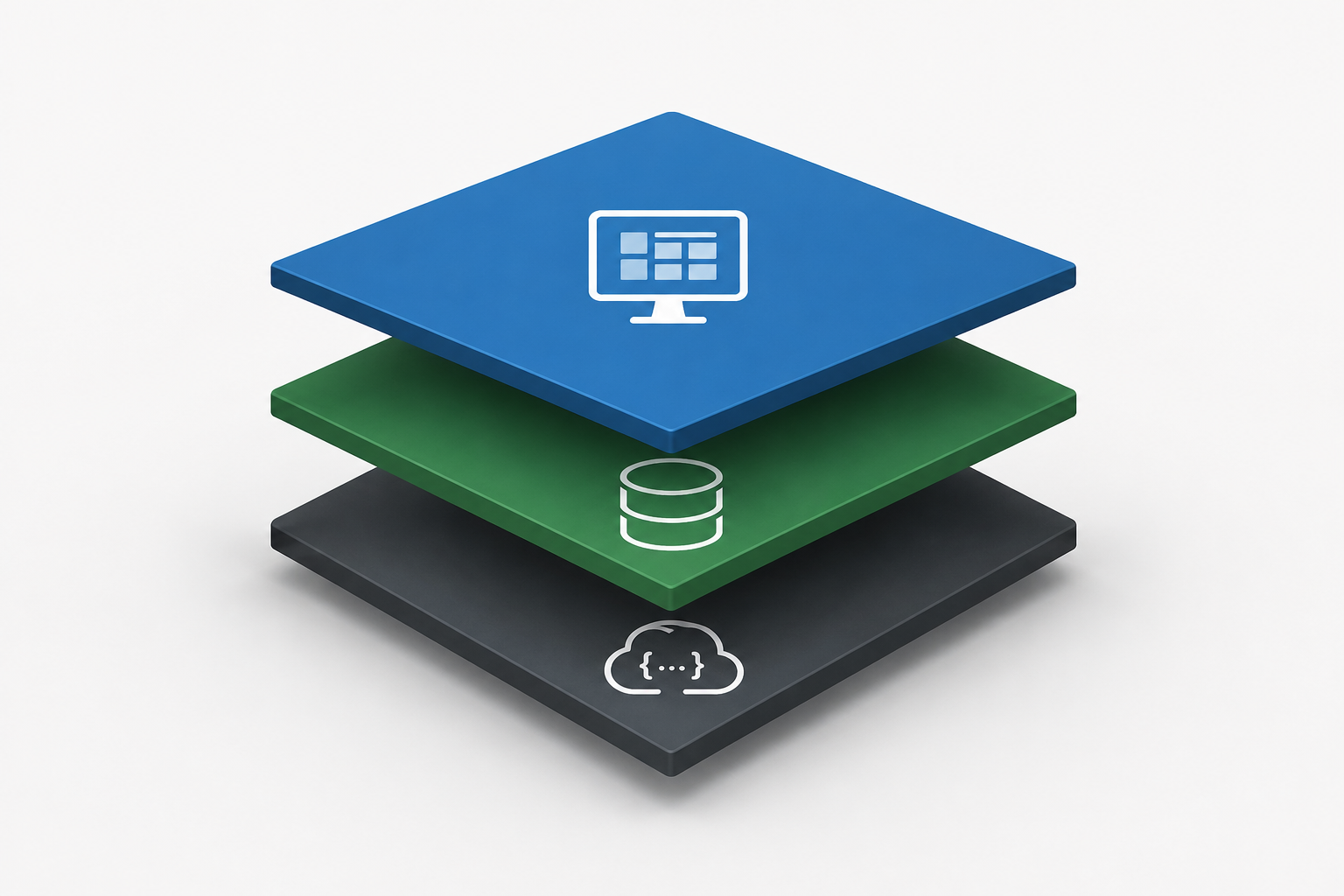
The solution was to split the data model into two halves that depend on each other but are governed by completely different rules.
The static model is the metadata layer — the blueprint. It defines entity types, their properties, and their relationships, and it lives in tables like T_EntityType and T_EntityTypeProperty. It also happens to be where MES stores everything the framework needs to operate that isn’t business data: security, transaction history, state transitions, query execution structures, DEE actions. Critically, the static model cannot be extended. If you want to add something new to it, you implement it explicitly, new tables, new stored procedures to read and write it, the works. Nothing about it is automatic.
The dynamic model is the data layer — the building. It’s where actual business information lives: materials, production orders, steps, flows, and anything a custom entity type produces.
On the database, it splits into two schemas:
| Schema | Purpose |
|---|---|
CoreDataModel | System-level, out-of-the-box entities, generic tables, and smart tables |
UserDataModel | Anything created through customization — custom entities, custom generic tables, custom smart tables |
If you’re staring at a database and trying to figure out what’s core product versus what a customization project created, the schema is explicit.
If you crack open the online database and browse alphabetically, the dynamic model — CoreDataModel and UserDataModel combined — is roughly 90% of the entire MES data model.
The static model is a comparatively small, fixed core that exists purely to describe how to build everything else.
The runtime generation engine#
Here’s the part that actually does the work. Since the static model is fixed and explicit, and the dynamic model is neither, something has to translate one into the other. That something is the runtime generation engine, and it’s arguably the single most important mechanism in the whole platform.
Create a new entity type through System > Administration > Entity Types, and the wizard calls CreateEntityType, which does exactly one thing: it writes a row into T_EntityType and rows into T_EntityTypeProperty. That’s it. No tables, no DLLs, nothing else exists yet.
SELECT *
FROM [dbo].[T_EntityType]
WHERE [Name] = 'ACustomEntity'
SELECT etp.*
FROM [dbo].[T_EntityTypeProperty] etp
INNER JOIN [dbo].[T_EntityType] et ON etp.EntityTypeId = et.EntityTypeId
WHERE et.[Name] = 'ACustomEntity'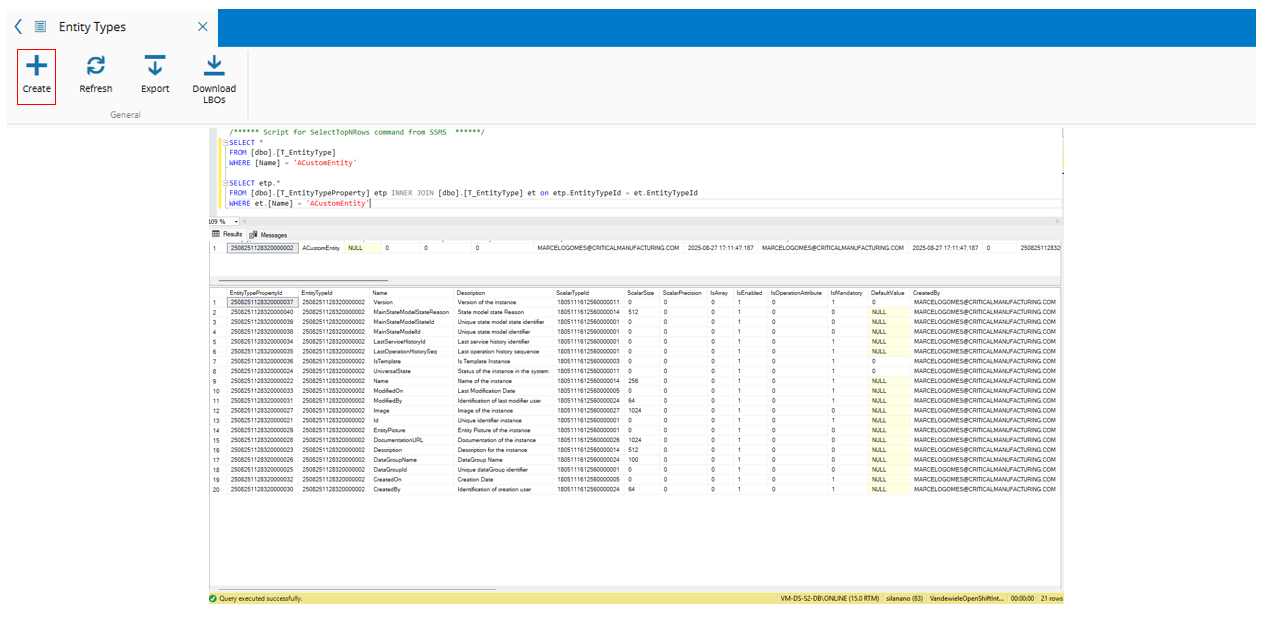
That gap between defining the entity and generating it isn’t an oversight — it’s deliberate. Once the schema is generated, properties are locked. You can’t rename or remove them. So the system gives you a window to iterate on the definition before it becomes permanent.
When you’re happy with the definition, you hit Generate Schema, and two things fire: GenerateEntitySchema, a SQL procedure that builds the main table, the history table, and — depending on the entity’s configuration — relation tables, effective version tables, and attribute tables; and a second step that generates the C# assembly.
That second part matters because a database table by itself is useless to the application layer. The generator produces a CMF.<Tenant>.BusinessObjects.<EntityName>.dll, dropped straight into the application host, with the same method surface as every out-of-the-box entity’s DLL.
This will generate two new tables:
- T_[EntityName] - which stores all the instances of that entity in the system. The structure of the table is created based on the metadata defined for the table in the T_EntityTypeProperty table.
- T_[EntityName]History - stores the complete changes history of the T_[EntityName] table. It will have a similar structure but additionally it will have the DatabaseOperation, the ServiceHistoryId and the OperationHistorySeq
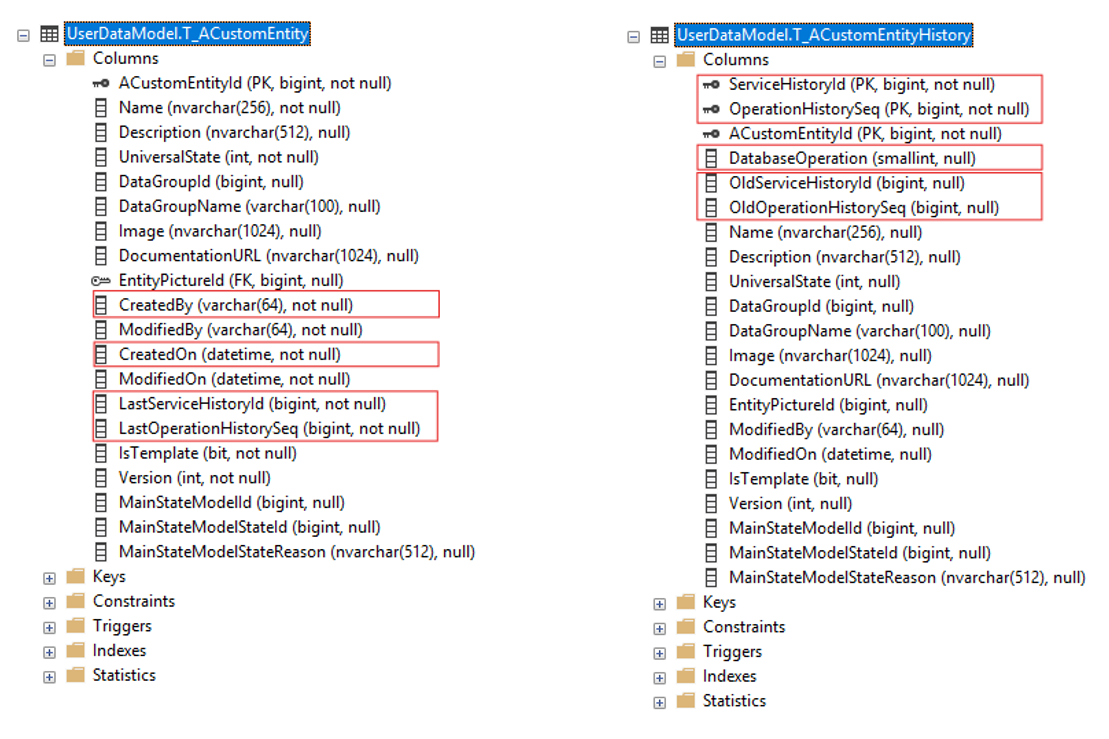
A custom entity and a CM MES entity Area share the exact same shape at the code level they were built by the same machine.
Tenant name casing has to match exactly between where the assembly is built and where it runs. A mismatched case on an otherwise-identical tenant name is a real, reported failure mode.
Anatomy of an entity#
Once an entity exists, MES gives you five different places to hang data off it, and picking the wrong one is the most common way to paint yourself into a corner.
| Type | Stored where | Access | Notes |
|---|---|---|---|
| Property | Column on the main table | Entity.Load / Entity.Save | Native, fastest, can reference other entities |
| Custom Property | Column on the main table | Entity.LoadAttributes / SaveAttributes | Requires a schema regeneration every time one is added |
| Attribute | Separate attribute table | Entity.LoadAttributes / SaveAttributes | Scalar types only, can be an array |
| Operation Attribute | Separate attribute table, written by operations | OperationAttributeCollection on the orchestration call | Not visible on the entity page — only in history |
| State Model | Main table (primary) or T_[Entity]State (secondary) | Standard state APIs | Only the first state model lives on the main table |
Properties are the default and the fast path — direct columns, and Entity.Load with zero levels fetches only them. Bump the load level and you start pulling in every referenced entity behind them, which is the single easiest way to accidentally drag your whole database into memory. Load in collection, and keep lazy-loading to a minimum — every level you add is a database round trip you didn’t need. More information on developer portal and in a blog post.
Attributes live in a dedicated table and can’t reference other entities — scalar types only. They can also be arrays, which is a feature almost nobody in the field seems to use. Each array element is its own database row:
/* Get attributes for Site and Materials */
SELECT *
FROM CoreDataModel.T_SiteAttribute
SELECT *
FROM CoreDataModel.T_MaterialAttribute
That’s worth sitting with for a second: if an attribute array holds 100,000 values, loading it means fetching 100,000 rows. It’s a legitimate tool, but not one to reach for without thinking about the ceiling on cardinality first.
Custom Properties are the odd one out — stored as columns on the main table like a native property, but accessed through the attribute API like an attribute. The entire justification for their existence is performance: pull a heavily-used attribute onto the main table so it’s a column scan instead of a join. The catch is that adding one means regenerating the schema, and the payoff isn’t guaranteed — if the main table is already wide, or the entity already sees heavy traffic, bringing more columns onto it can make things worse, not better. This needs to be measured case by case, not assumed.
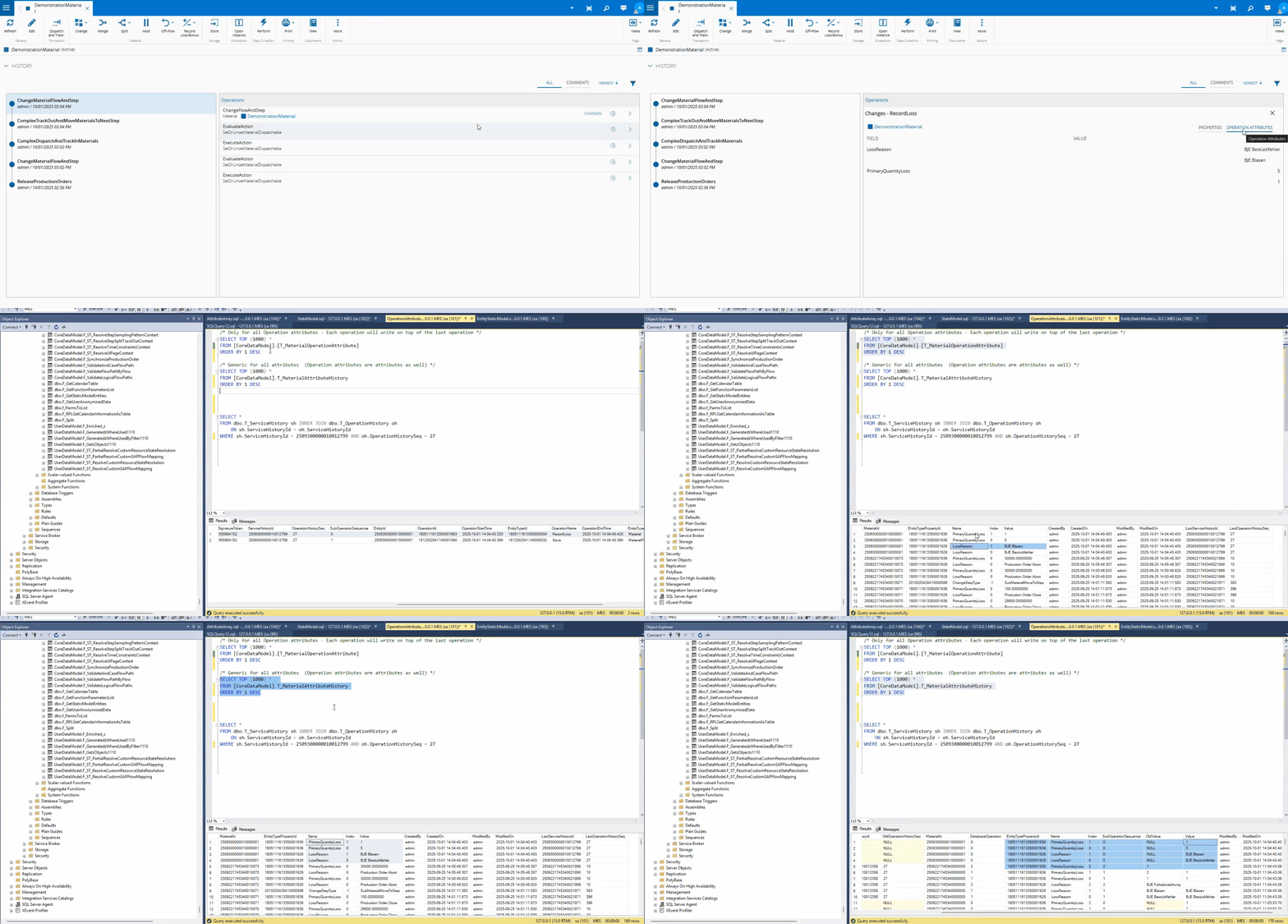
Operation Attributes are the one most people haven’t touched, and probably should more. They’re not tied to the entity — they’re tied to a specific operation performed on it, and they only show up in history, never on the entity’s own page.
/* Only for all Operation attributes - Each operation writes on top of the last */
SELECT TOP (1000) *
FROM [CoreDataModel].[T_MaterialOperationAttribute]
/* Generic for all attributes (Operation attributes are attributes too) */
SELECT TOP (1000) *
FROM [CoreDataModel].T_MaterialAttributeHistory
The canonical example is a track-out with a recorded loss: a LossReason array and a PrimaryQuantityLoss array, matched by index — position 0 of one array corresponds to position 0 of the other. That’s how a single operation reports “this much scrap, for this reason, and this much scrap, for that other reason” without inventing a new entity for it.
Finally, State Models. Every entity’s primary state lives directly on the main table — MainStateModelId and MainStateModelStateId are just columns:
SELECT MainStateModelId, MainStateModelStateId, *
FROM [CoreDataModel].[T_Resource]
WHERE ResourceId = 2509290318110000004
SELECT Name, *
FROM dbo.T_StateModel
WHERE StateModelId = 1805111618120000001
The T_[Entity]State table only fills up once you attach a second state model to the same entity. Query T_ResourceState on a resource that only has its one universal state model, and you’ll find it empty — not a bug, just a table that only exists for the overflow case.
Access, localization, and validation#
Every property carries a bitmask access level — hidden, read-only, or editable, independently configurable at create, view, and update time, and independently at the entity level versus the template level. That last part is a genuinely useful trick: lock a property down at the entity level while leaving it editable at the template level, and you’ve built yourself an administrator override without writing a line of custom code.
The access level is stored as a raw integer (e.g 530) on the database, which is exactly as unreadable as it sounds if you’re building custom entities by code rather than through the UI — there’s an AccessLevelHelper spreadsheet for translating the bit flags into something you can reason about.
Two more small but underused levers: a property can carry a localized message to decouple its internal name from what the operator actually sees, and a validation rule (regex or range) can be attached directly at the property level, which cuts down on the number of custom Dynamic Execution Engine actions you’d otherwise write just to reject bad input.
Relations are entities too#
Relations aren’t a separate concept bolted onto entities, they are entity types, just ones with a source and a target instead of a flat property list. There are two main scenarios that push you toward a relation instead of a plain property:
- A genuine N:N relationship —
EmployeeCertification, where one employee holds many certifications and one certification belongs to many employees. - A relationship that needs to carry more information than a single property can hold —
MaterialContainer, where it’s not enough to know which container a material sits in; you also need to know where in it (slot 9, say).
The one question that actually matters when you design a relation is: what happens to the relation when one side of it terminates? The default rule is straightforward — terminate the source, and the relation terminates with it; terminate the target, and the termination operation should fail. For MaterialContainer: terminate the material, the relation is meaningless and dies with it; terminate the container while materials still reference it, and that termination should be rejected, because those materials would be left pointing at nothing.
Like most default rules, there are exceptions carved out in business logic, for example MaterialProductionOrder allows both sides to terminate independently, because a production order closing shouldn’t force the physical materials still sitting on the line out of existence.
If we have a use case where at production order close, report to the ERP the sum of scrap quantity per step. We would create a custom relation with information that includes the Production Order, the Step and the Scrap information.
The instinctive answer is to make Step the source, since you’re aggregating by step…
But if you see it from a terminate perspective: terminate the step, and every production order that used it would have to stop — clearly not acceptable. Terminate the production order, and you just lose the scrap counter, which is fine, because the production order no longer existing means the counter is irrelevant anyway. So Production Order is the source, Step is the target, the relation dies cleanly when the thing it’s describing (a specific order’s run) goes away, and survives the thing it’s merely referencing (a step definition that other orders still use).
If you’re not sure which side of a relation is the source, ask what should happen when each side terminates. The answer is a good rule of thumb.
Relations also carry a LockType — None, LockSource, LockTarget, or LockBoth — which forces a row lock on the relevant entity’s main table every time the relation is created or updated. That’s a real DB lock, so it needs a real justification.
The textbook case is a sub-resource relation, where you need the parent resource’s state update to wait for the child relation update to finish, because state propagation logic depends on it.
Reach for it deliberately, not by default.
Recap - Generated tables per Entity#
A closer look at the other generated tables for a more complex Entity configuration:
T_[EntityName]Attribute&T_[EntityName]AttributeHistory- Store current and historical values of instance attributes.T_[EntityName]OperationAttribute- Stores values for operation attributes performed on the entity.T_[EntityName]EffectiveVersionHistory- Stores the history for the effective version.T_[EntityName]State&T_[EntityName]StateHistory- Store the current and historical states across different state models. Its only populated when an entity has more than one StateModel.
Entity limitations worth knowing up front#
A short list of hard constraints that are easy to discover the expensive way:
- Properties and custom properties cannot be deleted once the schema is generated — you’d be dropping live database columns.
- Properties can only be added before the first schema generation.
- Custom properties can be added after generation, but each addition requires a schema regeneration.
- Adding a mandatory custom property to an entity that already has instances requires a default value, or the existing rows would have no way to satisfy the constraint.
- Attributes and operation attributes are the most forgiving of the five, they’re new rows in an attribute table, addable at any point in the entity’s life.
Smart and generic tables#
Entities aren’t the only way to store business data. When you just need a lookup or a temporary mapping, generic and smart tables exist specifically so you don’t reach for a full entity type by default.
Generic tables are the simple case: general-purpose key/value storage with a T_GT_ prefix, a main table and a history table, and nothing more exotic than that. Keys are mandatory, resolution is a straight lookup, and if an entity referenced by a key gets terminated, the row disappears with it.
Smart tables (T_ST_ prefix) add three things generic tables don’t have: validation rules that run before and after a value changes, support for more than one value per key, and precedence keys.
Precedence keys define a priority order for resolving a lookup from most specific to most generic, evaluated top-down until something matches.
Let’s see an example: a table keyed by Step (mandatory), Flow, Product, and Material. Building the precedence order out loud forces you to reason about which keys generalize which:
Step + Flow + Material— most specificStep + Material— same specificity of business meaning, one less dependencyStep + Flow + Product— abstract away Material into ProductStep + ProductStep + FlowStep— most generic, always resolves
The rule for building that list: every combination should use all the keys that matter to it, and any combination that would resolve identically to another (Step + Product + Material next to Step + Material — since a material only ever belongs to one product) should be dropped as redundant noise.
Resolution itself comes in two flavors.
Standard requires every precedence key to match the input exactly. Partial loosens that — a row still matches if a key was left out of the input entirely, or if the key column is null and the input passed null for it too.
That distinction is what lets a smart table serve both a fully-specified lookup and a fallback default from the same structure.
| Generic Table | Smart Table | |
|---|---|---|
| Resolution | One fixed key combination, all keys mandatory | Multiple precedence combinations, evaluated top-down |
| Validation | None | Pre/post validation rules |
| Multiple values per key | No | Yes |
| Partial / null matching | No | Yes |
| Change control | No | Yes |
If none of those extra capabilities are in play, a generic table is genuinely a smart table with exactly one precedence key using every column — there’s no reason to pay for the complexity you don’t need.
Overriding the framework’s own tables#
The ContextResolution generic table is how the product itself decides which smart table governs a given resolution context — and it’s user-overridable.
Point it at your own smart table, and you own the resolution logic. Do that for a step-related context and the custom table must carry a Step column typed against the Step entity; same pattern for Resource. The one discipline worth holding onto here: before building a custom smart table that overrides a step- or resource-based context, go look at what precedence keys the out-of-the-box table already uses. Ship a replacement that’s missing functionality the standard one had, and the client will absolutely notice a few months later.
Final thoughts#
Strip away the SQL and the wizard screens, and the whole dynamic model is one idea, applied consistently: describe what you want in the static model, and let the runtime generation engine build the database objects, the assemblies, and the application-layer plumbing for you. Static is the blueprint. Dynamic is the data. Everything else — entities, custom properties, attributes, relations, smart tables — is a variation on how much structure you’re willing to ask the generator to build on your behalf.
The part that’s easy to miss from the outside is that this isn’t just a code-generation convenience. It’s the mechanism that lets a base product entity and a customer’s custom entity be structurally indistinguishable at the framework level — which is the entire reason the platform can be extended without slowly turning into an unmaintainable pile of one-off systems per customer.
This blog post was based on a talk by Marcelo Gomes in 2025-10-02 @CM-Portugal