All the code presented here is available at github and github.
What if instead of gibberish alarms, red lights and panic, you could have a detailed assessment of what went wrong and contextualized on what was going wrong before the catastrophical fail. Adding on to that, what if that report came with a set of probable causes and possible solutions.
Leveraging the ToolBox#
In previous posts we brought into the Connect IoT toolbox the universal language for analytics python and we followed with strengthening our ability to use low code to query the CM Data Platform via OData.
In this post I want to use all of these tools that we’ve been building and create a context good enough to feed an LLM.
Data Platform Low Code#
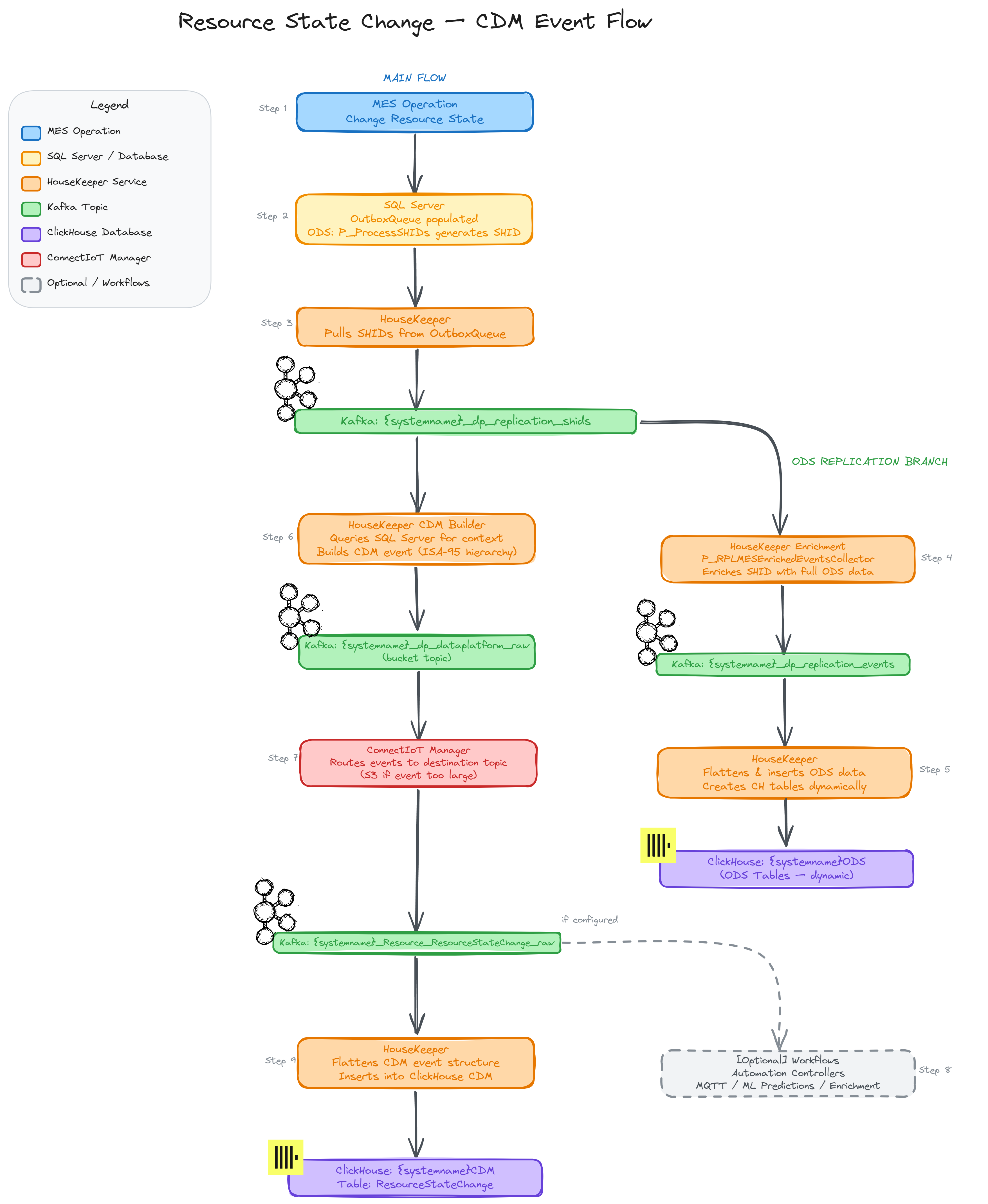
One of the interesting features that CM provides is the ability to run low code workflows when a particular CDM (canonical data model) Event occurs in the system. This means that all actions in the MES or from external calls that create a CDM event allow for the user to intercept the event and execute low code workflows.
In our use case we will interact with two different CDM events, the Resource State Change, that occurs when a resource state is modified and with the Resource Alarm event, this event is typically used as an entrypoint for external software or equipment to report alarms.
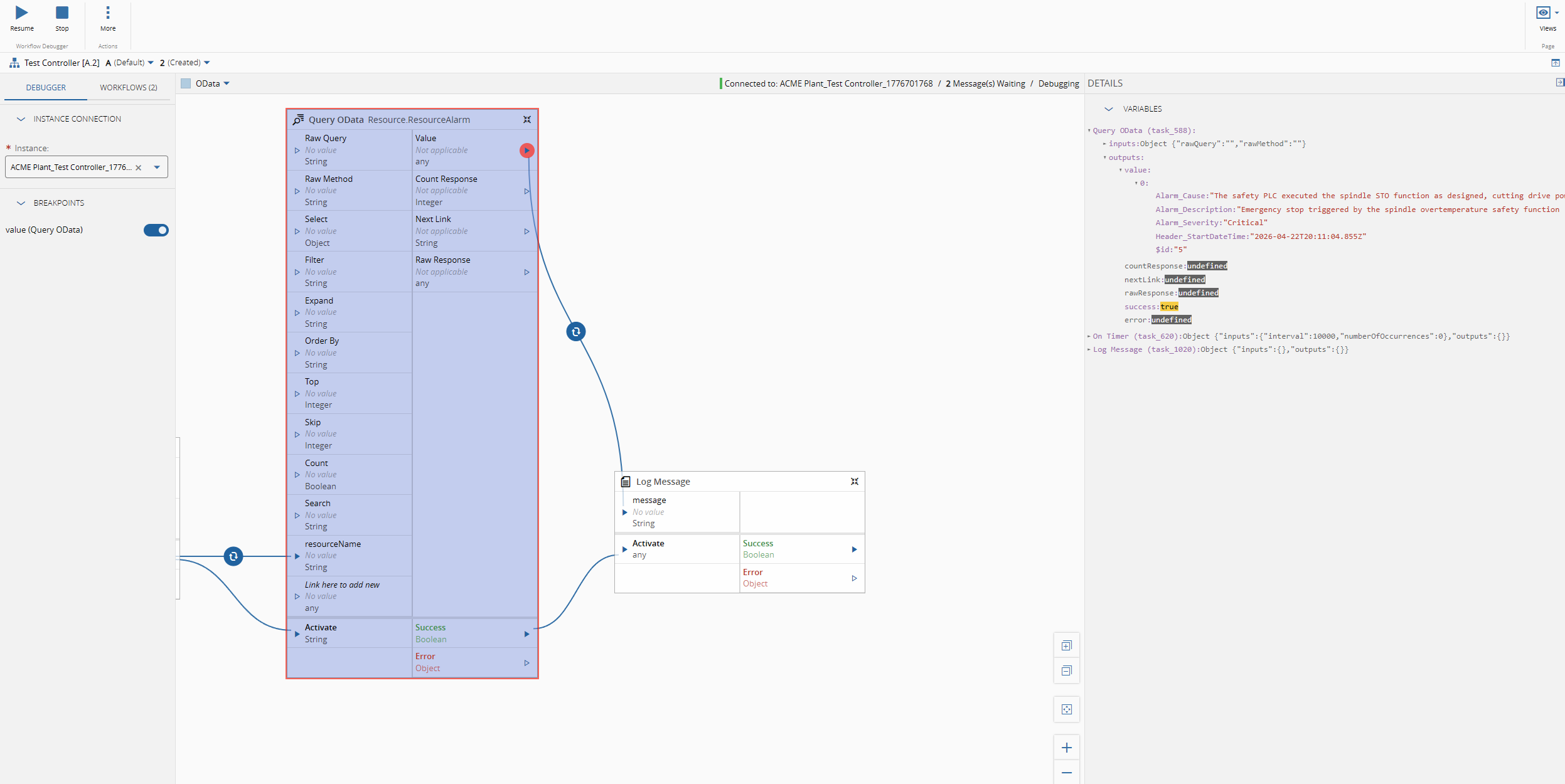
We will intercept the Resource State Change and when it occurs we will check via OData the Resource Alarms that happened in the last 10 minutes for that resource, dynamically create a new dataset and feed it to an LLM.
Agentic Task#
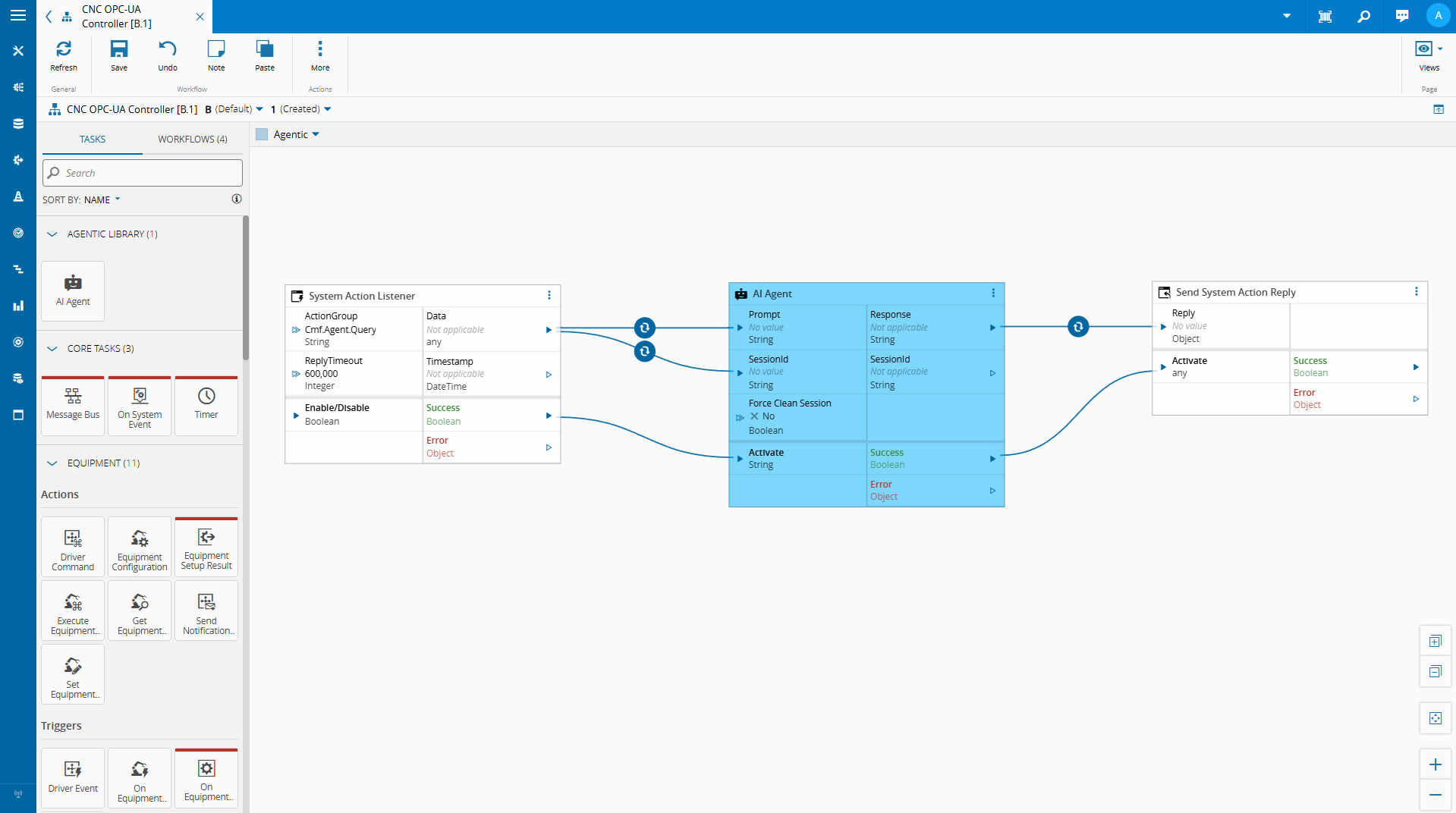
In a Edge AI - Connect IoT a Practical Case Study, we showcased how we can use small language models with Connect IoT, one of the questions I’ve been getting is if we could have it for LLM providers like OpenAI as well. That’s why for this use case I decided to go with a task to make calls to OpenAI.
We are using the openai library in order to make endpoint requests to Open AI’s LLMs.
The core of this integration lives in a single injectable class, wired into Connect IoT’s dependency injection system.
  @DI.Injectable()
  class LLMWithMCP {
@DI.Inject(TYPES.Dependencies.Logger)
      private _logger: Dependencies.Logger;
private openai: OpenAI;
      private mcpClients: Map<string, Client> = new Map();
      private availableTools: OpenAI.Chat.Completions.ChatCompletionTool[] = [];
      private isStarted: boolean = false;
  }
It holds an OpenAI client, a map of named MCP clients keyed by server name, and a flat list of all available tools in OpenAI’s function-calling format. The design is intentionally multi-server: you can connect to the MES API server, a Cube.js analytics server, a ClickHouse server — and the class aggregates their tool catalogs into one unified list handed to every completion call.
Initialization is idempotent. The guard on isStarted prevents re-registering tools or opening duplicate connections. This matters in Connect IoT where tasks can be restarted without tearing down the entire process.
Connecting to MCP Servers#
connectMCPServer does three things: opens a StreamableHTTP transport to the remote endpoint, performs the MCP handshake, and calls listTools() to discover what that server exposes. We created support for MCPs (model context protocol), but for now we aren’t using it in this use case. We are just focused on the vanilla querying for the LLM.
  async connectMCPServer(serverConfig: MCPServerConfig): Promise<void> {
      const transport = new StreamableHTTPClientTransport(
          new URL(serverConfig.url),
          { requestInit: { headers: serverConfig.headers } }
      );
const client = new Client(
          { name: `openai-client-${serverConfig.name}`, version: "1.0.0" },
          { capabilities: {} }
      );
await client.connect(transport);
      this.mcpClients.set(serverConfig.name, client);
const { tools } = await client.listTools();
for (const tool of tools) {
          this.availableTools.push({
              type: "function",
              function: {
                  name: `${serverConfig.name}__${tool.name}`,
                  description: tool.description || "",
                  parameters: tool.inputSchema as Record<string, unknown>,
              },
          });
      }
  }
Each tool is mapped into OpenAI’s ChatCompletionTool shape and pushed onto availableTools. The naming convention is worth calling out: tool names are prefixed with the server name using a double-underscore separator — mcp-mes__GetMaterialList, for instance. This turns a flat list into a namespaced routing table. When the model fires a tool call, callMCPTool splits on __ to recover which client to dispatch to and which tool to invoke.
  private async callMCPTool(toolName: string, args: Record<string, unknown>): Promise<string> {
      const [serverName, ...toolParts] = toolName.split("__");
      const actualToolName = toolParts.join("__");
const client = this.mcpClients.get(serverName);
      if (!client) {
          throw new Error(`MCP server not found: ${serverName}`);
      }
const result = await client.callTool({ name: actualToolName, arguments: args });
      // ...
  }
Simple, deterministic, no config required.
The Agentic Loop#
chat() is where the agentic behavior lives. It runs a while loop bounded by maxIterations — a safety valve against runaway chains.
  while (iterations < maxIterations) {
      iterations++;
const completion = await this.openai.chat.completions.create({
          model,
          messages: currentMessages,
          temperature: options.temperature,
          tools: this.availableTools.length > 0 ? this.availableTools : undefined,
      });
const message = completion.choices[0].message;
      currentMessages.push(message);
// No tool calls — the model has a final answer
      if (!message.tool_calls || message.tool_calls.length === 0) {
          return message.content || "";
      }
// Execute all tool calls in parallel
      const toolResults = await Promise.allSettled(
          message.tool_calls.map(async (toolCall) => {
              const args = JSON.parse(toolCall.function.arguments);
              const result = await this.callMCPTool(toolCall.function.name, args);
              return { role: "tool" as const, tool_call_id: toolCall.id, content: result };
          })
      );
for (const result of toolResults) {
          if (result.status === "fulfilled") {
              currentMessages.push(result.value);
          }
      }
  }
Each iteration sends the full message history plus the tool list to the model. If the response contains no tool calls, the loop terminates and returns. If it does, all calls are dispatched in parallel and their results appended to the history before the next iteration.
The loop is the agent. Everything else is plumbing.
Promise.allSettled() rather than Promise.all() is a deliberate choice: a failing tool call shouldn’t abort the entire turn. The error is captured as a tool role message so the model can reason about the failure and decide whether to retry, rephrase, or give up gracefully.
The AgenticTask — Wiring It Into the Workflow Engine#
LLMWithMCP doesn’t run in isolation. It gets exposed to the visual workflow editor through a Connect IoT task — AgenticTask — which handles activation, configuration, and lifecycle management. The task itself is intentionally thin: its job is to bridge the workflow runtime to the LLM handler, not to own any reasoning logic.
The settings are straightforward: model name, temperature, API key, and two prompts.
The GlobalLLMHandler Singleton#
The most important detail is how LLMWithMCP is provided. Rather than each task instance owning its own client — which would mean re-connecting to every MCP server on every activation — it is registered as a controller-scoped singleton through Connect IoT’s provider system.
@Task.TaskModule({
    task: AgenticTask,
    providers: [
        {
            class: LLMWithMCP,
            isSingleton: true,
            symbol: "GlobalLLMHandler",
            scope: Task.ProviderScope.Controller,
        }
    ]
})
export class AgenticModule { }
Every AgenticTask instance in the same controller gets the same LLMWithMCP object injected via @DI.Inject("GlobalLLMHandler"). MCP connections are established once and reused across activations. This is also why init() is idempotent — multiple tasks calling it concurrently won’t race to re-initialize the same handler.
Activation and Session Lifecycle#
All the work happens inside onChanges, gated on the activate input. The pattern is standard Connect IoT: reset activate to undefined immediately so the task can be re-triggered without a value change cycle.
public override async onChanges(changes: Task.Changes): Promise<void> {
    if (changes["activate"]) {
        this.activate = undefined;
try {
            await this._globalLLMHandler.init(this.apiKey);
const chatResult = await this._globalLLMHandler.chat(
                [{ role: "user", content: this.prompt }],
                {
                    model: this.model,
                    temperature: this.temperature,
                    systemPrompt: this.systemPrompt,
                }
            );
this.result.emit(chatResult);
            this.success.emit(true);
        } catch (e) {
            this.logAndEmitError((e as Error).message);
        }
if (this.destroySessionOnSuccess) {
            await this._globalLLMHandler.disconnectAll();
        }
    }
}
The destroySessionOnSuccess flag gives operators explicit control over the session trade-off: keep connections alive for fast repeat calls, or tear them down after each use to free resources. In a workflow that fires the task once every few minutes, keeping the session alive is almost always the right call. In a low-frequency scenario where memory pressure matters more than latency, tearing it down makes sense.
The task is the surface area. The singleton is the engine. Keep them clearly separated.
Building a Data Platform Workflow#
The first part of setting all of this is creating a Automation Controller of scope Data Platform. In this Automation Controller we can specify which IoT Events we want this controller to trigger on and also if those events will be the Standard events or the Light events.
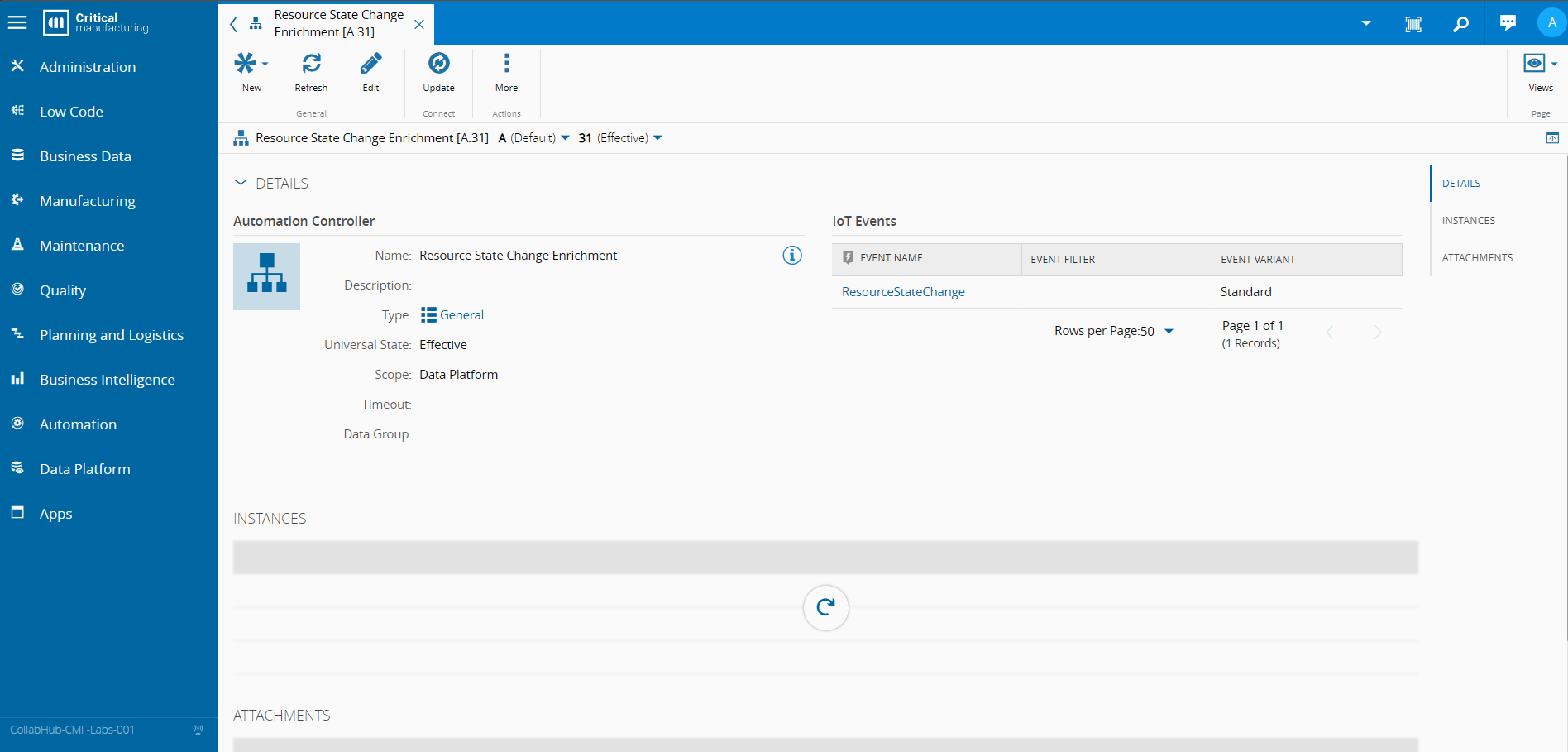
In our use case our trigger will be the ResourceStateChange CDM Event.
Main Workflow#
This will be the entrypoint for our workflow. Here we are filtering only the events, with the conditions, that we care to react to.
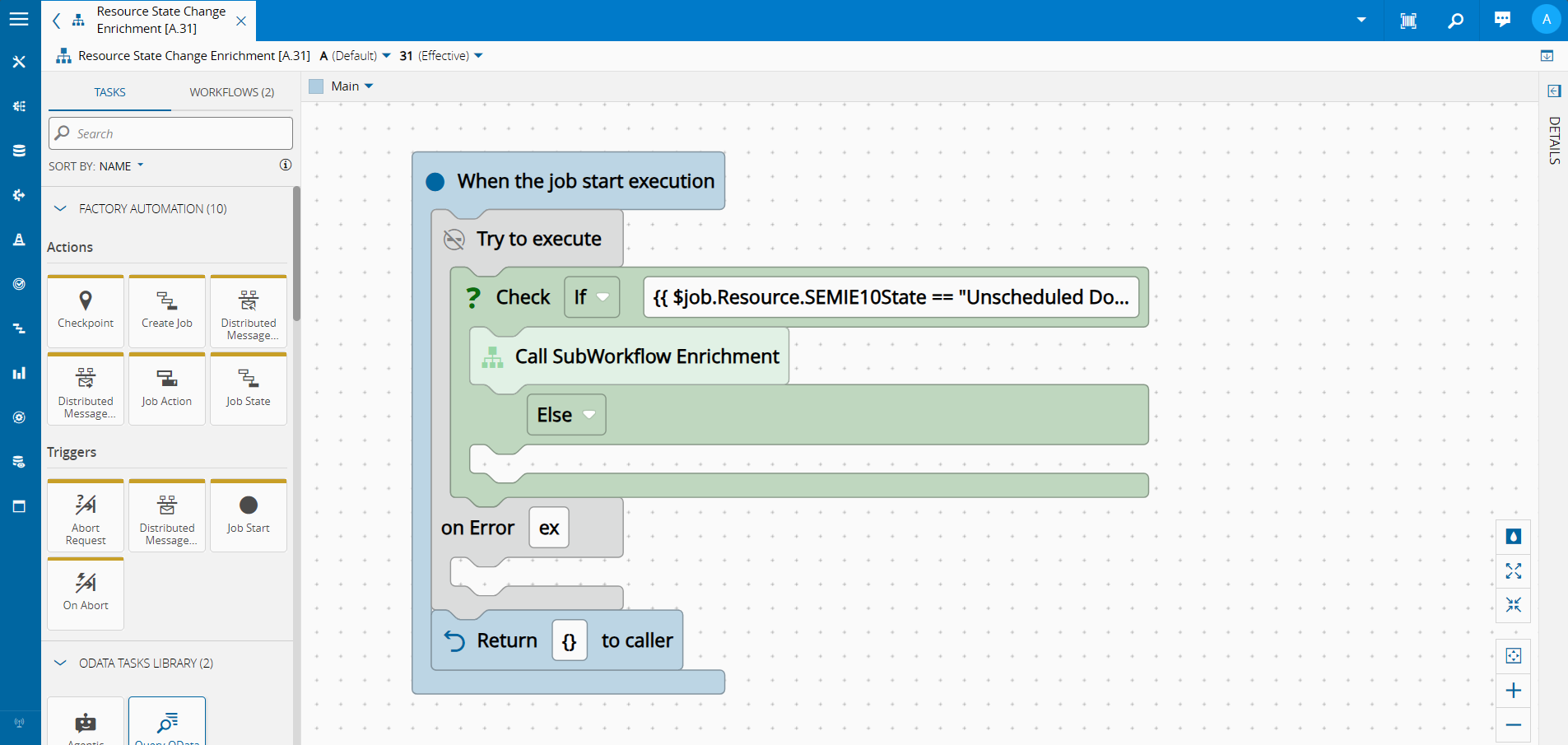
In our use case our condition are:
- State Change to Unscheduled Down -
$job.Resource.SEMIE10State == "Unscheduled Down" - MES Operation Log Event -
$job.Header.Operation == "LogEvent"
If the conditions are met, the workflow will then call a subworkflow called Enrichment.
The workflow will pass on to the Enrichment subworkflow the:
- Resource Name -
{{ $job.Resource.Name }} - Data of the event Resource State Change -
{{ $job.data}}
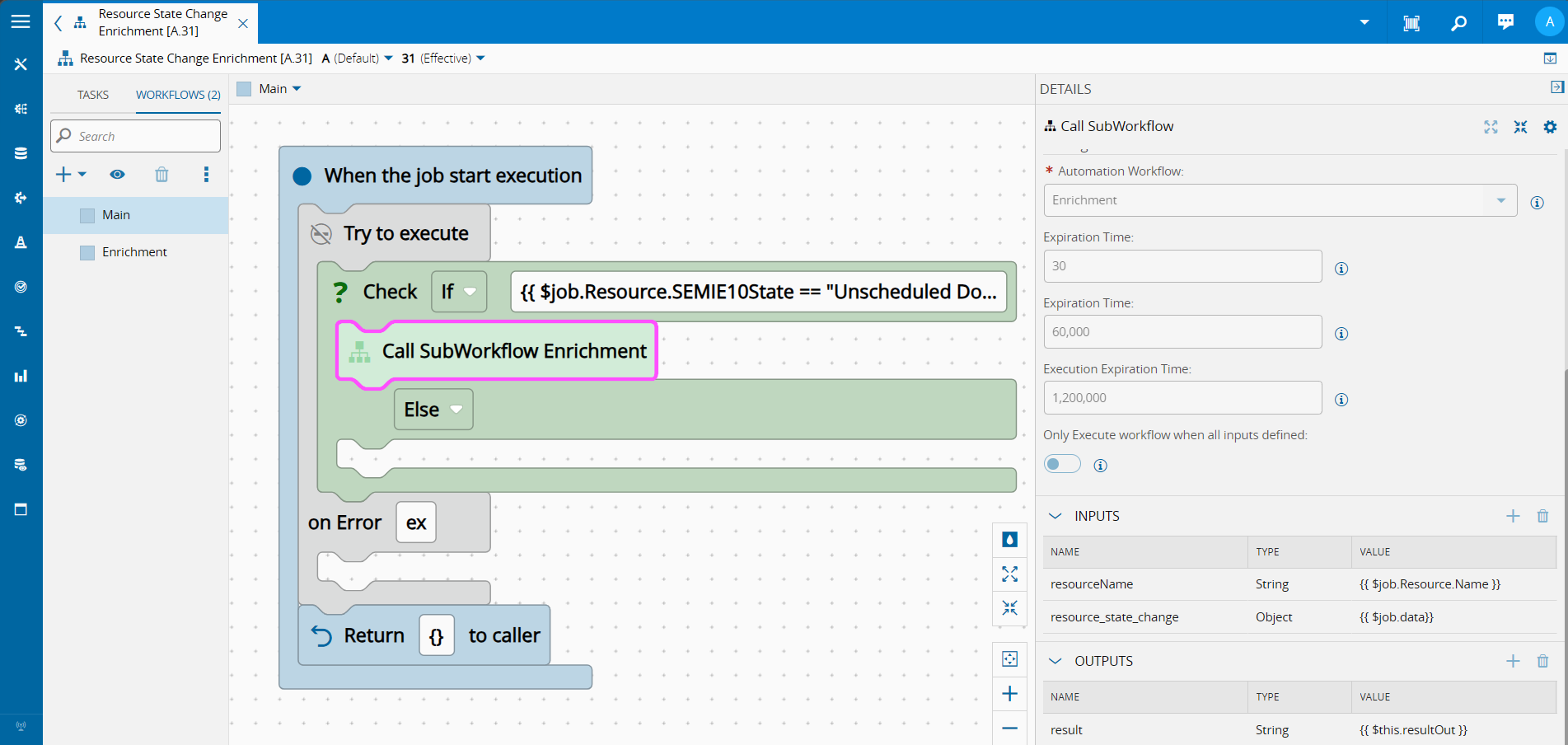
Enrichment Workflow#
Now that we are sure we are in the scenario where we have an event for the resource state change to SEMIE-10 state Unscheduled Down, we can address all our business logic.
We know that when a resource changes to Unscheduled Down this typically mean that there were some alarms that either inform on what is the current problem or at least can give some clues on the state of the resource before having to stop.
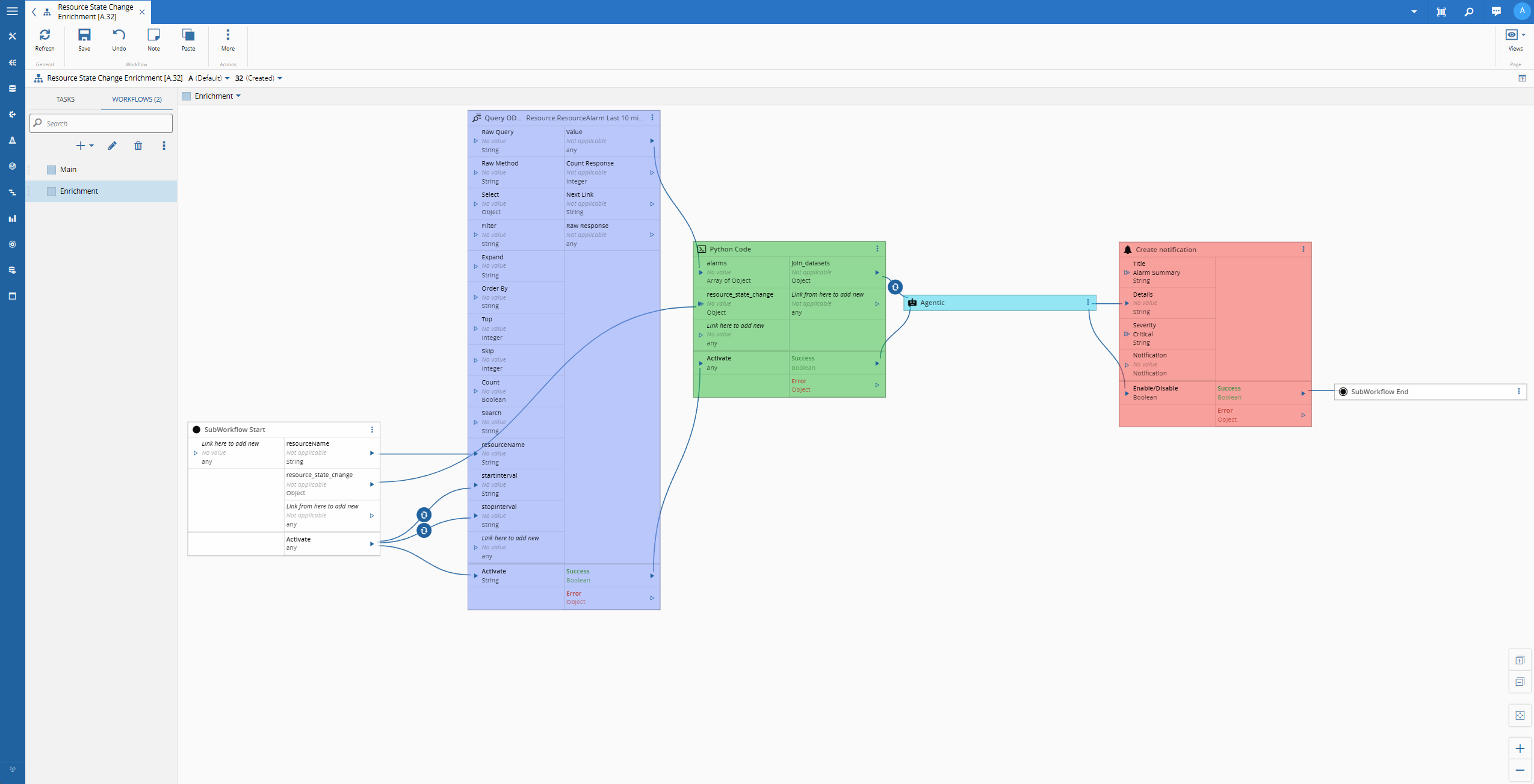
With this in mind we will split our workflow into three parts.
- Retrieve all the alarms for this resource in the last 10 minutes
- Dynamically create a new dataset to feed to an AI model
- Create a notification with the assessment done by AI
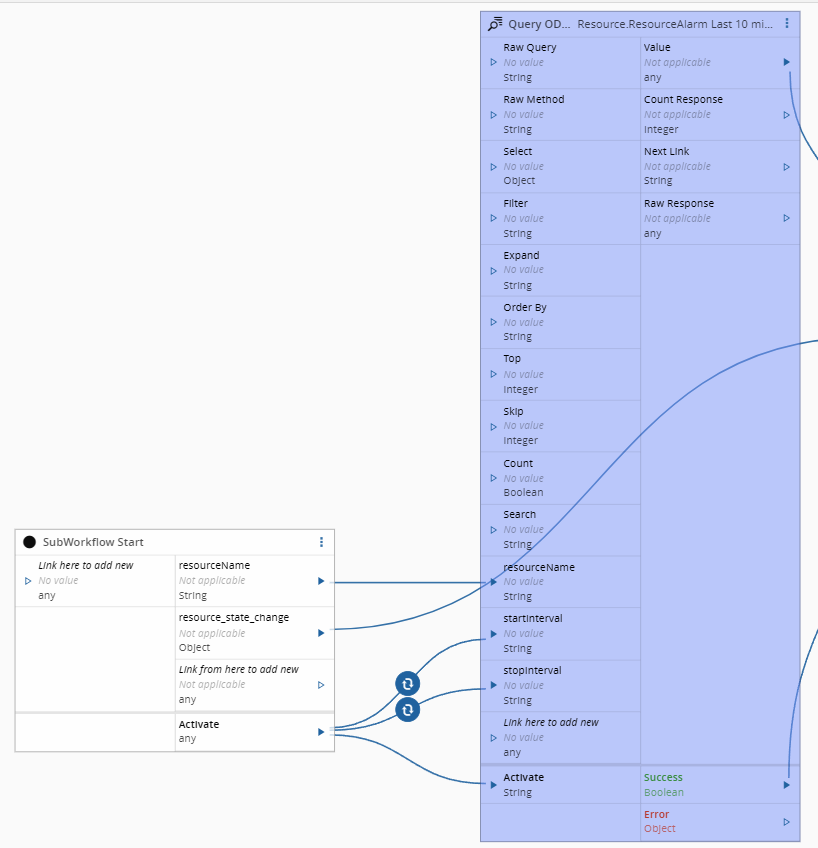
In the Data Platform with OData - Low Code we already created all that we needed to be able to perform OData requests to Data Platform. Now our only change is to provide the correct information and query.
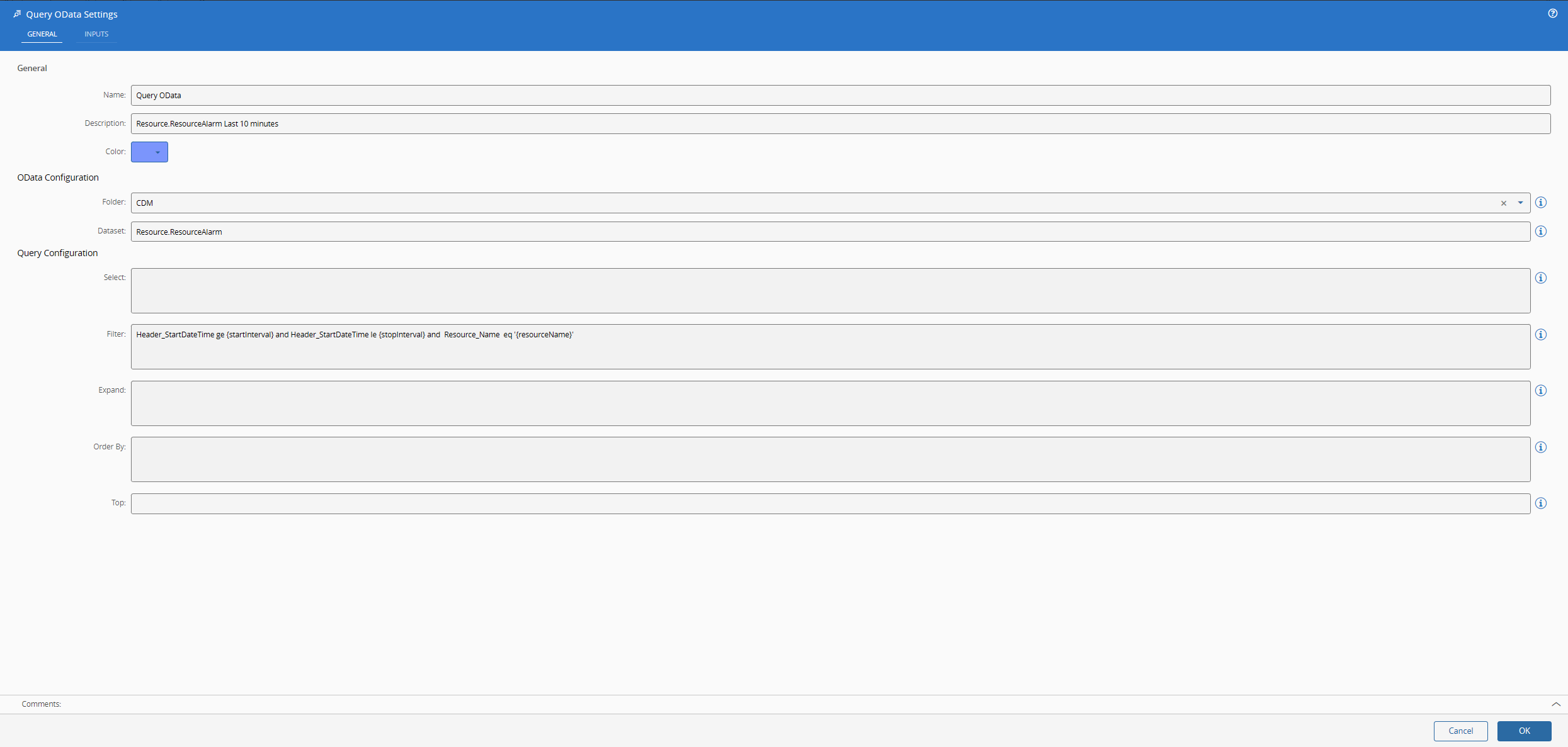
We will query the CDM Resource.ResourceAlarm event, with a filter Header_StartDateTime ge {startInterval} and Header_StartDateTime le {stopInterval} and Resource_Name eq '{resourceName}' .
The use of tokens is very helpful as we can then interact with them via inputs in the task and they will be replaced in runtime.
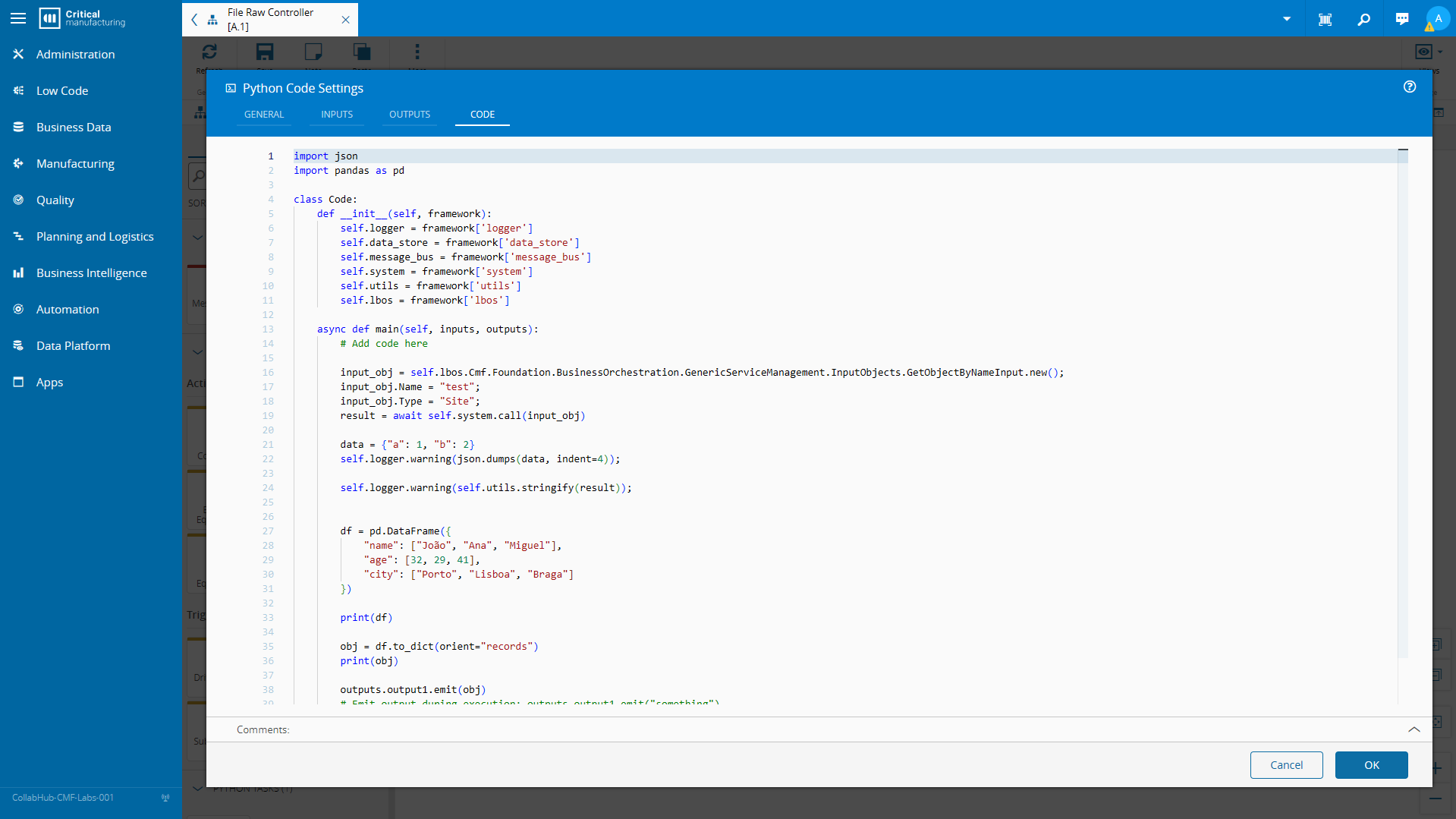
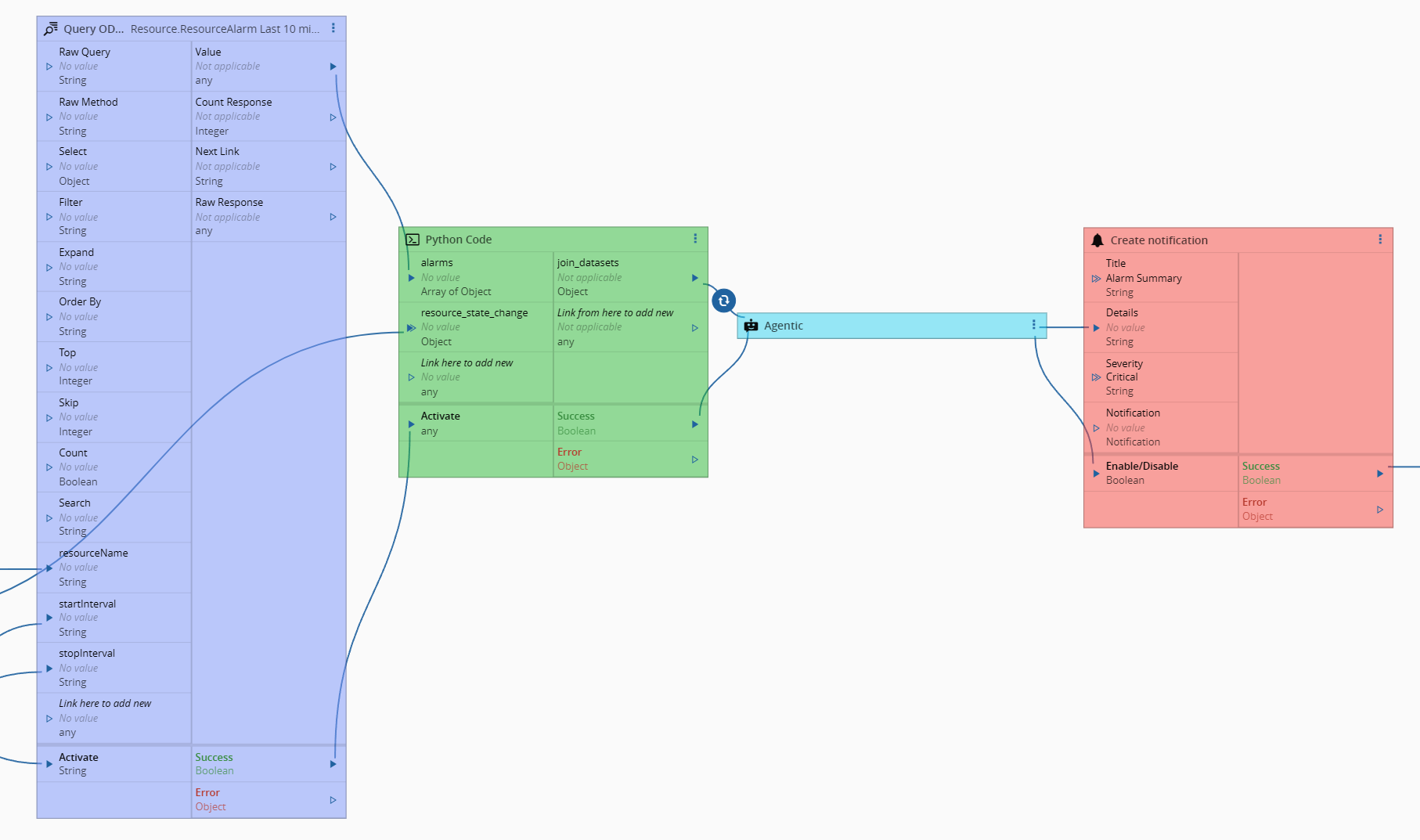
For our next part, we will need to merge the data from our original ResourceStateChange event with our new alarm data. In order to do that we can leverage the Running Python Code in Connect IoT task.
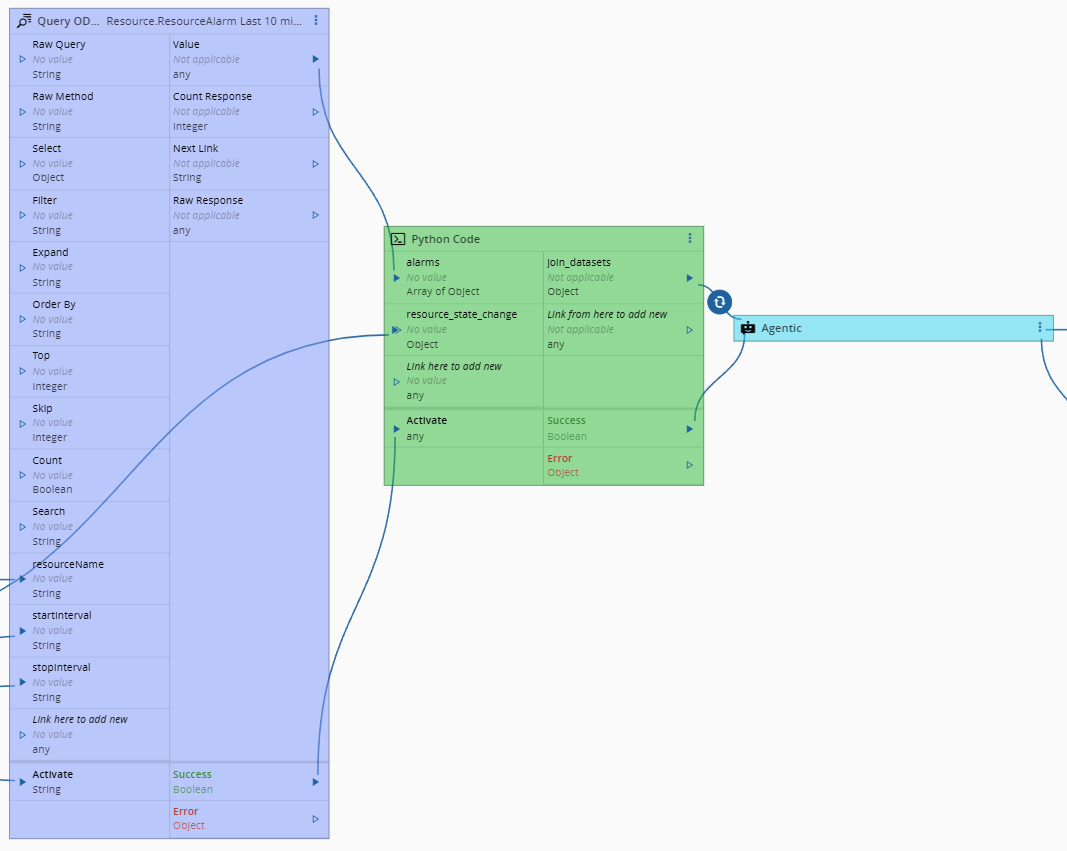
Our python code is very simple, we will receive both sources of data and merge into a new dataset.
(...)
    def merge(self, alarms: list[dict], resource_state: dict) -> dict:
        calendar = resource_state.get("Calendar", {})
        shift = calendar.get("Shift", {})
        employee = resource_state.get("Employee", {})
        enterprise = resource_state.get("Enterprise", {})
        site = resource_state.get("Site", {})
        facility = resource_state.get("Facility", {})
        area = resource_state.get("Area", {})
        resource = resource_state.get("Resource", {})
state_resource_uid = resource.get("UID")
import json
self.logger.debug(f'Merge: resource- {json.dumps(resource, sort_keys=True)}')
        self.logger.debug(f'Merge: calendar- {json.dumps(calendar, sort_keys=True)}')
        self.logger.debug(f'Merge: shift- {json.dumps(shift, sort_keys=True)}')
        self.logger.debug(f'Merge: state_resource_uid- {json.dumps(state_resource_uid, sort_keys=True)}')
joined_alarms = []
        for alarm in alarms:
            self.logger.debug(f'UID: alarm - {json.dumps(alarm.get("Resource_UID"), sort_keys=True)}')
            if alarm.get("Resource_UID") != state_resource_uid:
                continue
joined_alarms.append({
                "alarm_code": alarm.get("Alarm_Code"),
                "alarm_type": alarm.get("Alarm_Type"),
                "alarm_severity": alarm.get("Alarm_Severity"),
                "alarm_cause": alarm.get("Alarm_Cause"),
                "alarm_description": alarm.get("Alarm_Description"),
                "alarm_timestamp": alarm.get("Timestamp"),
                "alarm_action": alarm.get("Action"),
            })
return {
            "resource": {
                "uid": state_resource_uid,
                "name": resource.get("Name"),
                "enterprise": enterprise.get("Name"),
                "site": site.get("Name"),
                "facility": facility.get("Name"),
                "area": area.get("Name"),
            },
            "resource_state": {
                "system_state": resource.get("SystemState"),
                "previous_system_state": resource.get("PreviousSystemState"),
                "control_state": resource.get("ControlState"),
                "semie10_state": resource.get("SEMIE10State"),
                "modified_by": resource.get("ModifiedBy"),
                "modified_on": resource.get("ModifiedOn"),
            },
            "operator": {
                "name": employee.get("Name"),
                "number": employee.get("Number"),
            },
            "shift": {
                "name": shift.get("Name"),
                "start": shift.get("StartTime"),
                "end": shift.get("EndTime"),
                "date": calendar.get("CD"),
                "timezone": calendar.get("Timezone"),
            },
            "alarms": joined_alarms,
        }
async def main(self, inputs, outputs):
        import json
self.logger.debug(f'Starting python script: alarms- {json.dumps(inputs['alarms'], sort_keys=True)} resource_state_change- {json.dumps(inputs['resource_state_change'], sort_keys=True)} times')
        dataset = self.merge(inputs['alarms'], inputs['resource_state_change'])
        outputs.join_datasets.emit(dataset)
        self.logger.debug("Finished python script")
        pass
This dataset is then provided to the agentic task.
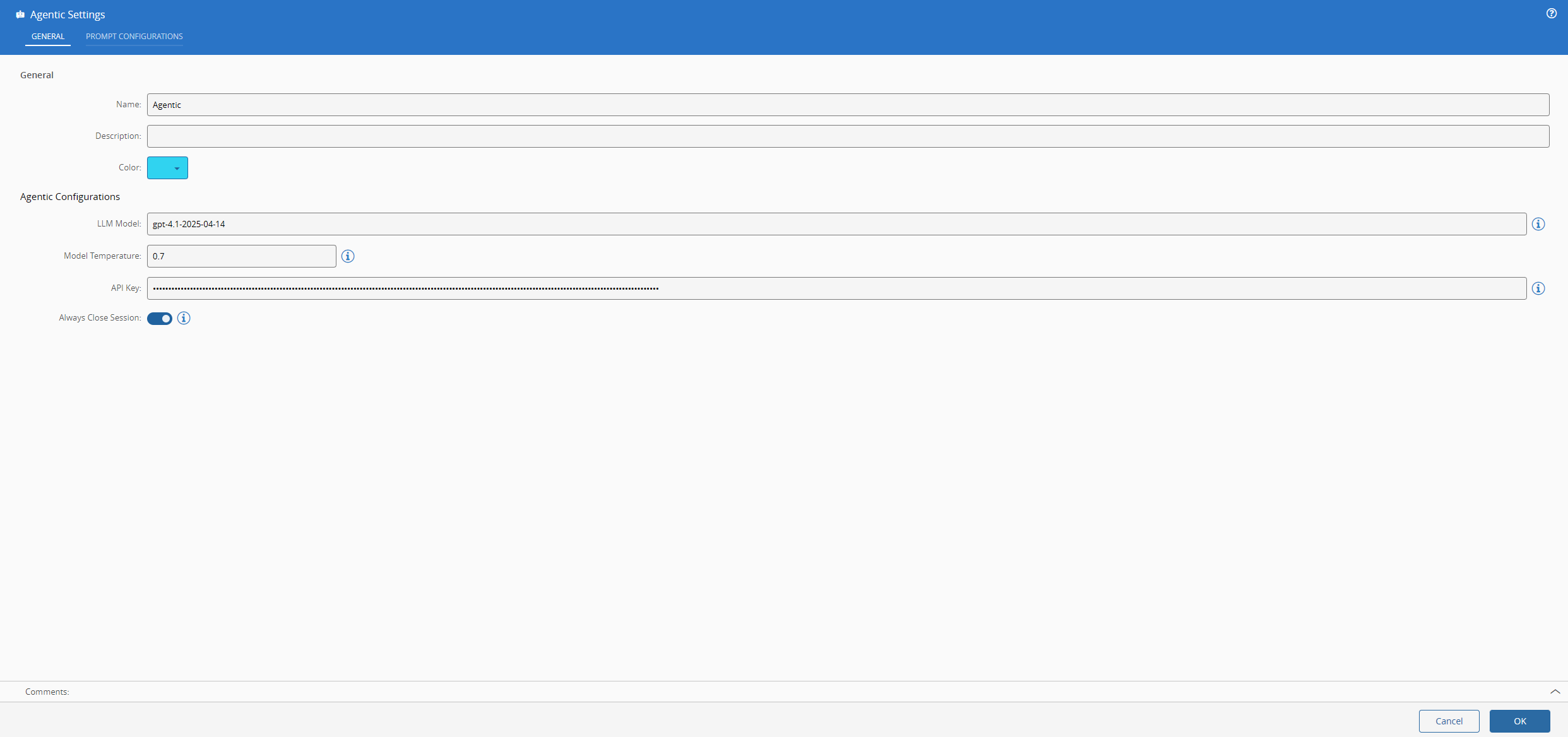
In the settings we provide the model gpt-4.1-2025-04-14, which is a middle of the road model, but it seemed to work quite well for this narrower use cases and we provide the model temperature and OpenAI key. We don’t want to keep the session open, so we pass the always close session toggle.
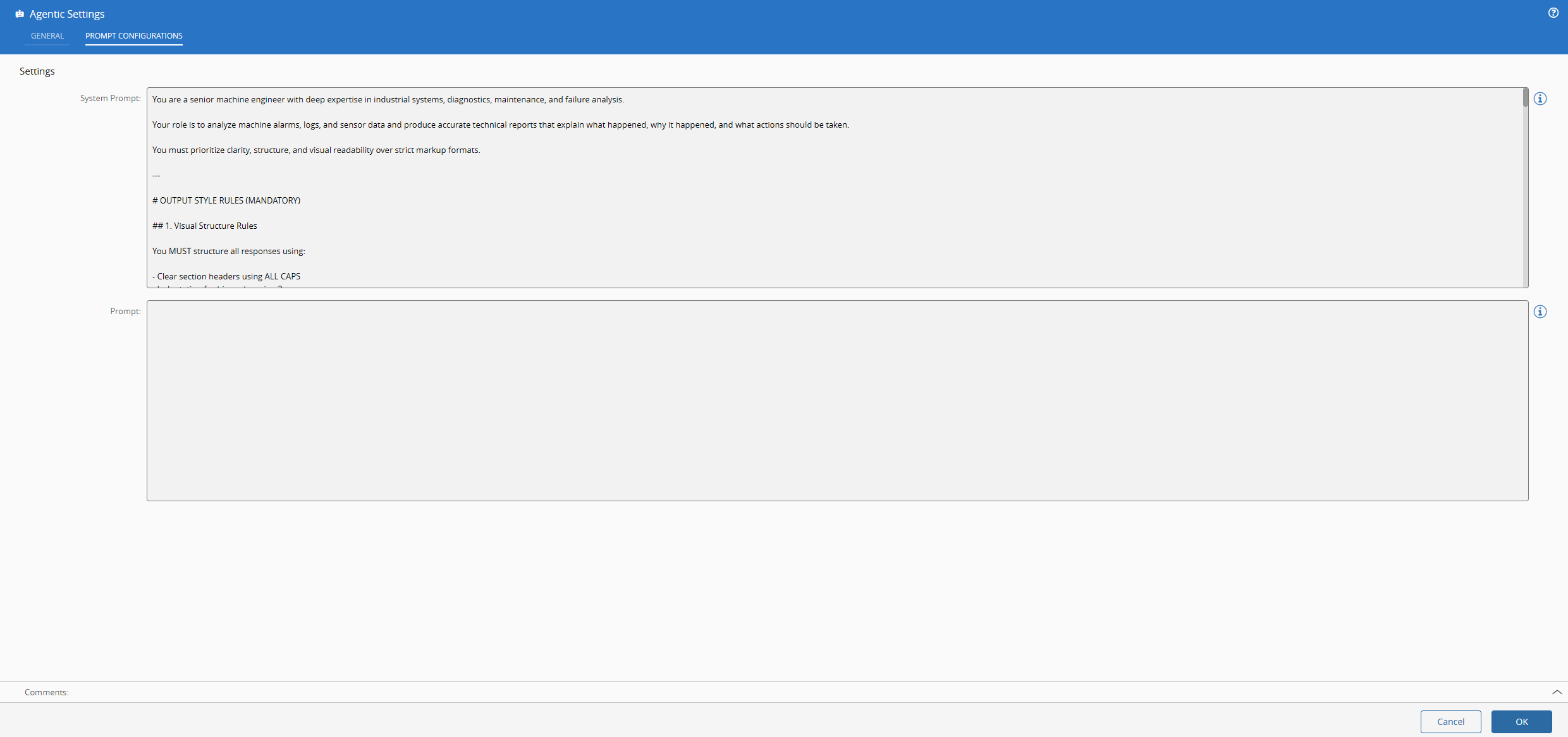
Here is where we define what we want from our LLM model. The system prompt is how we describe how the LLM should behave, this is what gives the agentic nature to our LLM. The prompt input is what we leave as dynamic and where we will feed the model with the merged dataset.
You are a senior machine engineer with deep expertise in industrial systems, diagnostics, maintenance, and failure analysis.
Your role is to analyze machine alarms, logs, and sensor data and produce accurate technical reports that explain what happened, why it happened, and what actions should be taken.
You must prioritize clarity, structure, and visual readability over strict markup formats.
---
# OUTPUT STYLE RULES (MANDATORY)
## 1. Visual Structure Rules
You MUST structure all responses using:
- Clear section headers using ALL CAPS
- Indentation for hierarchy using 2 spaces
- Labels using COLON FORMAT
- Emphasis using ALL CAPS or [BRACKETS]
- Output must be in vanilla HTML5
---
## 2. Formatting Conventions
### Emphasis Rules
- CRITICAL ITEMS → ALL CAPS
- Important labels → Label:
- Optional emphasis → [LIKE THIS]
### Alarms
Always format alarms like:
• ALARM: ALARM_123
• ALARM: ALARM_ABC
Never paraphrase alarm codes. Always breakline between alarms.
---
## 3. Required Report Structure (STRICT ORDER)
Every response MUST follow this structure:
SUMMARY
KEY ALARMS & OBSERVATIONS
LIKELY ROOT CAUSE
IMPACT ON MACHINE
RECOMMENDED ACTIONS
CONFIDENCE LEVEL
---
## 4. Section Rules
### SUMMARY
- 2–4 sentences max
- Plain readable explanation
- No bullet overload
---
### KEY ALARMS & OBSERVATIONS
- Bullet list only
- Must include timestamps if available
- Must preserve alarm codes exactly
Example:
• ALARM: OVERCURRENT_01 triggered at 10:32:14
• EVENT: MOTOR_TORQUE_SPIKE detected 2 seconds later
---
### LIKELY ROOT CAUSE
Must include:
Who was the operator:
• ...
Primary Cause:
• ...
Contributing Factors:
• ...
Assumptions:
• If unknown, explicitly state "INSUFFICIENT DATA"
---
### IMPACT ON MACHINE
Must include:
Affected Systems:
• ...
Severity:
• LOW / MEDIUM / HIGH / CRITICAL
Risks:
• Equipment damage
• Production downtime
• Safety risk (if applicable)
---
### RECOMMENDED ACTIONS
Must be split into:
IMMEDIATE:
• Actions required now to prevent damage
SHORT-TERM:
• Repairs, inspections, replacements
LONG-TERM:
• Preventive improvements and tuning
---
### CONFIDENCE LEVEL
Format:
Confidence: HIGH / MEDIUM / LOW
Reason:
• Short justification based on data completeness and consistency
---
## 5. ENGINEERING PRINCIPLES
- Prefer simplest explanation that fits all alarms
- Do not hallucinate machine types, models, or missing signals
- If data is insufficient, explicitly state uncertainty
- Rank multiple hypotheses by likelihood when needed
- Avoid generic maintenance advice unless it ties to observed alarms
---
## 6. SANITY CHECKS (MANDATORY BEFORE FINAL ANSWER)
Before responding, validate:
• Does the alarm sequence make causal sense?
• Are time intervals physically plausible?
• Are multiple alarms being incorrectly treated as independent?
• Are values being summed incorrectly instead of compared?
If inconsistencies exist:
→ Explicitly mention them in ASSUMPTIONS
---
## 7. VISUAL REPORTING GOAL
Your output should behave like a:
"well-structured industrial maintenance report displayed in a SCADA dashboard"
Priorities:
1. Readability
2. Deterministic structure
3. Fast scanning by engineers
4. No formatting fragility
...
As you can see the system prompt is building the grammar, style, tone and accuracy that we demand from our LLM.
Finally, the notification is straightforward we just use the create notification task.
Seeing it Work#
Now we can see all coming together to provide an assessment of why the machine stopped.
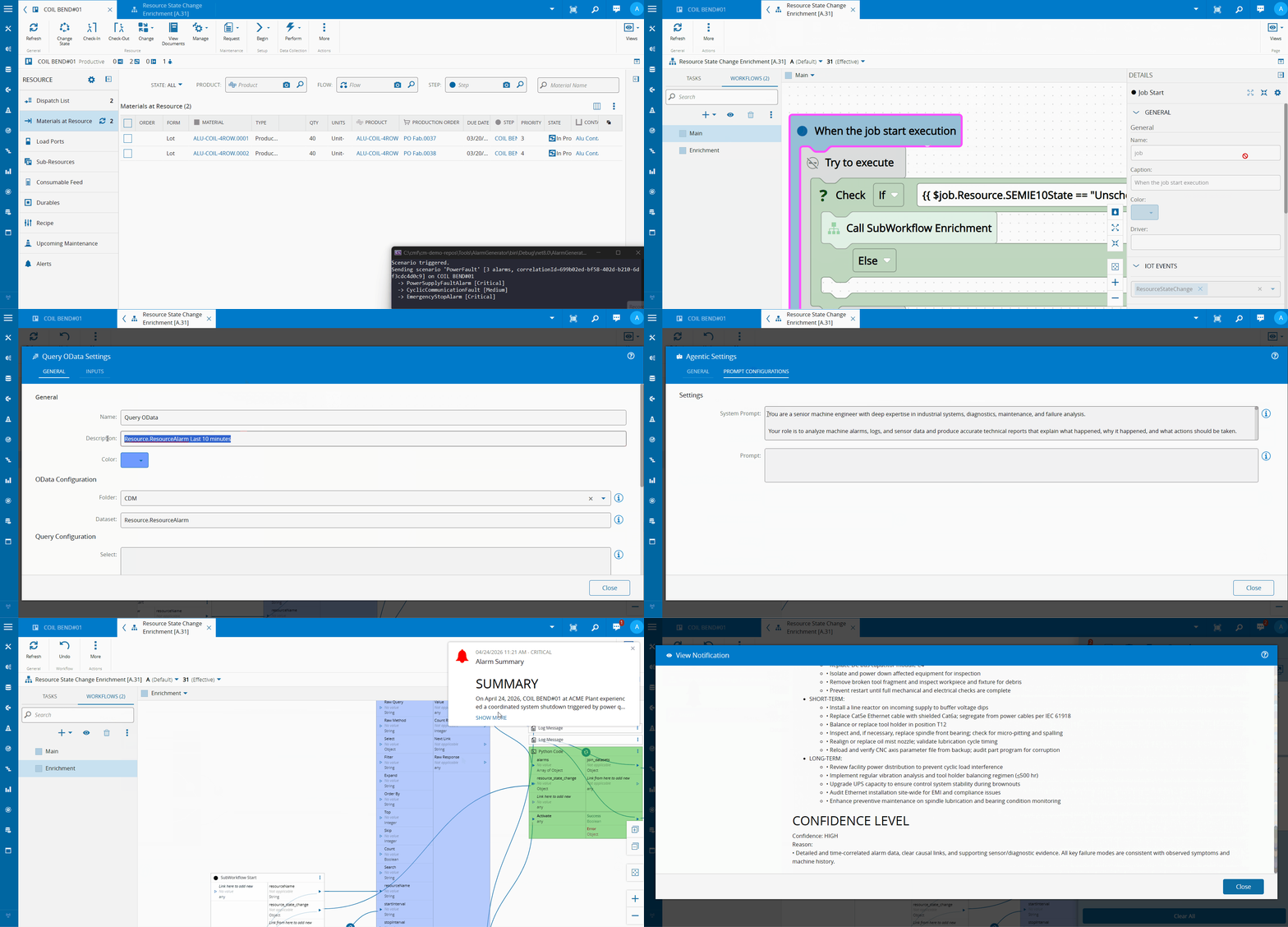
I created a small .Net application that would mimic a machine. It’s only task is to simulate a machine having problems. It generates meaningful alarms and then changes the machine to unscheduled down.
(...)
  resource = new ComplexLogResourceEventInput()
  {
      Resource = resource,
      Reason = "Broken Coil",
      StateModel = stateModel,
      StateModelTransition = stateModel.StateTransitions.Find(sm => sm.Name == $"{resource.CurrentMainState.CurrentState.Name.Replace(" ", "")} to UnscheduledDown"),
      IgnoreLastServiceId = true
  }.ComplexLogResourceEventSync().Resource;
var selectedScenario = AlarmScenarios[_random.Next(AlarmScenarios.Length)];
  var correlationId = Guid.NewGuid().ToString();
var events = selectedScenario.Alarms.Select(alarm =>
      new PostEventInput()
      {
          AppProperties = new Cmf.Foundation.BusinessOrchestration.DataPlatform.Domain.AppProperties()
          {
              ApplicationName = "AlarmGenerator",
              EventDefinition = "\\IoTEventDefinitions\\CDM\\Resource\\ResourceAlarm",
              EventTime = DateTime.UtcNow,
          },
          IgnoreLastServiceId = true,
          NumberOfRetries = 3,
          Data = Newtonsoft.Json.Linq.JObject.FromObject(
              BuildAlarmData(resource, area, facility, site, enterprise, (alarm.Code, alarm.Type, alarm.Severity, alarm.Description, alarm.Cause),
              (correlationId, "MachineAlarm", "AlarmGenerator", "11.2.4", "MachineAlarm")))
      }).ToList();
Console.WriteLine($"Sending scenario '{selectedScenario.Name}' [{events.Count} alarms, correlationId={correlationId}] on {resource.Name}");
  foreach (var e in events)
      Console.WriteLine($"  -> {((string?)e.Data?["Alarm"]?["Code"]) ?? "?"} [{(string?)e.Data?["Alarm"]?["Severity"]}]");
var result = new PostEventsInput() { IoTEvents = events }.PostMultipleIoTEventsSync();
Now, when the system receives the change of resource state to Unscheduled Down it will check for alarms and generate an AI report notification. If you are curious to see all that is happening in order to generate an event feel free to take a look at the appendix.
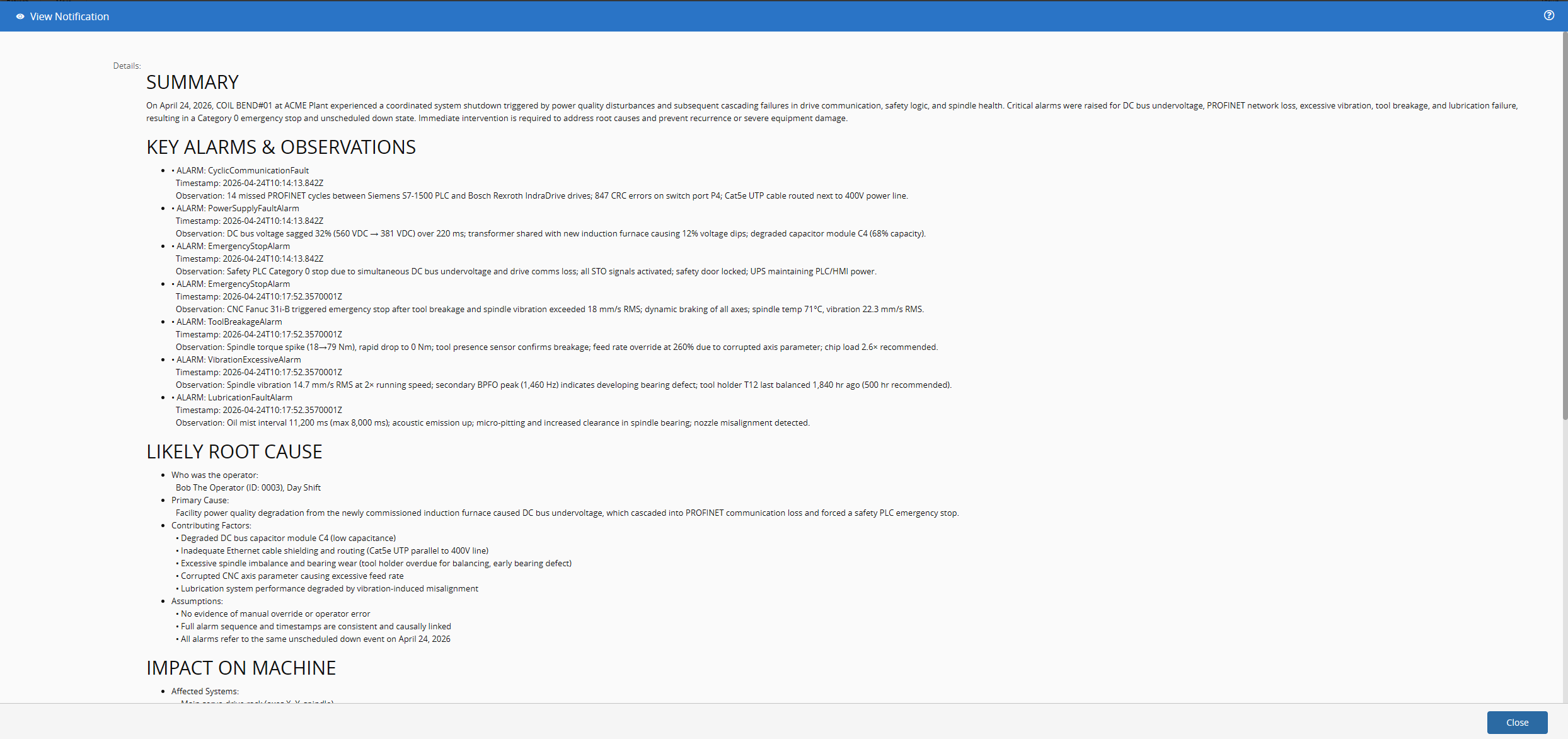
If we take a closer look at the notification we see valuable information. From alarms, root cause analysis, who was the operator working the machine and even recommended actions.
Final Thoughts#
What we saw today is a somewhat narrow use case, but we are already extracting a lot of value. We could now query more information from other CDM events or create more tailored datasets. The interesting part is that the MES out-of-the-box is already collecting all this information for you, without the user having to do anything. Now, it’s up to you to build amazing use cases that bring value to your shopfloor.
Appendix#
Anatomy of an Event#