Overview#
In a previous blog post we explored what were Small Language Models on the Edge. In this blog post I want to go step by step on how we made it possible.
CM MES edge middleware is called Connect IoT. It’s a nodejs application responsible for interfacing with third-party systems.
Connect IoT can be deployed in the same infrastructure and stack that the MES is running, but it’s often the case it’s deployed closer to the shopfloor. This avoids common issues like networking security and latency.
Low-Code Tasks as the Integration Point#
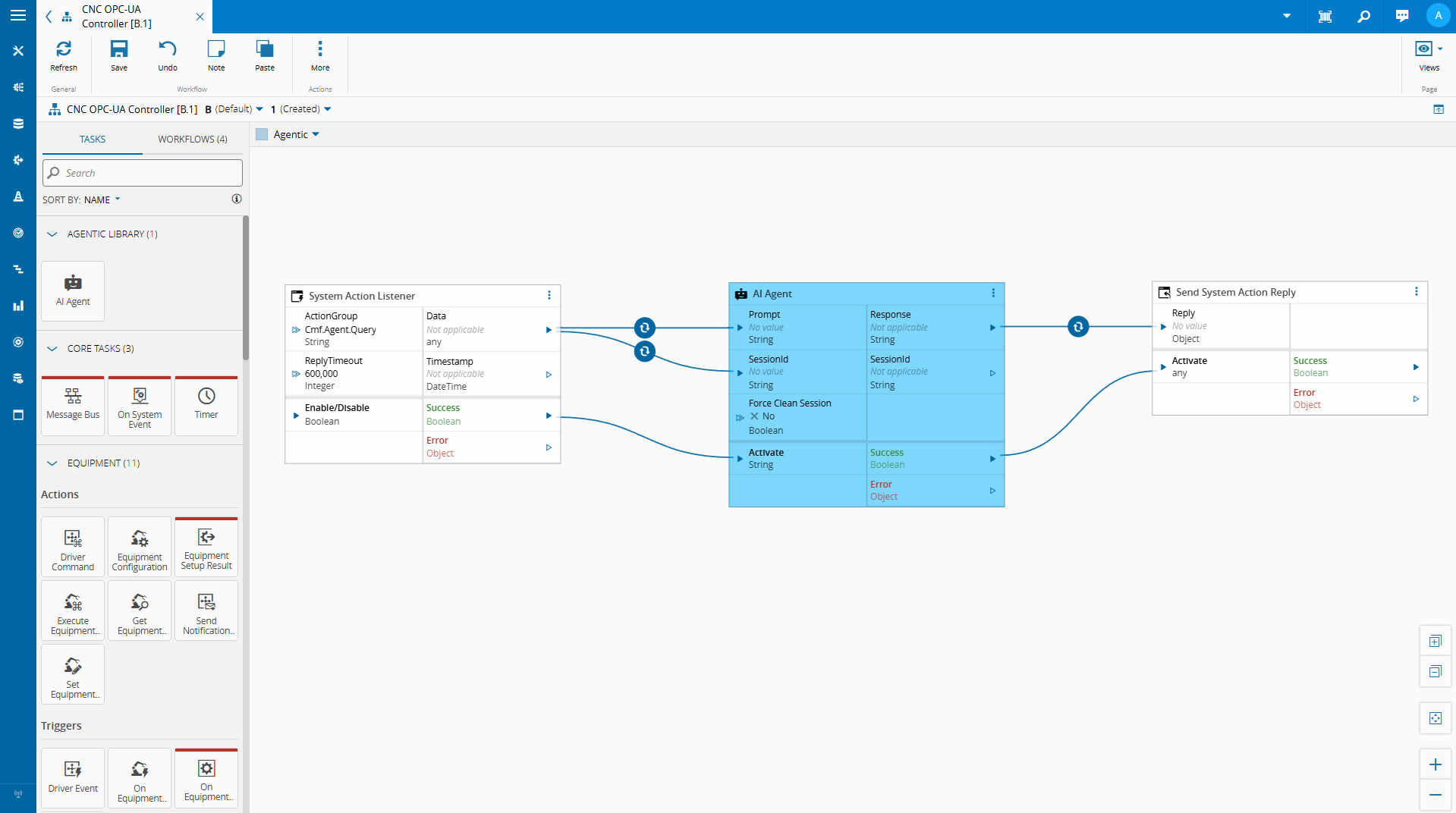
We showed an example of a integration in a low code workflow of a small language model.
A low code task that:
- Reads variables from the controller’s current state
- Serializes that state into a structured context payload
- Passes a user query and that context to a locally running SLM
- Returns the model’s response as a task output or controller variable
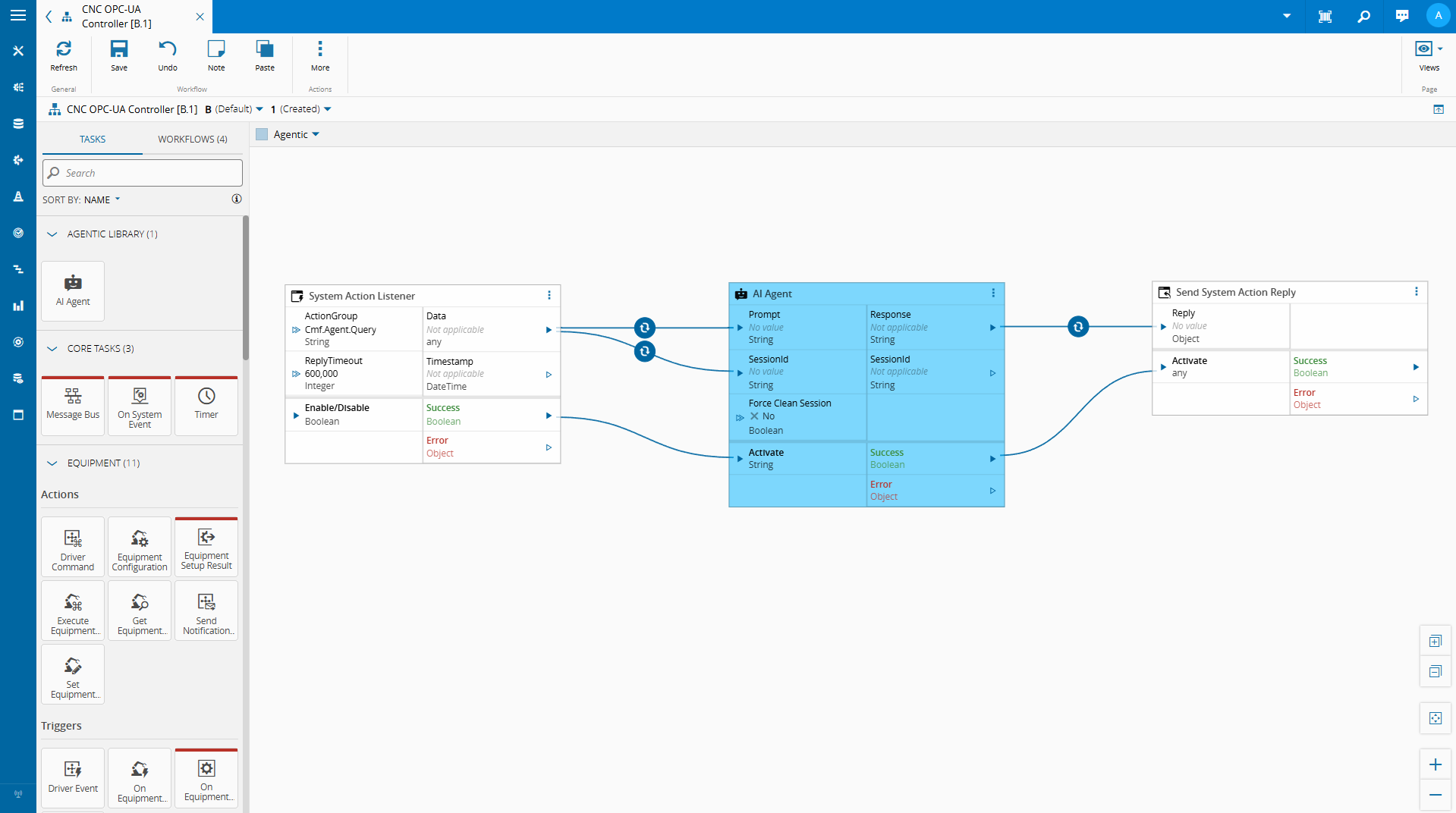
Let’s take a look on how we built this…
Building the AI Agent Task#
The Role of node-llama-cpp#
Connect IoT’s extensibility layer runs on Node.js. Custom tasks are written in TypeScript and executed within the Node.js runtime of the Automation Manager. This means that any Node.js-compatible library is available for use in custom tasks.
node-llama-cpp is a Node.js binding for llama.cpp, the widely-used inference engine for running quantized GGUF models locally. It supports CPU inference across platforms, has a clean TypeScript API, and gives us the ability to load and query a local SLM directly from within a Connect IoT custom task — no external process, no sidecar service, no cloud API key.
The model file lives on the edge server. The inference runs in-process.
The result comes back as a string that the task can publish to a controller variable or return as a response to whoever initiated the query.
This is what makes the implementation practical: we are not building a separate AI service and integrating it over HTTP. We are loading a model inside the same runtime where Connect IoT already executes business logic.
What This Enables#
The immediate use case is natural language querying of the edge runtime state.
An operator, an engineer, or a support technician can ask a question in plain language and receive an answer grounded in the actual current state of the integration, without needing to know which OPC-UA node to look at, which controller variable holds the relevant value, or how to read a low-code task output.
Beyond direct Q&A, this pattern opens up a few other directions worth exploring:
Anomaly explanation. When a condition flag changes or a threshold is crossed, the model can be invoked automatically to produce a plain-language explanation of what changed and what the surrounding state looked like — a first-pass interpretation before an operator investigates.
Configuration assistance. A model with knowledge of the Connect IoT task library and variable conventions could help a developer draft low-code logic by describing the intent in natural language and having the model suggest a task sequence.
Agentic workflows. We can have autonomous agents that are able to make decision and provide meaningful reporting on the state of the integration.
Practical Considerations#
Running SLMs locally is feasible, but it requires some honest accounting of the constraints.
Hardware. A 3B–4B parameter model quantized to 4-bit precision needs at least 2–3 GB of RAM and will run inference in 1–5 seconds on a modern CPU. That is acceptable for an on-demand query interface. It is not acceptable for high-frequency polling — do not invoke a local SLM on every OPC-UA data change.
Model selection. Smaller models are less reliable on complex reasoning tasks. For a scoped use case — interpreting a JSON snapshot of machine state in response to a narrow question — a well-prompted 3B model can perform very well. Testing with representative queries before committing to a model is essential.
Prompt engineering. The quality of the output is directly tied to the quality of the prompt. A system prompt that clearly explains what the context payload contains, what the model’s role is, and what format the response should take will outperform a vague prompt with a larger model.
For this scenario I am using Phi-3.1-mini-4k, which is a very simple model. We could use more advanced models like the Qwen models, which would offer better results at the cost of being more resource heavy.
Building a Task#
We used our CM CLI to create a new Connect IoT Task . Full implementation here.
We created a dependency injection container to deal with all the node-llama instantiation. The advantage of having a dependency that is defined globally for our whole controller is that it is detached from the task lifecycle. We can call it from different tasks and instantiate it outside of the lifecycle of a task.
    import { resolve } from "path";
    import { createHash } from "node:crypto";
    import type { Dependencies } from "@criticalmanufacturing/connect-iot-controller-engine";
    import { TYPES, DI } from "@criticalmanufacturing/connect-iot-controller-engine";
    import type { LLamaChatPromptOptions, LlamaContext, LlamaModel } from "node-llama-cpp";
    import { getLlama, LlamaChatSession, resolveModelFile } from "node-llama-cpp";

    @DI.Injectable()
    export class SLMManager {

        @DI.Inject(TYPES.Dependencies.Logger)
        protected _logger: Dependencies.Logger;

        private _models: Map<string, { model: LlamaModel, context: LlamaContext }> = new Map();
        private _sessions: Map<string, LlamaChatSession> = new Map();

        public async loadModel(modelLocation: string, modelName: string, loadModelSettings: any = {}, contextSettings: any = {}) {
            (...)
        }

        public getSession(modelId: string, systemPrompt: string = "", sessionId: string = ""): { id: string, session: any } {

            (...)
        }

        public disposeSession(sessionId: string): void {
            (...)
        }

        public async promptSession(sessionId: string, prompt: string, schema: any = undefined, functions: any = undefined, options: LLamaChatPromptOptions<undefined> = {}): Promise<string> {
            (...)
        }
    (...)
The SLManager will provide a set of methods the tasks can then call.
    public async loadModel(modelLocation: string, modelName: string, loadModelSettings: any = {}, contextSettings: any = {}) {
        const id = this.modelSessionId(modelLocation, modelName, loadModelSettings, contextSettings);

        if (!this._models.has(id)) {
            const llama = await getLlama();
            const modelPath = await resolveModelFile(modelName, resolve(modelLocation));
            const model = await llama.loadModel({ modelPath, ...loadModelSettings });
            const context = await model.createContext(Object.assign({
                contextSize: { max: 4096 },
                sequences: 2 // set max sequences here
            }, contextSettings));

            this._models.set(id, { model, context });

            this._logger.debug(`Model '${modelName}' loaded and cached with id ${id}`);
        } else {
            this._logger.debug(`Model '${modelName}' is already loaded, will not do anything ${id}`);
        }

        return id;
    }
The loadModel will import an SLM model from a file and pass on a set of start settings. It will also create a registry to keep track of all models that were already loaded as this is a very costly operation.
    public getSession(modelId: string, systemPrompt: string = "", sessionId: string = ""): { id: string, session: any } {

        if (sessionId === "") {
            sessionId = createHash("sha1").update(modelId + systemPrompt).digest("hex");
        }

        if (this._sessions.has(sessionId)) {
            this._logger.debug(`Session with id ${sessionId} retrieved from cache`);
            return { id: sessionId, session: this._sessions.get(sessionId) };
        } else {
            if (!this._models.has(modelId)) {
                throw new Error(`Model with id ${modelId} not found. Make sure to load the model before trying to get a session for it.`);
            }

            const { context } = this._models.get(modelId);

            if (context.sequencesLeft === 0) {
                this._sessions.values().next().value.dispose({ disposeSequence: true });
                this._sessions.delete(this._sessions.keys().next().value);
                this._logger.debug(`No sequences left in context, disposed the oldest session to free up sequences`);
            }

            const session = new LlamaChatSession({
                contextSequence: context.getSequence(),
                systemPrompt
            });

            this._sessions.set(sessionId, session);
            return { id: sessionId, session };
        }
    }

    public disposeSession(sessionId: string): void {
        if (this._sessions.has(sessionId)) {
            this._sessions.get(sessionId).dispose({ disposeSequence: true });
            this._sessions.delete(sessionId);
            this._logger.debug(`Session with id ${sessionId} disposed and removed from cache`);
        }
    }
The gestSession and disposeSession work in tandem. They allow the task to orchestrate sessions. A task can keep a session or multiple session opened and keep track of that context.
    public async promptSession(sessionId: string, prompt: string, schema: any = undefined, functions: any = undefined, options: LLamaChatPromptOptions<undefined> = {}): Promise<string> {

        if (!this._sessions.has(sessionId)) {
            throw new Error(`Session with id ${sessionId} not found. Make sure to get the session before trying to prompt it.`);
        }

        let grammar = undefined;
        if (schema) {
            const llama = await getLlama();
            grammar = await llama.createGrammarForJsonSchema(schema);
        }

        const session = this._sessions.get(sessionId);
        if (functions) {
            return await session.prompt(prompt, Object.assign({
                onResponseChunk: (chunk) => this._logger.debug(`Received chunk from session ${sessionId}: ${JSON.stringify(chunk)}`),
                functions
            }, options));
        } else if (grammar) {
            return await session.prompt(prompt, Object.assign({
                onResponseChunk: (chunk) => this._logger.debug(`Received chunk from session ${sessionId}: ${JSON.stringify(chunk)}`),
                grammar
            }, options));
        } else {
            return await session.prompt(prompt, options);
        }
    }
The promptSession is where the task is able to pass on prompt requests to the SLM model.
One of the interesting features of node-llama-cpp is that it allows for functions and grammar.
Functions allows us to provide in a controlled fashion internal APIs to the model.
The grammar allows us to enforce a specific model reply format. This is key, to be able to create further tasks and transformations down the line of your low code workflow.
After we create our DI node llama container we can add it to our task.
In order to depend on this global containers we need to add those providers to our task.
    @Task.TaskModule({
        task: AiAgentTask,
        providers: [
            {
                class: SLMManager,
                isSingleton: true,
                symbol: "GlobalSLMManagerHandler",
                scope: Task.ProviderScope.Controller,
            }
        ]
    })
    export class AiAgentModule { }
Then we import the AiAgentModule instead of directly the task.
export { AiAgentModule } from "./tasks/aiAgent/aiAgent.task.js";
Our task is now working as a wrapper on the SLMManager.
    /**
     * This is the representation of the SLM manager
     */
    @DI.Inject("GlobalSLMManagerHandler")
    private _slmManager: SLMManager;

    /**
     * When one or more input values is changed this will be triggered,
     * @param changes Task changes
     */
    public override async onChanges(changes: Task.Changes): Promise<void> {
        if (changes["activate"]) {
            // It is advised to reset the activate to allow being reactivated without the value being different
            this.activate = undefined;
            let sessionId = this.sessionId;
            try {

                // Load Model
                const modelId = await this._slmManager.loadModel(this.modelLocation, this.model, this.loadModelSettings, this.contextSettings);
                // Get Session
                const sessionValues = this._slmManager.getSession(modelId, this.systemPrompt, this.sessionId);
                sessionId = sessionValues.id;

                let functions: any = undefined;
                if (this.enablePersistencyAccess) {
                    (...)
                }

                const result = await this._slmManager.promptSession(sessionId, this.prompt, this.schema, functions, this.promptSettings);
                this.response.emit(this.stripLlamaFunctionMarkup(result.trim()));
                this.sessionIdOut.emit(sessionId);

                if (this.forceCleanSession === true) {
                    this._slmManager.disposeSession(sessionId);
                }

                this.success.emit(true);
            } catch (error) {
                this._slmManager.disposeSession(sessionId);
                this.logAndEmitError(`Error while executing the AiAgent task: ${error instanceof Error ? error.message : String(error)}`);
            }
        }
    }
Our code is actually quite simple, it loads the model, retrieves/creates the session and passes the prompt into the model.
With only this code we are already able to have a task that can grab the inputs and provide a response.
An interesting feature that we saw in the video is the ability to surface internal APIs into the AI.
    functions = {
        listKeysFromPersistency: defineChatSessionFunction({
            (...)
        }),
        retrieveFromStorePersistency: defineChatSessionFunction({
            (...)
        }),
        storeInPersistency: defineChatSessionFunction({
            (...)
        })
    };
The Connect IoT Persistency out of the box is a key value mapping storage. We are able to surface a self descriptive API to the SLM.
    listKeysFromPersistency: defineChatSessionFunction({
        description: "List all keys from the persistency layer.",
        handler: () => {
            return this._dataStore.listKeys(System.DataStoreLocation.Temporary);
        }
    }),
This is the simples API. It has no inputs, but allows the SLM to provide discoverability into our persistency.
    retrieveFromStorePersistency: defineChatSessionFunction({
        description: "Retrieve information from the persistency layer.",
        params: {
            type: "object",
            properties: {
                identifier: {
                    description: "The key to identify the data to be retrieved. Case insensitive.",
                    type: "string"
                },
                defaultValue: {
                    description: "The default value to return if the key is not found.",
                    type: "string"
                },
                maxSize: {
                    description: "The number of items to retrieve. e.g. 1 or 2",
                    type: "number"
                },
                offset: {
                    description: "Skip this many items from the end to start paginating backwards. 0 = most recent, 1 = second most recent, etc.",
                    type: "number"
                }
            }
        },
        handler: async (params: any) => {
            let identifier = params.identifier;
            let defaultValue = params.defaultValue;
            let maxSize = params.maxSize || 2;
            let offset = params.offset || 0;

            let retrievedValue = await this._dataStore.retrieve(identifier, defaultValue);

            if (retrievedValue === defaultValue) {
                identifier = identifier.toLowerCase();
                defaultValue = defaultValue.toLowerCase();
                retrievedValue = await this._dataStore.retrieve(identifier, defaultValue);
            }

            retrievedValue = retrievedValue.storage ? retrievedValue.storage.map((item: any) => item.value) : retrievedValue;

            if (Array.isArray(retrievedValue)) {
                // Calculate start position: end - offset - maxSize
                const startIndex = Math.max(0, retrievedValue.length - offset - maxSize);
                const endIndex = retrievedValue.length - offset || undefined;
                retrievedValue = retrievedValue.slice(startIndex, endIndex);
            }

            const formatForLLM = (value: any, totalLength: number): string => {
                if (Array.isArray(value)) {
                    const showing = value.length;
                    const remaining = totalLength - showing;
                    const startIndex = Math.max(0, totalLength - showing - offset);
                    const lastValue = value.length > 0 ? JSON.stringify(value[value.length - 1]) : "none";

                    let result = `Array: Total ${totalLength} items | Showing ${showing} items (indices ${startIndex}-${startIndex + showing - 1}) | Remaining ${remaining} items\n`;
                    result += `Last shown value: ${lastValue}\n`;
                    result += `Data: `;

                    // Try to include full values, truncate individual items if needed
                    const processedItems = value.map((item: any, itemIndex: number) => {
                        let itemStr = typeof item === "string" ? item : JSON.stringify(item);
                        const arrayIndex = startIndex + itemIndex;

                        if (itemStr.length > 300) {
                            return `[Index ${arrayIndex}] ${itemStr.substring(0, 300)}...[truncated at position ${arrayIndex}]`;
                        }
                        return itemStr;
                    });

                    result += JSON.stringify(processedItems);
                    return result;
                }

                let str = typeof value === "string" ? value : JSON.stringify(value);

                if (str.length > 500) {
                    return str.substring(0, 500) + "...[truncated - data too large]";
                }

                return str;
            };

            // Get total length from storage before slicing
            let originalLength = Array.isArray(retrievedValue) ? (retrievedValue.length + offset + maxSize) : 1;
            return formatForLLM(retrievedValue, originalLength);
        }
    }),
The retrieve API is a bit more complex. We are also surfacing a persistency API, in this case the retrieve API, but we are also adding concepts like number of values and the possibility for the API to request more values.
Now we support grammar, functions, system prompts and surface all the settings that node-llama-cpp provides out of the box.
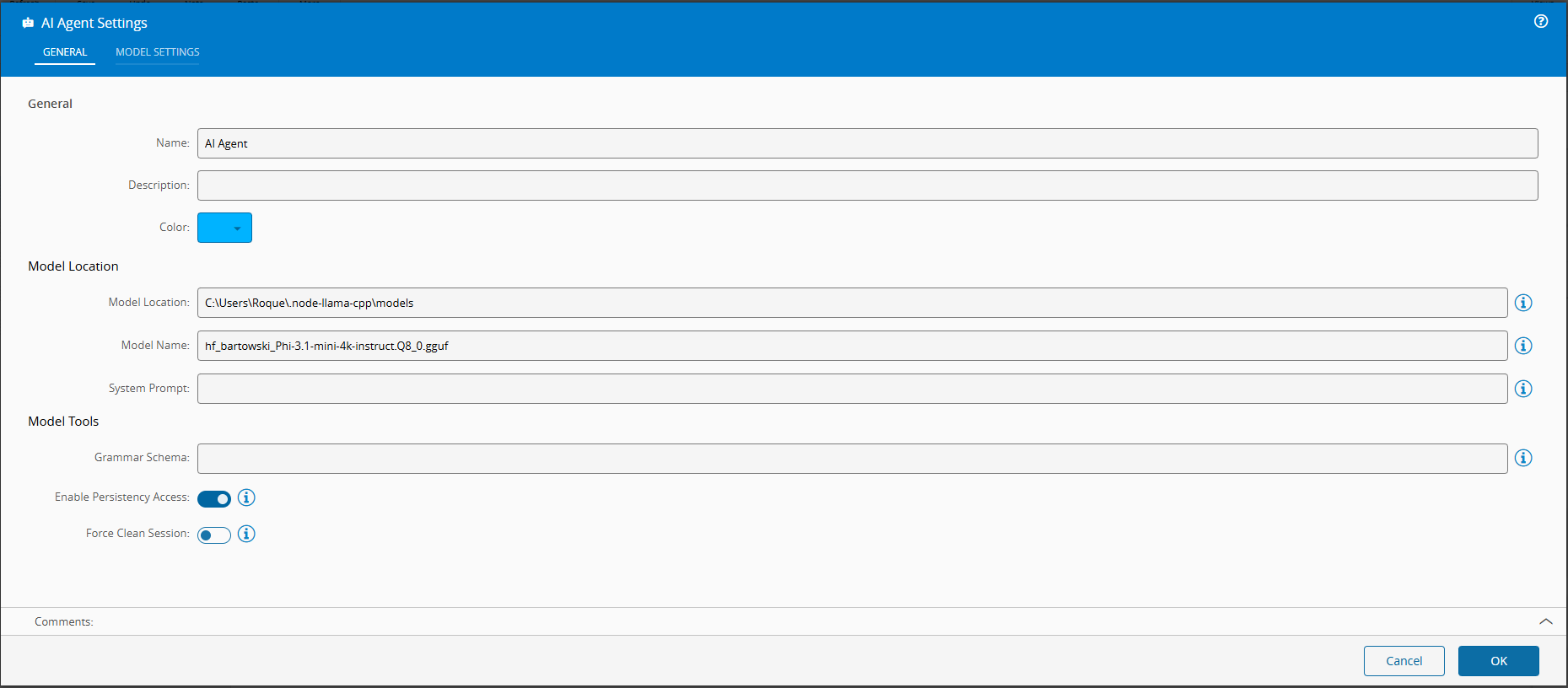
This is where low code really shines. You can use the SLM, but provide it with guarded use cases, where the actions are controlled by the low code workflow it is able to provide. You can also provide grammars, this allows to enforce the model to provide replies in a specific format, this allows for your workflows to have predictable outcomes that they can respond to.
Building a Chat Interface#
In version 11.1 of the CM MES a new feature was released called the Automation Business Scenarios.
This allows for the user to create deterministic workflows for the chat panel. The interactions we saw when using the chatbot were all controlled using this feature. Where we have a set of steps and possible actions.
We used a publicly available vscode extension to have a json formatter for the scenario creation and a command to be able to generate mermaid charts.
graph TD
classDef startClass fill: #007ac9, color:#000000;
classDef finallyClass fill: #50b450, color:#000000;
classDef endClass fill: #3b8b3b, color:#000000;
    ControllersWithAgenticInstances["Script:
ControllersWithAgenticInstances
(controllersWithAgenticInstances)"] --> InstancesToTalkWith
    InstancesToTalkWith["Question:
InstancesToTalkWith
(instanceToTalkWith)"] --> AskQuestionsToInstanceWithMessage
    AskQuestionsToInstanceWithMessage["Question:
AskQuestionsToInstanceWithMessage
(question)"] --> EndConversationCondition
    EndConversationCondition["Condition:
EndConversationCondition"] -->
|"question != 'end'"|SendMessageToInstance
    SendMessageToInstance["Script:
SendMessageToInstance
(replyFromInstance)"] --> ReplyFromInstance
    ReplyFromInstance["Message:
ReplyFromInstance"] --> AskQuestionsToInstance
    AskQuestionsToInstance["Question:
AskQuestionsToInstance
(question)"] --> EndConversationCondition
    StartStep["Start Step"]:::startClass  --> ControllersWithAgenticInstances
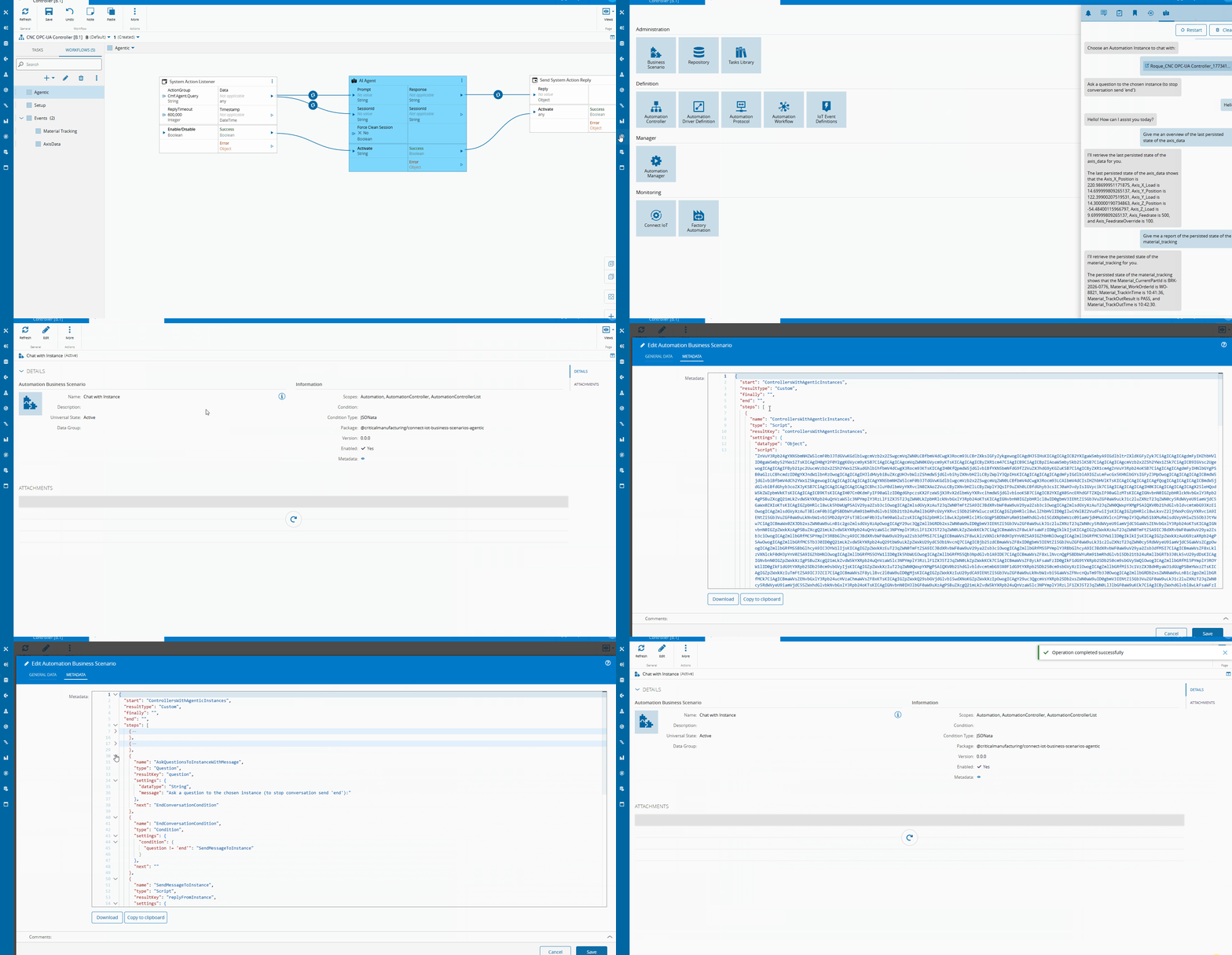
We have a step to filter all the Instances that have an AI Agentic Task.
    {
        "name": "ControllersWithAgenticInstances",
        "type": "Script",
        "resultKey": "controllersWithAgenticInstances",
        "settings": {
            "dataType": "Object",
            "script": "${script(./scripts/agentic_controllers.ts)}"
        },
        "next": "InstancesToTalkWith"
    }
    (async () => {
        const filterCollection: Cmf.Foundation.BusinessObjects.QueryObject.FilterCollection = new Cmf.Foundation.BusinessObjects.QueryObject.FilterCollection();

        // Filter filter_0
        const filter_0: Cmf.Foundation.BusinessObjects.QueryObject.Filter = new Cmf.Foundation.BusinessObjects.QueryObject.Filter();
        filter_0.Name = "Workflow";
        filter_0.ObjectName = "AutomationWorkflow";
        filter_0.ObjectAlias = "AutomationWorkflow_1";
        filter_0.Operator = Cmf.Foundation.Common.FieldOperator.Contains;
        filter_0.Value = "\"aiAgent\"";
        filter_0.LogicalOperator = Cmf.Foundation.Common.LogicalOperator.Nothing;
        filter_0.FilterType = Cmf.Foundation.BusinessObjects.QueryObject.Enums.FilterType.Normal;

        filterCollection.push(filter_0);

        const fieldCollection: Cmf.Foundation.BusinessObjects.QueryObject.FieldCollection = new Cmf.Foundation.BusinessObjects.QueryObject.FieldCollection();

        // Field field_0
        const field_0: Cmf.Foundation.BusinessObjects.QueryObject.Field = new Cmf.Foundation.BusinessObjects.QueryObject.Field();
        field_0.Alias = "Id";
        field_0.ObjectName = "AutomationWorkflow";
        field_0.ObjectAlias = "AutomationWorkflow_1";
        field_0.IsUserAttribute = false;
        field_0.Name = "Id";
        field_0.Position = 0;
        field_0.Sort = Cmf.Foundation.Common.FieldSort.NoSort;

        // Field field_1
        const field_1: Cmf.Foundation.BusinessObjects.QueryObject.Field = new Cmf.Foundation.BusinessObjects.QueryObject.Field();
        field_1.Alias = "Name";
        field_1.ObjectName = "AutomationWorkflow";
        field_1.ObjectAlias = "AutomationWorkflow_1";
        field_1.IsUserAttribute = false;
        field_1.Name = "Name";
        field_1.Position = 1;
        field_1.Sort = Cmf.Foundation.Common.FieldSort.NoSort;

        // Field field_2
        const field_2: Cmf.Foundation.BusinessObjects.QueryObject.Field = new Cmf.Foundation.BusinessObjects.QueryObject.Field();
        field_2.Alias = "AutomationControllerId";
        field_2.ObjectName = "AutomationController";
        field_2.ObjectAlias = "AutomationWorkflow_AutomationController_2";
        field_2.IsUserAttribute = false;
        field_2.Name = "Id";
        field_2.Position = 2;
        field_2.Sort = Cmf.Foundation.Common.FieldSort.NoSort;

        fieldCollection.push(field_0);
        fieldCollection.push(field_1);
        fieldCollection.push(field_2);

        const relationCollection: Cmf.Foundation.BusinessObjects.QueryObject.RelationCollection = new Cmf.Foundation.BusinessObjects.QueryObject.RelationCollection();

        // Relation relation_0
        const relation_0: Cmf.Foundation.BusinessObjects.QueryObject.Relation = new Cmf.Foundation.BusinessObjects.QueryObject.Relation();
        relation_0.Alias = "";
        relation_0.IsRelation = false;
        relation_0.Name = "";
        relation_0.SourceEntity = "AutomationWorkflow";
        relation_0.SourceEntityAlias = "AutomationWorkflow_1",
            relation_0.SourceJoinType = Cmf.Foundation.BusinessObjects.QueryObject.Enums.JoinType.InnerJoin;
        relation_0.SourceProperty = "AutomationControllerId";
        relation_0.TargetEntity = "AutomationController";
        relation_0.TargetEntityAlias = "AutomationWorkflow_AutomationController_2";
        relation_0.TargetJoinType = Cmf.Foundation.BusinessObjects.QueryObject.Enums.JoinType.InnerJoin;
        relation_0.TargetProperty = "Id";

        relationCollection.push(relation_0);

        const query: Cmf.Foundation.BusinessObjects.QueryObject.QueryObject = new Cmf.Foundation.BusinessObjects.QueryObject.QueryObject();
        query.Description = "";
        query.EntityTypeName = "AutomationWorkflow";
        query.Name = "InstancesToTalkWith";
        query.Query = new Cmf.Foundation.BusinessObjects.QueryObject.Query();
        query.Query.Distinct = false;
        query.Query.Filters = filterCollection;
        query.Query.Fields = fieldCollection;
        query.Query.Relations = relationCollection;

        const executeQueryObject =
            new Cmf.Foundation.BusinessOrchestration.QueryManagement.InputObjects.ExecuteQueryInput();
        executeQueryObject.QueryObject = query;

        const results = (await this.System.call(executeQueryObject))?.NgpDataSet?.T_Result ?? [];

        const distinctResults = new Map<string, any>();
        for (const result of results) {
            distinctResults.set(result.AutomationControllerId, result);
        }

        return [...distinctResults.values()];
    })();
This step will return all workflow that have an AIAgent task and then return all the distinct Automation Controllers. The list of Automation Controllers is persisted in the resultKey controllersWithAgenticInstances.
The query was generated in the MES and then exported to typescript.
    {
    "name": "InstancesToTalkWith",
    "type": "Question",
    "resultKey": "instanceToTalkWith",
    "settings": {
        "message": "Choose an Automation Instance to chat with:",
        "dataType": "FindEntity",
        "settings": {
        "query": "${script(./scripts/instances_to_talk_with.ts)}"
        }
    },
    "next": "AskQuestionsToInstanceWithMessage"
    }
    const filterCollection: Cmf.Foundation.BusinessObjects.QueryObject.FilterCollection = new Cmf.Foundation.BusinessObjects.QueryObject.FilterCollection();

    for (const controller of this.answers.controllersWithAgenticInstances) {
        let filter_0: Cmf.Foundation.BusinessObjects.QueryObject.Filter = new Cmf.Foundation.BusinessObjects.QueryObject.Filter();
        filter_0.Name = "AutomationControllerId";
        filter_0.ObjectName = "AutomationControllerInstance";
        filter_0.ObjectAlias = "AutomationControllerInstance_1";
        filter_0.Operator = Cmf.Foundation.Common.FieldOperator.IsEqualTo;
        filter_0.Value = controller.AutomationControllerId;
        filter_0.LogicalOperator = Cmf.Foundation.Common.LogicalOperator.OR;
        filter_0.FilterType = Cmf.Foundation.BusinessObjects.QueryObject.Enums.FilterType.Normal;

        filterCollection.push(filter_0);
    }

    const fieldCollection: Cmf.Foundation.BusinessObjects.QueryObject.FieldCollection = new Cmf.Foundation.BusinessObjects.QueryObject.FieldCollection();

    // Field field_0
    const field_0: Cmf.Foundation.BusinessObjects.QueryObject.Field = new Cmf.Foundation.BusinessObjects.QueryObject.Field();
    field_0.Alias = "Id";
    field_0.ObjectName = "AutomationControllerInstance";
    field_0.ObjectAlias = "AutomationControllerInstance_1";
    field_0.IsUserAttribute = false;
    field_0.Name = "Id";
    field_0.Position = 0;
    field_0.Sort = Cmf.Foundation.Common.FieldSort.NoSort;

    // Field field_1
    const field_1: Cmf.Foundation.BusinessObjects.QueryObject.Field = new Cmf.Foundation.BusinessObjects.QueryObject.Field();
    field_1.Alias = "Name";
    field_1.ObjectName = "AutomationControllerInstance";
    field_1.ObjectAlias = "AutomationControllerInstance_1";
    field_1.IsUserAttribute = false;
    field_1.Name = "Name";
    field_1.Position = 1;
    field_1.Sort = Cmf.Foundation.Common.FieldSort.NoSort;

    fieldCollection.push(field_0);
    fieldCollection.push(field_1);


    const query: Cmf.Foundation.BusinessObjects.QueryObject.QueryObject = new Cmf.Foundation.BusinessObjects.QueryObject.QueryObject();
    query.Description = "";
    query.EntityTypeName = "AutomationControllerInstance";
    query.Name = "InstancesToTalkWith";
    query.Query = new Cmf.Foundation.BusinessObjects.QueryObject.Query();
    query.Query.Distinct = false;
    query.Query.Filters = filterCollection;
    query.Query.Fields = fieldCollection;

    query;
Now we can retrieve all the instances filtered by which controllers have an AIAgent task. The FindEntity dataType will provide the possible values in a searchable text box.
    {
        "name": "AskQuestionsToInstanceWithMessage",
        "type": "Question",
        "resultKey": "question",
        "settings": {
            "dataType": "String",
            "message": "Ask a question to the chosen instance (to stop conversation send 'end'):"
        },
        "next": "EndConversationCondition"
    },
    {
        "name": "EndConversationCondition",
        "type": "Condition",
        "settings": {
            "condition": {
            "question != 'end'": "SendMessageToInstance"
            }
        },
        "next": ""
    },
    {
        "name": "SendMessageToInstance",
        "type": "Script",
        "resultKey": "replyFromInstance",
        "settings": {
            "dataType": "String",
            "script": "${script(./scripts/send_message_to_instance.ts)}"
        },
        "next": "ReplyFromInstance"
    },
    {
        "name": "ReplyFromInstance",
        "type": "Message",
        "settings": {
            "messageKey": "replyFromInstance"
        },
        "next": "AskQuestionsToInstance"
    },
    {
        "name": "AskQuestionsToInstance",
        "type": "Question",
        "resultKey": "question",
        "settings": {
            "dataType": "String"
        },
        "next": "EndConversationCondition"
    }
The conversation loop is provided by this flow. We have first step that provides a message informing the user he can type a message to converse with the SLM of the selected instance or he can type q to stop the conversation.
When the user types and submits a prompt, we will query the SLM, wait for the reply and the show the reply to the user.
In the scenario we can also specify in what scopes should the scenario be accessible, depending where the user is when he opens the chatbot he can enter different scenarios.
For the full implementation you can take a look at here
Looking Ahead#
In this example we were able to leverage the CM MES low code platforms to quickly create an implementation of edge AI that provides value.
The goal is to show that this is not a research experiment — it is a practical, deployable extension of the low-code model that Connect IoT already provides, achievable with a few hundred lines of TypeScript and a model file sitting on the edge server.